
Margin per day
margeparjour · v1.0.2
You see what a working day brings in before you accept the quote.
dolixtags · version 1.0.1
The tags of your proposals, orders, invoices, third parties, contacts, products and projects are shown in colour in a column of the list, without opening each card.
€15 excl. VAT.
Ordering, payment, invoicing and download are handled by the DoliStore.
Try it without installing anything: the online demo (login demo, password demo; sample data, reset every night; the demo is in French).
Dolibarr can filter a list by tag, but it does not show tags in the list: to see which tags an order or a customer has, you have to open its card.
Dolibarr can filter a list by tag: the “Tag/category” filter sits above each list. But it does not show tags in the list. To see which tags an order or a customer has, you have to open its card, go back to the list, then open the next one.
Who it is for: Dolibarr users who classify their customers, products, projects or documents with tags and want to see them at a glance in the lists, without opening each card.
This section appears on all 21 module pages, without exception.
The module adds a “Tags/categories” column to Dolibarr’s native lists. It creates no new page: the column takes its place in the lists you already use.
Each tag is shown as a pill, in its own colour, with black or white text depending on contrast, as on the object’s card. A click on the pill opens the tag page. A row without tags leaves the cell empty.
Dolibarr’s tag filter stays above the list: you filter with it, and the column then shows the tags of each row.
The module follows the tag types that exist in your version:
| Dolibarr 21 | Dolibarr 22 | Dolibarr 23 and 24 | |
|---|---|---|---|
| Third parties, contacts, products and services, projects | yes | yes | yes |
| Orders and invoices, customer and supplier | — | yes | yes |
| Commercial proposals | — | — | yes |
Where a tag type does not exist, the column does not appear on the list, and the settings page says so: “Tags of this type do not exist in this Dolibarr version.”
Where the list allows it, the column appears in Dolibarr’s column selector, under the name “Tags/categories”: each user can hide it for themselves. This depends on the list and on the Dolibarr version. Elsewhere, only the module’s setting decides.
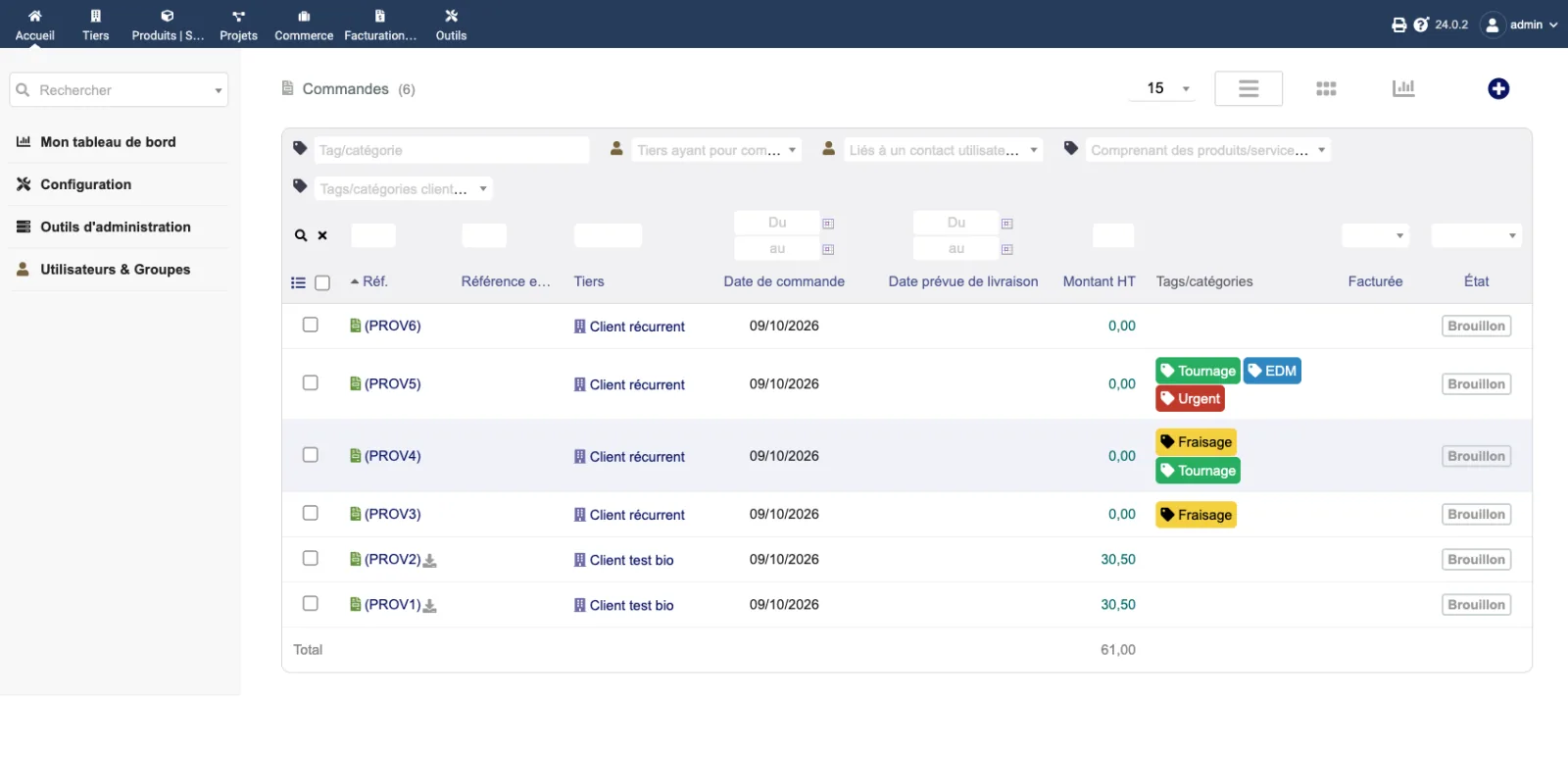
The customer order list on Dolibarr 24.0.2. The “Tags/catégories” column sits between “Montant HT” and “Facturée”: “Tournage”, “EDM” and “Urgent” on one order, “Fraisage” and “Tournage” on another, and nothing on orders without tags. Above, Dolibarr’s tag filters are unchanged.
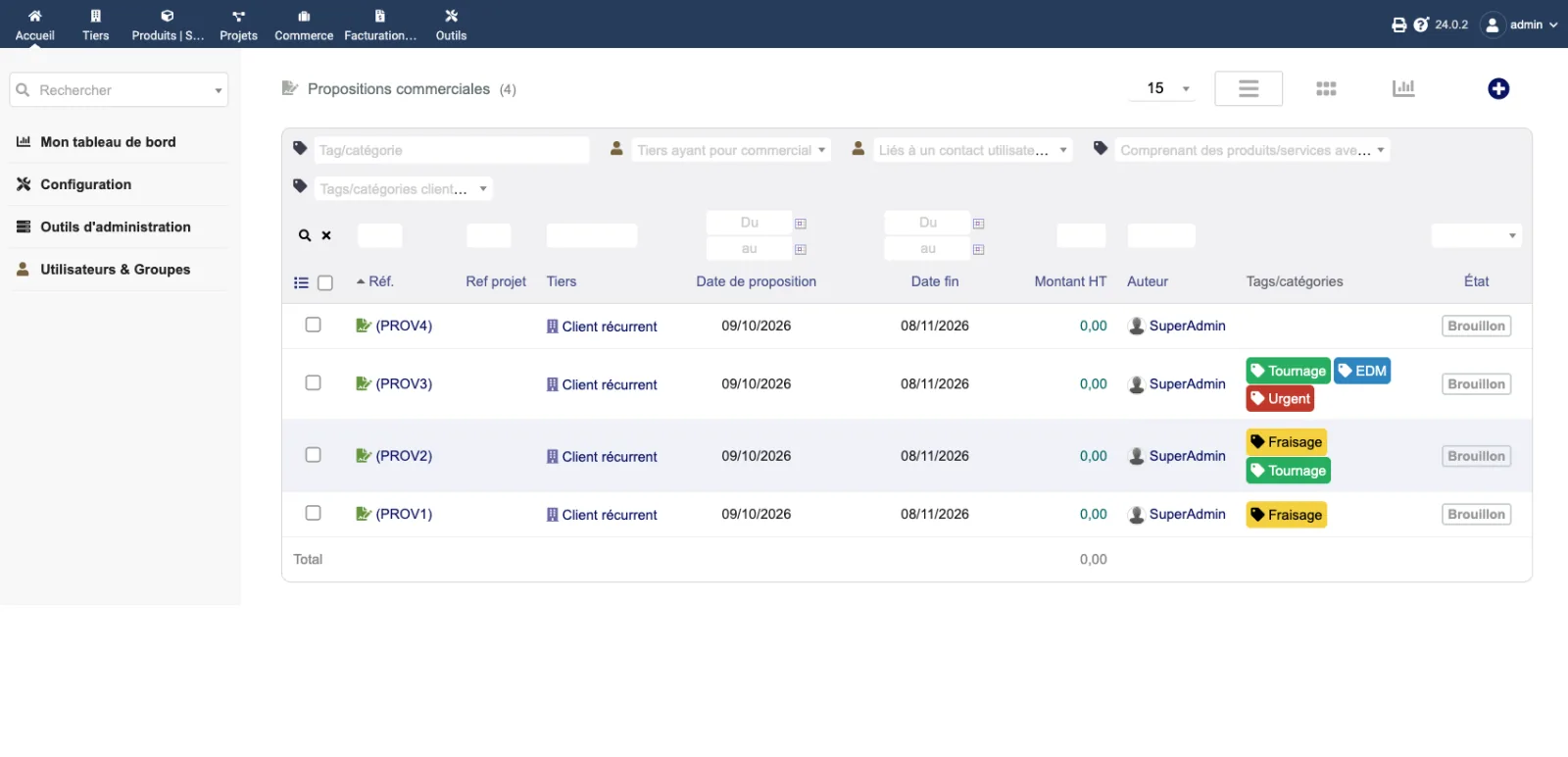
The same column on the commercial proposal list: one, two or three tags per proposal, and an empty cell for the proposal without tags.
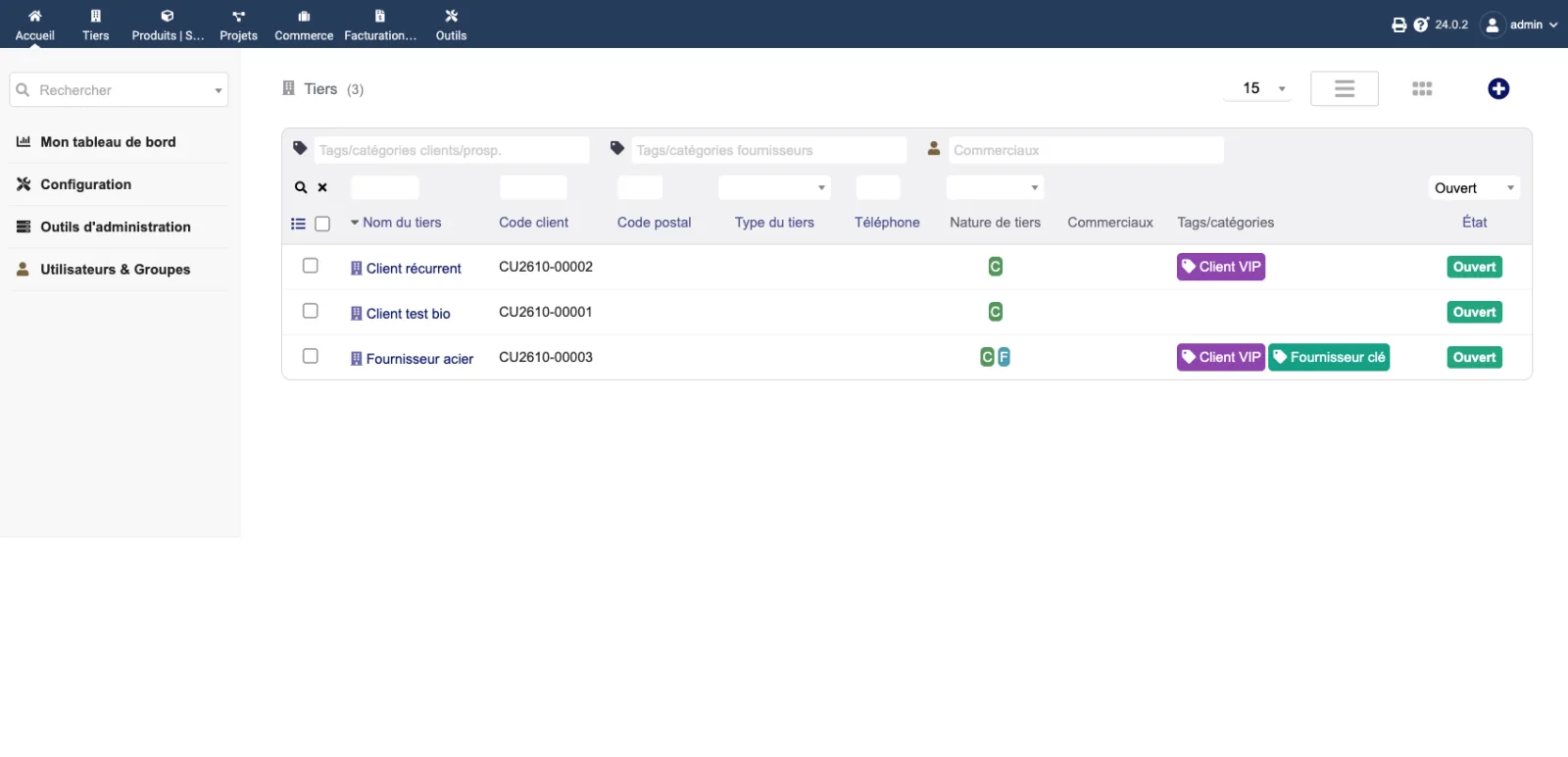
On the third-party list, the column brings both families of tags together: the third party “Fournisseur acier”, both customer and supplier, has “Client VIP” and “Fournisseur clé”.
HomeSetupModules/ApplicationsTags column in lists. The page is restricted to administrators.
| Setting | Default | Effect |
|---|---|---|
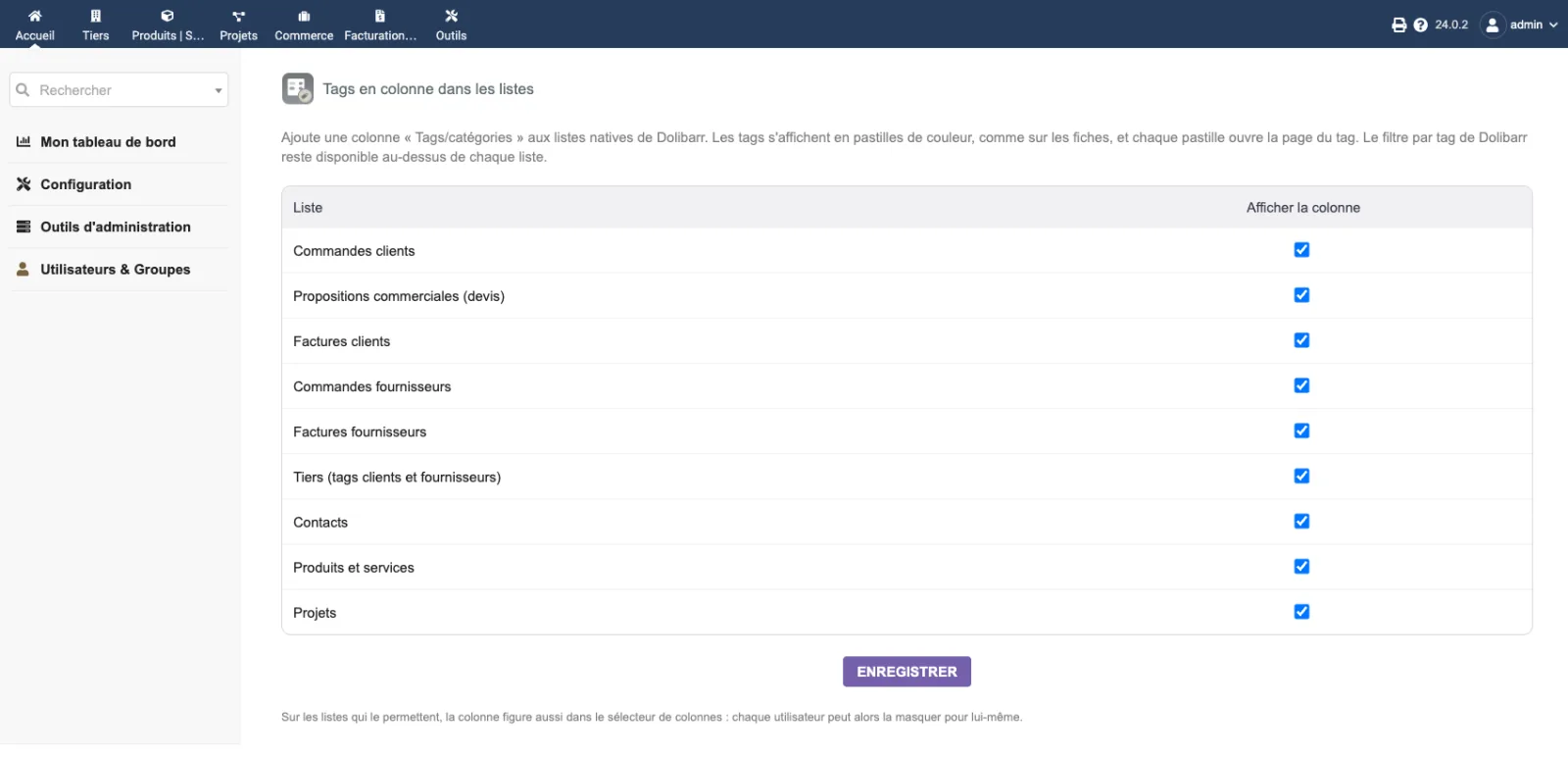
| Show the column, one checkbox for each of the nine lists | ticked | Unticked, the column no longer appears on that list, for any user. |
All nine boxes are ticked on first activation. A setting already saved is not overwritten when the module is disabled and enabled again. A list whose tags do not exist in your Dolibarr version has no checkbox: a message explains why.
rights = array().| Database tables created | No table. The module has no sql/ directory and reads tags through the core Categorie class. Its nine settings are Dolibarr constants, one per list: DOLIXTAGS_LIST_ORDER, DOLIXTAGS_LIST_PROPAL, DOLIXTAGS_LIST_INVOICE, DOLIXTAGS_LIST_SUPPLIER_ORDER, DOLIXTAGS_LIST_SUPPLIER_INVOICE, DOLIXTAGS_LIST_THIRDPARTY, DOLIXTAGS_LIST_CONTACT, DOLIXTAGS_LIST_PRODUCT and DOLIXTAGS_LIST_PROJECT, set to 1 on first activation. |
|---|---|
| Permissions | No permission of its own: the descriptor declares rights = array(). The column is only shown to users who have the Dolibarr permission “Read categories”. The module adds no row to the list: it shows the tags of the rows Dolibarr already displays there, according to the user's permissions. The setup page is restricted to administrators. |
| Uninstalling |
|
The dolixtags folder, in readable PHP, under the GPL v3 or later licence: the module descriptor,
the list hook class, the settings page, the icons.
fr_FR), English (en_US), German (de_DE) and Spanish (es_ES).README.md and a ChangeLog.md.sql/ directory. It reads tags through the core
Categorie class.DOLIXTAGS_LIST_ORDER, DOLIXTAGS_LIST_PROPAL, DOLIXTAGS_LIST_INVOICE,
DOLIXTAGS_LIST_SUPPLIER_ORDER, DOLIXTAGS_LIST_SUPPLIER_INVOICE,
DOLIXTAGS_LIST_THIRDPARTY, DOLIXTAGS_LIST_CONTACT, DOLIXTAGS_LIST_PRODUCT and
DOLIXTAGS_LIST_PROJECT.The module descriptor only declares a minimum version. No upper bound is written in the code: the versions below are those on which the module has actually been run.
| Dolibarr versions | Dolibarr 21.0 minimum. Installed and checked in a browser on 21.0.4, 22.0.5, 23.0.4, 24.0.0 and 24.0.2. Tags on orders and invoices from 22, on proposals from 23. |
|---|---|
| Minimum PHP | 7.4 |
| Dolibarr modules to enable | Tags/Categories |
| Licence | GPL v3 or later, full source code |
| Languages | French, English, German, Spanish |
| Menu | No menu entry. The column is added to the native lists; the settings are in HomeSetupModules/Applications“Tags column in lists”. |
The details — permissions on the custom folder, shared hosting, upgrades, uninstalling — are on the page Installation and upgrades.
The descriptor requires Dolibarr 21.0 minimum and PHP 7.4 minimum: on Dolibarr 19 or 20, the module cannot be enabled. It has been installed and checked in a browser on 21.0.4, 22.0.5, 23.0.4, 24.0.0 and 24.0.2 with MariaDB, on 24.0.0 with PostgreSQL 16, and under PHP 7.4.33 on 24.0.2. If you have any doubt, write before buying.
Dolibarr only offers tags on orders and invoices, customer and supplier, from version 22, and on commercial proposals from 23. On an older version these tags do not exist: the module does not show the column on these lists, and the settings page says so. Also check the “Read categories” permission and the list's checkbox in the settings.
It creates no table and writes nothing to your documents, third parties, contacts, products, projects or tags: it reads them. The only writes are the module's nine settings, stored as Dolibarr constants. No Dolibarr file is modified.
Not on the column itself: it has neither sorting nor a filter field. To filter, use the tag filter Dolibarr places above the list; the column then shows the tags of each row.
Yes, on lists where it appears in Dolibarr's column selector, under the name “Tags/categories”: everyone can untick it for themselves. This depends on the list and on the Dolibarr version. Where it does not appear there, only the module's setting decides, and it applies to all users.
The column disappears from the lists. As the module wrote nothing to your data, there is nothing to restore. The module's nine settings remain stored.
Support is provided by the person who wrote the module, at support@dolix.fr. Ordering, payment, the invoice and the download are handled by the DoliStore, where new versions are published.
Taken from the module’s ChangeLog.md file: a single source.
1.0.13 November 2026
Interface translated into Spanish (es_ES). Tested on 21.0.4 to 24.0.2 with Dolibarr in Spanish.
1.0.011 October 2026
First version: “Tags/categories” column as coloured pills in the lists of proposals, customer orders and invoices, supplier orders and invoices, third parties, contacts, products and services, and projects. Per-list setting; column added to the column selector where the list allows it. Follows the tag types available in the Dolibarr version; the tag read permission is respected. Interface in French, English and German.
Write to support@dolix.fr. The person who wrote the module is the one who replies.
Reply within two working days. This is not an on-call service.
To include in your message
This module is on sale on the DoliStore.
Ordering, payment, invoicing and download are handled by the DoliStore.
margeparjour · v1.0.2
You see what a working day brings in before you accept the quote.

dolixdomaine · v1.0.8
A customer changes its name: its addresses move to the new domain in a single operation.

dolixmasse · v1.0.9
You change a field across a series of records without writing an SQL query.

dolixtaches · v1.0.5
A task was created in the wrong project: you move it, with its subtasks, its time spent and its documents.

dolixdoublons · v1.1.8
You find records entered twice and merge them: third parties, contacts and members.
dolixprix · v1.1.4
Your draft quotes and template invoices pick up the catalogue prices, one by one or all at once.

dolixapproche · v1.0.5
You spread freight, customs and the other costs of a shipment over the cost of products and their weighted average price.

dolixresteafacturer · v1.0.2
You see what remains to be invoiced on each customer order, line by line, in quantity and in amount excluding tax.

dolixmaj · v1.0.3
Before upgrading Dolibarr, you know what will block, what will break and what to do first. The module changes nothing.

dolixtva · v1.0.1
The mandatory VAT statement is printed on your invoices by itself: small business exemption, intra-Community supply, reverse charge, export.

dolixjustif · v1.0.1
The expense report PDF also contains its receipts, photos and PDFs, page by page: one single document to hand over.

dolixportemonnaie · v1.1.1
Your customers or members pay an amount in advance, and TakePOS spends it at each visit to the till, until it runs out.

dolixmondialrelay · v1.0.2
You choose the recipient's Point Relais® or Locker on the shipment, and the module creates the Mondial Relay label with your Sendcloud account.

dolixdlc · v1.0.1
You see in time the lots in stock whose sell-by or eat-by date is near or past, and you can prevent the validation of a shipment that contains a lot past its sell-by date.
dolixhabillage · v1.0.3
Make TakePOS look like a modern till: category tabs, large product grid, basket on the right, Charge button, trade looks or your logo colours.
dolixcotisations · v1.0.4
A membership fee for each member, and all subscriptions renewed at once, with invoice, payment and email.
dolixconsignes · v1.0.2
You see how many returnable kegs, crates or pallets each customer holds, what those deposits are worth, and which ones have not come back in time.

dolixdepotvente · v1.0.4
For each consignor, you see what was sold and your commission, and the statement prepares the invoices as drafts.
dolixblgroupe · v1.0.3
One single PDF delivery note for several shipments of the same customer, signed only once.
dolixdernierprix · v1.0.1
You pick a product on a proposal, order or invoice: the last price and discount granted to that customer are shown, and applied in one click.