
Margin per day
margeparjour · v1.0.0
You see what a working day brings in before you accept the quote.
dolixprix · version 1.1.1
Your draft quotes and template invoices pick up the catalogue prices, one by one or all at once.
€49 excl. VAT.
Ordering, payment, invoicing and download are handled by the DoliStore.
Your catalogue prices have gone up, but your draft quotes and subscription invoices still go out at the old prices.
Your catalogue changes: a supplier raises prices, you pass it on. Two kinds of documents keep the prices of the day they were entered.
Who it is for: Businesses that invoice subscriptions or recurring contracts, and those whose catalogue changes during the year and that leave quotes pending: IT services, maintenance, trading, finishing trades.
This section appears on all 12 module pages, without exception.
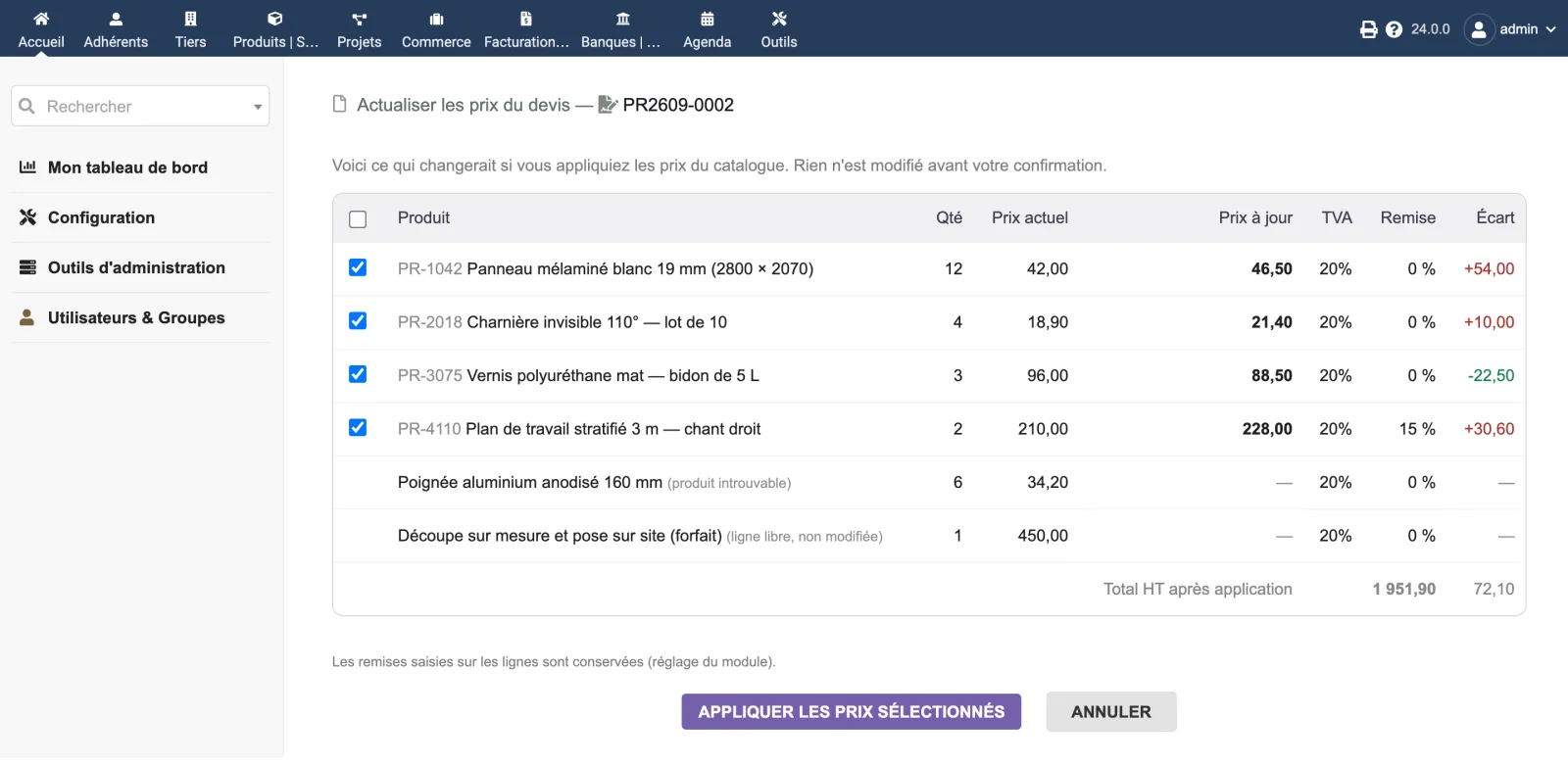
On a draft quote, the module adds an “Update prices” button. On a template invoice, the same button. It first shows, for each line linked to a product: the current price, the up-to-date price, the VAT, the discount and the difference in euros. The difference includes the discount, so the sum of the differences matches exactly the change in the total — the table footer shows the net total as it would be after applying. Uncheck the lines to leave alone, then apply. The existing document is modified: its reference, history and links do not change.
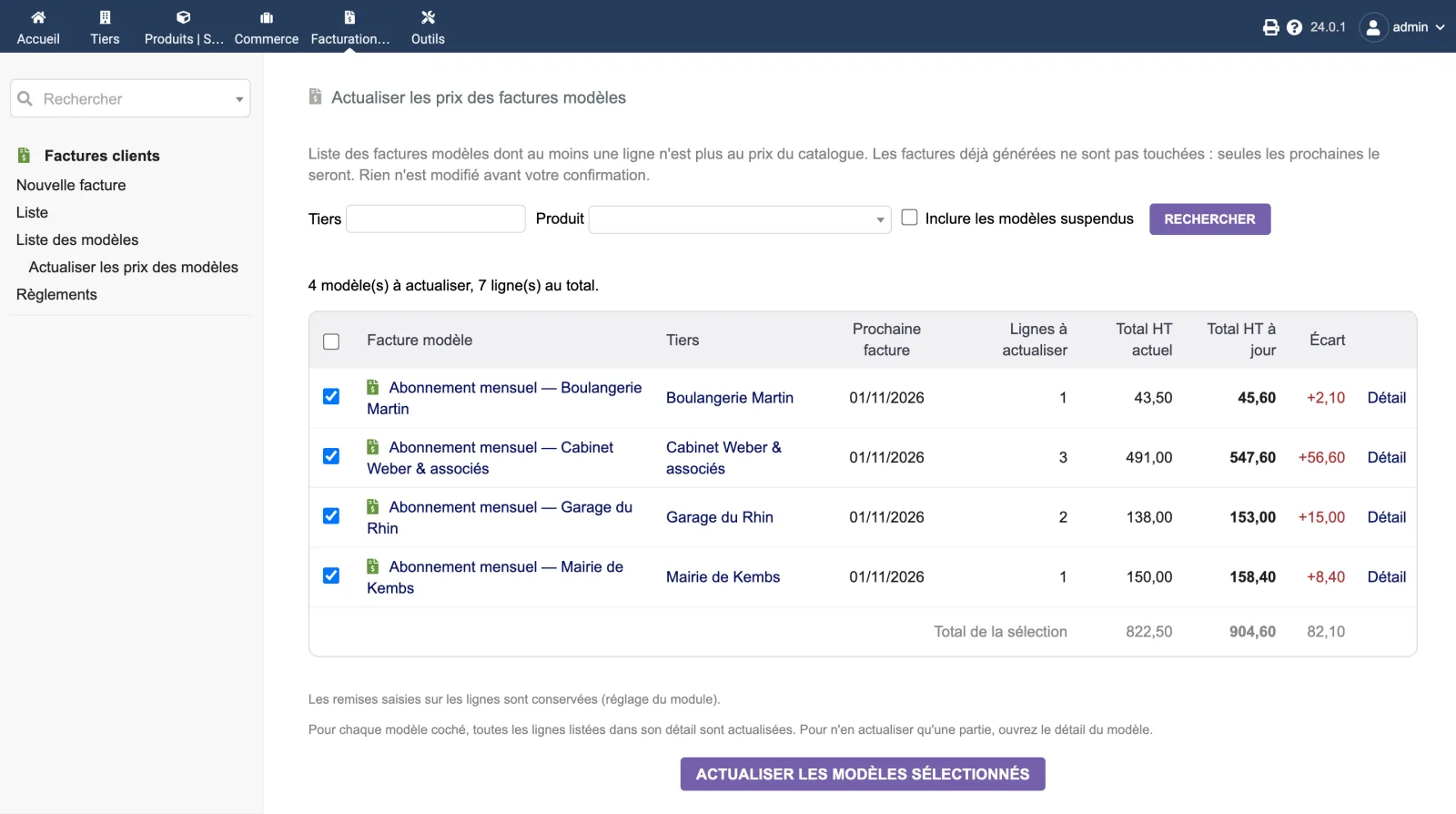
For all template invoices at once, the menu Billing › List of templates › Update template prices opens a screen listing every template with at least one line no longer at the catalogue price: the customer, the date of the next invoice, the number of lines affected, the current total, the up-to-date total and the difference. Filter by customer or product, include suspended templates if needed, uncheck the ones to leave out, and update them all at once. Only the next generated invoices carry the new prices: invoices already issued are never touched.
The module follows exactly the Dolibarr core’s order of priority when cloning a quote with “Update prices with current known prices”:
The module’s test suite compares its result with that of a real clone by the core, on the same data, and checks that both figures are identical.
By default, discounts entered on the lines are kept. This is a more cautious choice than the Dolibarr clone, which replaces them with the third party’s default discount: a negotiated discount would be lost. The clone behaviour remains available in the module setup if you prefer it.
The button appears with the other actions, on the card of a draft quote or of a template invoice, if you have the module permission and the permission to modify that type of document, and if the document contains at least one line linked to a product. Otherwise no useless button is added.
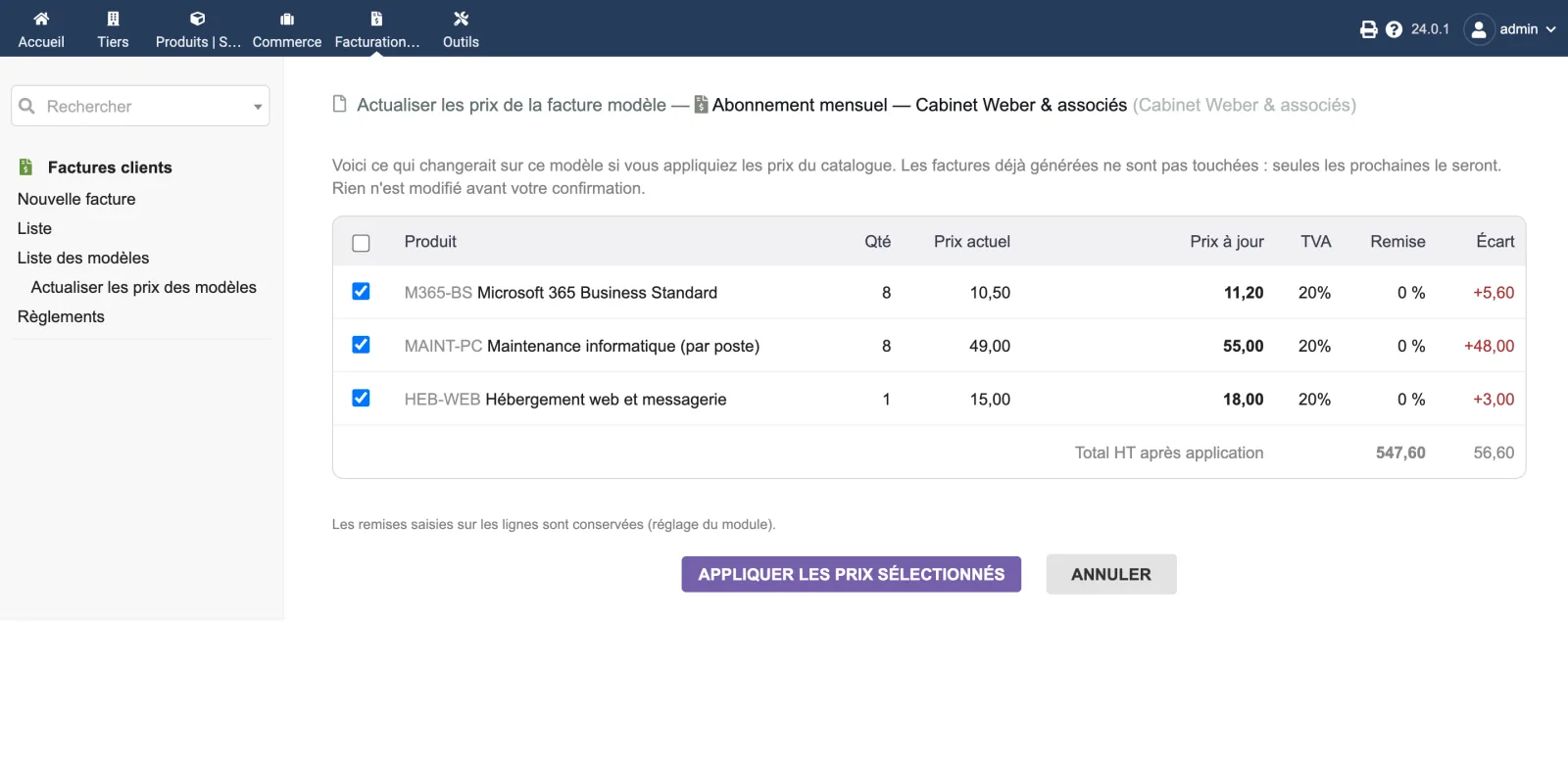
The screen for one document is an eight-column table: selection, product, quantity, current price, up-to-date price, VAT, discount, difference. Lines that cannot be changed are listed too, with the reason in brackets: “free line, left untouched”, “product not found”, “already up to date”.
The template invoices screen shows one row per template, with a Details link to the line-by-line screen, to update only part of a template. On both screens, the total at the bottom follows the boxes you check: what is announced is exactly what will be written.
| Setting | Default | Effect |
|---|---|---|
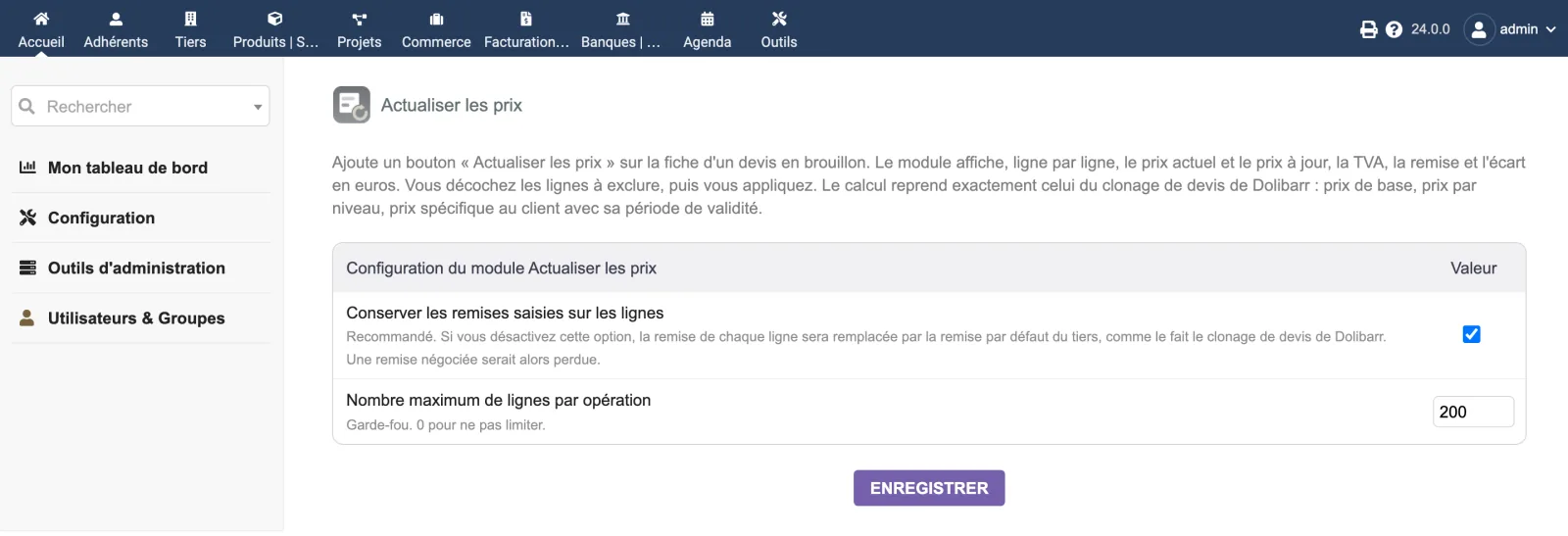
| Keep discounts entered on lines | on | Recommended. When off, each line’s discount is replaced by the third party’s default discount, as the Dolibarr clone does. |
| Maximum number of lines per operation | 200 | Safety cap, per document. 0 for no limit. |
| Database tables created | No table, no complementary attribute. The module folder does not contain a sql/ directory. The module only stores two settings in the Dolibarr constants. |
|---|---|
| Permissions | One permission: “Use price update (proposals and template invoices)”. The module also requires the standard permission on the document concerned (modify proposals, or create and modify invoices for templates) and applies Dolibarr's usual access control. |
| Uninstalling |
|
The module descriptor only declares a minimum version. No upper bound is written in the code: the versions below are those on which the module has actually been run.
| Dolibarr versions | Dolibarr 19 to 24. Tested on 19.0.4, 20.0.4, 21.0.4, 22.0.5, 23.0.4, 24.0.1 and 24.0.2. |
|---|---|
| Minimum PHP | 7.4 |
| Dolibarr modules to enable | Commercial proposals or Invoices |
| Licence | GPL v3 or later, full source code |
| Languages | French, English, German |
| Menu | One entry: Billing | Payment › List of templates › Update template prices. The button also appears on the card of a draft quote and of a template invoice. |
The details — permissions on the custom folder, shared hosting, upgrades, uninstalling — are on the page Installation and upgrades.
Dolibarr 19 to 24, PHP 7.4 to 8.3. Version 1.1.0 was tested on 19.0.4, 20.0.4, 21.0.4, 22.0.5, 23.0.4 and 24.0.1, and with PHP 7.4, 8.2 and 8.3.
No. The module changes the template invoice itself: only the invoices generated afterwards carry the new prices. An invoice already issued is never touched.
No. The Billing | Payment › List of templates › Update template prices screen lists them all, with the difference for each, and updates them at once. 300 templates were updated in a few seconds during testing.
Cloning creates a new quote, with a new reference, and leaves you to delete the old one. This module modifies the existing quote: its reference, its history and its links do not change. The price calculation, however, is the same — it is the Dolibarr core's, and the module's test suite compares its result with that of a real clone.
The module creates no table. It modifies the quote lines you selected, then recalculates the header totals, exactly like a line change made by hand. The write is transactional: in case of error, nothing is saved.
They are kept by default. This is a more cautious choice than that of the Dolibarr clone, which replaces each line's discount with the third party's default discount. The clone behaviour remains available in the module setup, if you prefer it.
The button disappears. There is nothing to clean up: no table, no complementary attribute. Prices already updated stay, like any change to a quote.
Support is provided by the person who wrote the module, at support@dolix.fr. Ordering, payment, the invoice and the download will be handled by the DoliStore, where new versions will be published.
Taken from the module’s ChangeLog.md file: a single source.
1.1.114 October 2026
Fix: the template invoice screens (bulk screen and template detail) no longer write a PHP warning (“Undefined variable $form”) to the server log. Nothing was displayed or changed.
1.1.013 October 2026
Template invoices: “Update prices” button on each template and a bulk update screen (Billing | Payment › List of templates). Fix: customer-specific prices with decimals or of 1,000 or more were misread. Prices in foreign currency recalculated, German translation. After upgrading from 1.0.0, disable then re-enable the module.
1.0.010 September 2026
First version: “Update prices” button on draft quotes, line-by-line preview, line selection, transactional and logged application. Discounts entered on the lines are kept by default. Two spellings of the same VAT rate (“0” and “0.0000”) are recognised as the same rate: an updated line is no longer offered for updating again.
Write to support@dolix.fr. The person who wrote the module is the one who replies.
Reply within two working days. This is not an on-call service.
To include in your message
This module is on sale on the DoliStore.
Ordering, payment, invoicing and download are handled by the DoliStore.
margeparjour · v1.0.0
You see what a working day brings in before you accept the quote.

dolixdomaine · v1.0.4
A customer changes its name: its addresses move to the new domain in a single operation.

dolixmasse · v1.0.4
You change a field across a series of records without writing an SQL query.

dolixtaches · v1.0.3
A task was created in the wrong project: you move it, with its subtasks, its time spent and its documents.

dolixdoublons · v1.1.3
You find records entered twice and merge them: third parties, contacts and members.

dolixapproche · v1.0.1
You spread freight, customs and the other costs of a shipment over the cost of products and their weighted average price.

dolixresteafacturer · v1.0.1
You see what remains to be invoiced on each customer order, line by line, in quantity and in amount excluding tax.

dolixmaj · v1.0.2
Before upgrading Dolibarr, you know what will block, what will break and what to do first. The module changes nothing.

dolixtva · v1.0.0
The mandatory VAT statement is printed on your invoices by itself: small business exemption, intra-Community supply, reverse charge, export.

dolixjustif · v1.0.0
The expense report PDF also contains its receipts, photos and PDFs, page by page: one single document to hand over.

dolixportemonnaie · v1.0.0
Your customers or members pay an amount in advance, and TakePOS spends it at each visit to the till, until it runs out.