
Margin per day
margeparjour · v1.0.0
You see what a working day brings in before you accept the quote.
dolixjustif · version 1.0.0
The expense report PDF also contains its receipts, photos and PDFs, page by page: one single document to hand over.
€49 excl. VAT.
Ordering, payment, invoicing and download are handled by the DoliStore.
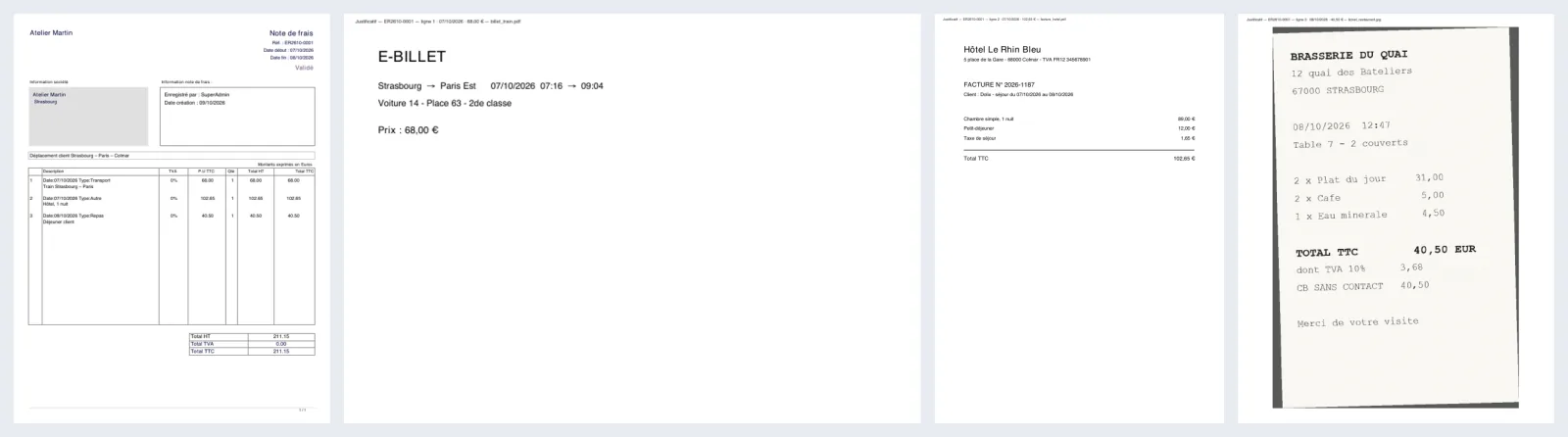
In Dolibarr, each expense report line can be linked to a receipt, but the report PDF only contains the table of expenses. Receipts stay apart and have to be downloaded one by one.
In Dolibarr, each expense report line can be linked to a receipt. But the report PDF only contains the table of expenses. Till receipts, hotel invoices and tickets stay apart, in the “Linked files” tab, to be downloaded one by one.
To hand a complete report over to the accountant or to whoever reimburses it, you have to send the PDF, then each file, and hope nobody mixes up the order.
Who it is for: Organisations that hand their expense reports over to an accountant or a reimbursement department, and employees who photograph their receipts with their phone.
This section appears on all 12 module pages, without exception.
When Dolibarr produces an expense report PDF, the module appends the receipts after it, in a fixed order:
| File | What the module does |
|---|---|
| JPG photo | Straightened according to the EXIF orientation recorded by the phone, read directly from the file, without the PHP “exif” extension. Centred and fitted to the page. |
| PNG or GIF image | Transparency replaced with white, image centred and fitted to the page. |
| Added page by page, each page in its original format, portrait or landscape. |
An image wider than it is tall is placed on a landscape page. In the PDF, photos are re-saved as JPEG and limited to 2,400 pixels on the longest side. The uploaded file itself is not changed.
Other formats — iPhone HEIC photos, Word documents… — are not converted: they are listed as not included. Straightening and support for PNG and GIF require the PHP GD extension; without it, only JPEGs are included, as they are.
At the top of each receipt page, one line says where it comes from (here in French):
Justificatif — ER2610-0001 — ligne 1 · 07/10/2026 · 68,00 € — billet_train.pdf
Report reference, line number, date and amount including tax of the line, file name. In English, the line reads “Receipt — … — line 1 …”. A file not attached to any line carries the mention “not attached to a line”. The marker can be switched off in the setup page.
Each file is checked before it is read: empty file, maximum size, format, complete PDF, non-encrypted PDF. A rejected file does not prevent the report from being produced. It is listed on a last page, “Receipts not included in this document”, with the reason, and a message reports it on screen.
On Dolibarr 19 to 23, the core PDF library can stop PHP on some damaged PDFs: the user gets a blank page. The module protects against this. The faulty file is set aside, and a page explains what happened and leads back to the expense report. On the next generation, the PDF is produced normally and the file appears in it as not included.
The module does not check that each line has a receipt: a line with no attached file is not reported.
The screenshot shows the result: four pages of the same PDF, side by side.
The first one is expense report ER2610-0001 as Dolibarr produces it: three lines — a train from Strasbourg to Paris at 68.00, one hotel night at 102.65, a client lunch at 40.50 — for a total of 211.15 including tax.
Then come the three receipts, in line order: the train ticket and the hotel invoice, two PDFs, then the photo of the restaurant receipt. Each page carries its marker, whose date and amount match the report line. There is no “Receipts not included in this document” page: all three files were included.
SetupModules/ApplicationsReceipts in expense reports:
| Setting | Default | Effect |
|---|---|---|
| Also append files not attached to a line | on | All files in the “Linked files” tab, except documents produced by Dolibarr. |
| Marker at the top of each receipt page | on | Report reference, line number, date and amount, file name. |
| Maximum size of a receipt (MB) | 20 | From 1 to 200. Larger files are left out and listed. |
Below the settings, the list of receipts set aside after a read error. A file set aside is recognised by its content: it stays left out until the list has been cleared with the “Clear the list” button.
Settings are specific to each entity in multi-company.
| Database tables created | No table. The module folder contains no sql/ directory. On activation, the module stores three settings in Dolibarr's constants. If a receipt is set aside, a record is kept in a small file, documents/dolixjustif/quarantaine_ |
|---|---|
| Permissions | The descriptor declares rights = array(): the module adds no permission. Receipts are appended for anyone who can generate the expense report PDF. The setup page is restricted to administrators. |
| Uninstalling |
|
dolixjustif folder, in readable source, under GPL v3 or later: descriptor, two classes
(the end-of-PDF-generation hook and the merge), setup page, icons.langs/: French (fr_FR), English (en_US) and German
(de_DE).README.md and a ChangeLog.md.The module needs the Expense Reports module. The descriptor requires Dolibarr 19.0 and PHP 7.4 minimum; the test scenarios were run on 19.0.4, 20.0.4, 21, 22, 23.0.4 and 24.0.1.
sql/ directory.documents/dolixjustif/quarantaine_<entity>.json, not in the database.The module descriptor only declares a minimum version. No upper bound is written in the code: the versions below are those on which the module has actually been run.
| Dolibarr versions | Dolibarr 19.0 minimum. Installed and run on 19.0.4, 20.0.4, 21, 22, 23.0.4 and 24.0.1. |
|---|---|
| Minimum PHP | 7.4 |
| Dolibarr modules to enable | Expense Reports |
| Licence | GPL v3 or later, full source code |
| Languages | French, English, German |
| Menu | No menu entry. The module acts when the expense report PDF is generated; its settings are in SetupModules/Applications. |
The details — permissions on the custom folder, shared hosting, upgrades, uninstalling — are on the page Installation and upgrades.
The descriptor requires Dolibarr 19.0 minimum and PHP 7.4 minimum. The test scenarios were run on 19.0.4, 20.0.4, 21, 22, 23.0.4 and 24.0.1, and installation from the zip on a fresh 24.0.1. If you have any doubt about your version, write before buying.
No. It creates no table and does not touch the lines, the amounts or the uploaded files. It reads the list of files of the expense report and only replaces the PDF produced by Dolibarr, and only if merging succeeded. The recorded tests were run on MariaDB; PostgreSQL has not been tried.
It is left out, and the expense report is produced anyway. The PDF ends with a “Receipts not included in this document” page, which gives the file name and the reason: empty file, file too large, unsupported format, unreadable or damaged file, protected PDF. A message also reports it on screen.
Yes for JPEGs that carry the EXIF orientation: the module reads it directly from the file, without the PHP “exif” extension, and straightens the image. Straightening and support for PNG and GIF require the PHP GD extension. Without it, JPEGs are included as they are and PNGs and GIFs are listed as not included.
PDFs generated afterwards are Dolibarr's own again. PDFs already generated keep their receipts until they are generated again. The three settings and the list of files set aside remain; you can delete them yourself.
Support is provided by the person who wrote the module, at support@dolix.fr. Ordering, payment, the invoice and the download are handled by the DoliStore, where new versions are published.
Taken from the module’s ChangeLog.md file: a single source.
1.0.09 October 2026
First version: the receipts attached to the lines, then, as an option, the other uploaded files, are appended to the expense report PDF. JPG, PNG and GIF photos straightened according to the EXIF orientation and fitted to the page; PDFs added page by page in their own format. Marker on each page. Check before reading; receipts left out are listed on a last page and reported on screen. Merging written separately: Dolibarr's PDF is only replaced if it succeeds. Protection against PHP being stopped by Dolibarr's PDF library (versions 19 to 23), with a list of files set aside in the setup page.
Write to support@dolix.fr. The person who wrote the module is the one who replies.
Reply within two working days. This is not an on-call service.
To include in your message
This module is on sale on the DoliStore.
Ordering, payment, invoicing and download are handled by the DoliStore.
margeparjour · v1.0.0
You see what a working day brings in before you accept the quote.

dolixdomaine · v1.0.4
A customer changes its name: its addresses move to the new domain in a single operation.

dolixmasse · v1.0.4
You change a field across a series of records without writing an SQL query.

dolixtaches · v1.0.3
A task was created in the wrong project: you move it, with its subtasks, its time spent and its documents.

dolixdoublons · v1.1.3
You find records entered twice and merge them: third parties, contacts and members.

dolixprix · v1.1.1
Your draft quotes and template invoices pick up the catalogue prices, one by one or all at once.

dolixapproche · v1.0.1
You spread freight, customs and the other costs of a shipment over the cost of products and their weighted average price.

dolixresteafacturer · v1.0.1
You see what remains to be invoiced on each customer order, line by line, in quantity and in amount excluding tax.

dolixmaj · v1.0.2
Before upgrading Dolibarr, you know what will block, what will break and what to do first. The module changes nothing.

dolixtva · v1.0.0
The mandatory VAT statement is printed on your invoices by itself: small business exemption, intra-Community supply, reverse charge, export.

dolixportemonnaie · v1.0.0
Your customers or members pay an amount in advance, and TakePOS spends it at each visit to the till, until it runs out.