
Margin per day
margeparjour · v1.0.0
You see what a working day brings in before you accept the quote.
dolixmaj · version 1.0.2
Before upgrading Dolibarr, you know what will block, what will break and what to do first. The module changes nothing.
Free.
Ordering, payment, invoicing and download are handled by the DoliStore.
You keep putting off the Dolibarr upgrade because you do not know what will break: an external module, the PHP version, a customisation.
A Dolibarr upgrade does not happen in one go: the wizard goes through the major versions one at a time, from 18 to 19, then to 20, and each one can break something. An external module calling a removed function, a PHP version too old for the next version or too recent for the current one, a table in a different encoding from the others, a core file edited by hand that will be overwritten.
The official wiki asks you to make sure your modules are compatible, without saying how. So the upgrade gets postponed, and the gap grows with every version.
The upgrade itself is described step by step in two tested guides: Upgrading Dolibarr without breaking anything and Upgrading Dolibarr from the command line.
Who it is for: Administrators of a Dolibarr 16 to 23 instance preparing an upgrade, especially with external modules or modified core files. Service providers who want an overview before stepping in.
This section appears on all 12 module pages, without exception.
You choose the target version, from the next major version up to 24.0, and the PHP version planned after the upgrade. You click Run the check. The module reads your installation without changing anything and gives you a report.
This is the main part of the module. The code of every external module is read file by file, without being run, and compared with the changes of every version on the path, not only the target version:
Each finding gives the file, the line, the version where it breaks, a degree of certainty and, when known, the replacement. Each module gets a coverage rate: the share of calls actually verified. Encrypted code (ionCube, SourceGuardian, Zend Guard) is reported as impossible to verify.
| Family | What is checked |
|---|---|
| Path | files and database at different versions, latest maintenance release of your branch, number of steps |
| PHP | PHP at every step, when to switch, extensions checked by the installer, memory_limit, max_execution_time |
| Database | server version, mixed encodings, MyISAM tables, size |
| Core modules | enabled modules that disappear: WebServicesClient (21), ExternalSite and OpenIDConnect (23), Deplacement and Paybox (24) |
| Integrity | modified, missing or extra core files, compared with the official signature of your version |
| Customisations | overridden translations, ODT templates, non-standard menu or theme, experimental modules, extrafield formulas refused from 23 |
| Backup | database backup less than 24 hours old in documents/admin/backup, exec() available, disk space |
| Keys | presence of the instance identifier and the encryption key, format of the unalterable log key for 24 |
| Wizard | install lock, conf.php permissions, .git folder, documents folder inside the web folder |
It starts with a one-line answer — ready, almost ready or not ready yet — then the highest version you can reach without changing anything, the path step by step and the plan in order. It also tells you whether the installed and target versions still receive security fixes, what to back up and which step rewrites the most data.
Each finding has a level — no problem, to check, blocking or cannot be verified — with what to do and the source of the rule.
The report can be downloaded as HTML or Markdown. The anonymise option hides the domain, the paths, the company name and the user’s login. For each module at fault, the Report for the publisher button produces a file to send to them: files, lines, known fix, nothing about your company or your server.
The report says so itself, at the bottom of the page: it reduces known risks, it does not guarantee that the upgrade will succeed. It does not prove that an external module will work — only a test on a copy can —, does not foresee bugs in the target version or how the migration scripts will handle your data, and does not check that a backup can be restored.
The code analysis is time-limited: 60 seconds in total, 30 seconds at most per module. Files over
2 MB and the vendor, node_modules and includes folders of modules are not read, and the
report says so. Target versions stop at 24.0: the module’s reference data is up to date as of
25 September 2026.
The tool is under HomeAdmin ToolsUpgrade readiness check. The screenshots below were taken with the French interface.
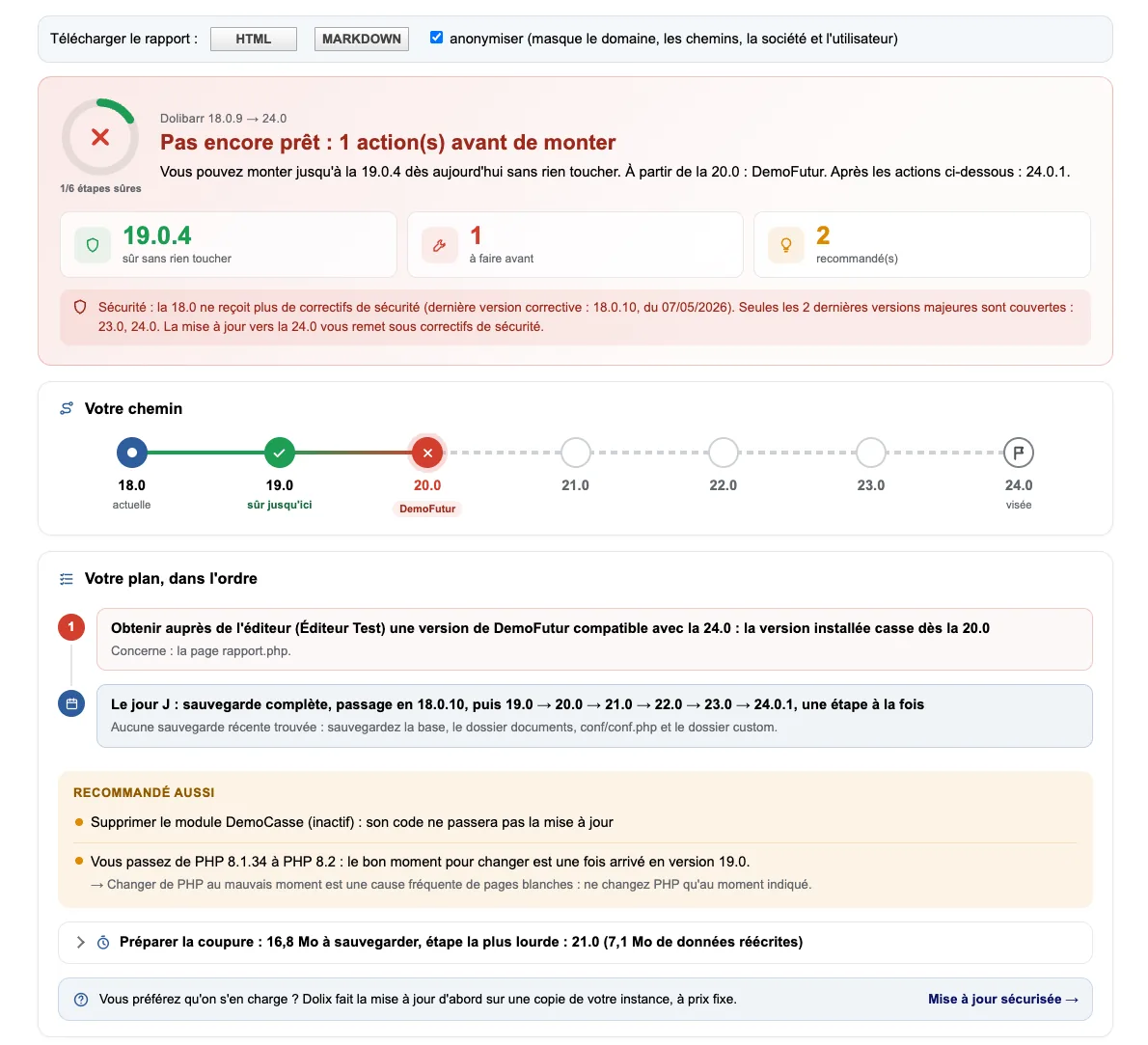
The report for a test instance on 18.0.9 aiming for 24.0: “Pas encore prêt : 1 action(s) avant de monter” (Not ready yet: 1 action(s) before upgrading). The fictitious module DemoFutur breaks from 20.0, so you can go up to 19.0.4 without changing anything. Below: the security line — 18.0 no longer receives fixes —, the path from 18.0 to 24.0 and the plan: get a compatible version from the publisher, then move to 18.0.10 and go up one step at a time.
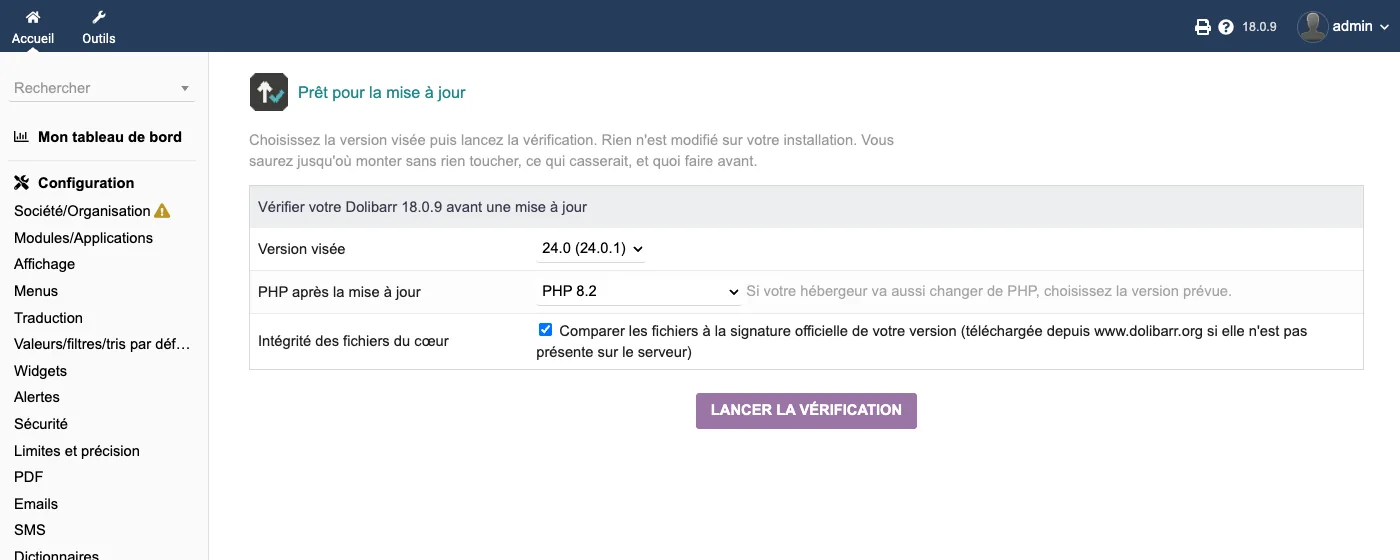
The starting screen: the target version, 24.0 (24.0.1), the PHP planned after the upgrade, and the “Intégrité des fichiers du cœur” box (Integrity of core files).
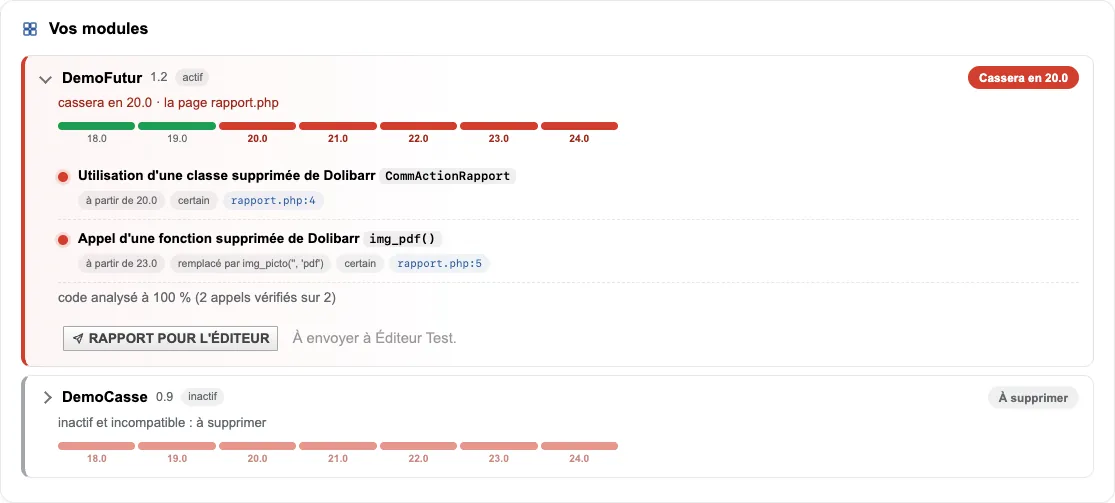
The “Vos modules” block (Your modules). For DemoFutur, a class removed in 20.0 and a function removed in 23.0, with the file, the line and the replacement, “code analysé à 100 % (2 appels vérifiés sur 2)” (code analysed at 100 %, 2 calls verified out of 2) and the “Rapport pour l’éditeur” button (Report for the publisher). DemoCasse, disabled and incompatible, should be deleted.
conf.php, the module only says whether a key is
present, never its value.install/: the comparison then needs no
network. Otherwise it stays unticked, and ticking it is what allows the signature to be downloaded
from dolibarr.org. With the box unticked, the module connects to nothing.| Database tables created | No table. The module creates no table, no setting and no file: the report is computed on each request and downloads are generated on the fly. |
|---|---|
| Permissions | No dedicated permission. The menu and every page are restricted to Dolibarr administrators: a non-administrator user does not see the menu and gets an access denied if they open the page. |
| Uninstalling |
|
dolixmaj folder, in readable source, under the GPL v3 or later licence: the tool page, an
“About” page with no setting, the check and code-analysis classes, and the Dolibarr 16.0 to
24.0.2 reference data (data/).langs/: French (fr_FR), English (en_US) and German (de_DE).README.md and a ChangeLog.md.The module descriptor only declares a minimum version. No upper bound is written in the code: the versions below are those on which the module has actually been run.
| Dolibarr versions | Dolibarr 16.0 minimum. Installed and run on 16.0.5, 17.0.4, 18.0.9, 18.0.10, 19.0.4, 20.0.4, 21.0.4, 22.0.5, 23.0.4, 24.0.0, 24.0.1 and 24.0.2. |
|---|---|
| Minimum PHP | 7.0 |
| Dolibarr modules to enable | None |
| Licence | GPL v3 or later, full source code |
| Languages | French, English, German |
| Menu | Home menuAdmin Tools“Upgrade readiness check”. |
The details — permissions on the custom folder, shared hosting, upgrades, uninstalling — are on the page Installation and upgrades.
The descriptor requires Dolibarr 16.0 minimum and PHP 7.0 minimum. The module has been installed and run on 16.0.5, 17.0.4, 18.0.9, 18.0.10, 19.0.4, 20.0.4, 21.0.4, 22.0.5, 23.0.4 and 24.0.0. The target versions it offers go up to 24.0: its reference data is up to date as of 25 September 2026. On a 24, it therefore has no more recent version to offer yet.
No. The module creates no table and writes nothing, neither to the database nor to disk. During testing, a full fingerprint of the database and the files was taken before and after a check: it was identical. Only enabling the module records, as for any module, its status and its menu.
No. It reduces known risks. It cannot prove that an external module will work, nor foresee bugs in the target version or how the migration scripts will handle your data. Make a full backup and, if possible, test on a copy first.
On 26 September 2026 it was compared with 45 open-source modules actually upgraded from their original version up to 24: the 10 fatal errors seen during those upgrades had all been announced. The test bench only opened pages, without entering data: this result only holds for what it observed. For each module, the report shows the share of the code it was able to verify.
The menu disappears. The module created no table and no setting, so there is nothing to delete. Downloaded reports stay on your computer.
Yes: €0 on the DoliStore, under the GPL v3 or later licence. When something blocks, the on-screen report shows a line pointing to Dolix's paid “Secure upgrade” service, and the report footer shows “Need help with this upgrade? Dolix — dolix.fr”. Neither appears in anonymised exports.
Support is provided by the person who wrote the module, at support@dolix.fr. The download is on the DoliStore, where new versions are published. The Dolibarr versions the module knows are in its built-in data: to target a version released after 24.0, a new version of the module will be needed.
Taken from the module’s ChangeLog.md file: a single source.
1.0.214 October 2026
Dolibarr 24.0.2 known: on 24.0.0 or 24.0.1, the module names 24.0.2 as the latest maintenance release, and the unalterable log key check advises targeting 24.0.2. Core 24.0 API re-read from the 24.0.2 tag code. A maintenance release published after the module's data (for example a future 24.0.3) is clearly reported, without pretending to know it. Reference data as of 14 October 2026.
1.0.112 October 2026
Fix: the “Integrity of core files” box is now ticked by default only when the official signature of your version is already on the server (comparison without network). Otherwise it stays unticked, and ticking it is what allows the download from dolibarr.org: no network call without your consent.
1.0.027 September 2026
First version: read-only check of a Dolibarr 16.0 to 24.0 instance against a target version. Ten families of checks, including reading the code of external modules. On-screen report, downloadable as HTML and Markdown, can be anonymised: one-line answer, highest version reachable without changing anything, path, action plan. Security status of the installed and target versions, downtime preparation, report to send to the publisher of a module. French, English, German. Dolibarr reference data up to date as of 25 September 2026, versions 16.0 to 24.0.1.
Write to support@dolix.fr. The person who wrote the module is the one who replies.
Reply within two working days. This is not an on-call service.
To include in your message
This module is available free of charge on the DoliStore.
Ordering, payment, invoicing and download are handled by the DoliStore.
margeparjour · v1.0.0
You see what a working day brings in before you accept the quote.

dolixdomaine · v1.0.4
A customer changes its name: its addresses move to the new domain in a single operation.

dolixmasse · v1.0.4
You change a field across a series of records without writing an SQL query.
dolixtaches · v1.0.3
A task was created in the wrong project: you move it, with its subtasks, its time spent and its documents.

dolixdoublons · v1.1.3
You find records entered twice and merge them: third parties, contacts and members.
dolixprix · v1.1.1
Your draft quotes and template invoices pick up the catalogue prices, one by one or all at once.

dolixapproche · v1.0.1
You spread freight, customs and the other costs of a shipment over the cost of products and their weighted average price.

dolixresteafacturer · v1.0.1
You see what remains to be invoiced on each customer order, line by line, in quantity and in amount excluding tax.

dolixtva · v1.0.0
The mandatory VAT statement is printed on your invoices by itself: small business exemption, intra-Community supply, reverse charge, export.

dolixjustif · v1.0.0
The expense report PDF also contains its receipts, photos and PDFs, page by page: one single document to hand over.

dolixportemonnaie · v1.0.0
Your customers or members pay an amount in advance, and TakePOS spends it at each visit to the till, until it runs out.