
Margin per day
margeparjour · v1.0.0
You see what a working day brings in before you accept the quote.
dolixportemonnaie · version 1.0.0
Your customers or members pay an amount in advance, and TakePOS spends it at each visit to the till, until it runs out.
€79 excl. VAT.
Ordering, payment, invoicing and download are handled by the DoliStore.
Your members pay an amount in advance and draw on it at each visit to the till, but TakePOS offers no way to pay with a prepaid balance.
In a community grocery, a food co-op or a cooperative, the member pays €50 in advance and draws on it purchase after purchase. TakePOS cannot do this: its payment screen offers no way to pay with a prepaid balance.
The workarounds tried on the Dolibarr forum — €1 vouchers managed as stock, products with a negative price on the receipt — were judged unsatisfactory by the people using them.
Who it is for: Community groceries, food co-ops, cooperatives, cafés or canteens that take payments with TakePOS and whose members pay in advance.
This section appears on all 12 module pages, without exception.
The module gives each third party a prepaid balance. It keeps no separate accounting: it relies on Dolibarr’s available credit, the one the core already uses for down payments and credit notes.
It is done from the “Wallet” tab of the third-party card or the member card: amount, payment method, bank account, note. The module then runs, in a single transaction:
If one step fails, nothing is recorded in the database. The same tab shows the available balance and the history of top-ups and purchases.
On the member card, the tab shows the wallet of the third party linked to the member. A member who is not linked to any third party has no wallet: the tab says so.
On the TakePOS payment screen, a “Wallet (balance)” button appears when the customer of the sale has a balance and the sale is not settled.
The credit is applied as a payment, not as a discount: the receipt keeps its lines and its VAT, with no negative line.
Only credits coming from a top-up are used. The customer’s ordinary credit notes and down payments are never touched.
If a draft sale to which the wallet has been applied is edited — line added, modified or deleted —, deleted, or changes customer, the applied amount is given back to the wallet. A new click on the button is enough.
This fills a gap in the core: when an invoice is deleted, Dolibarr does not release the credits applied to it as a payment.
From 19 to 22, the TakePOS payment screen does not display buttons added by modules. On those versions, the module displays its button itself.
A top-up is recorded at 0% VAT: VAT is due at purchase time, on the receipt. This is the multi-purpose voucher treatment, valid when your products have different VAT rates.
If all your products share the same rate — for example food only at 5.5% —, the balance is a single-purpose voucher: VAT is due at top-up, and version 1.0.0 does not handle that case (French tax guidance BOI-TVA-CHAMP-10-10-40-50). Not relevant if your organisation is not liable for VAT. If in doubt, ask your accountant.
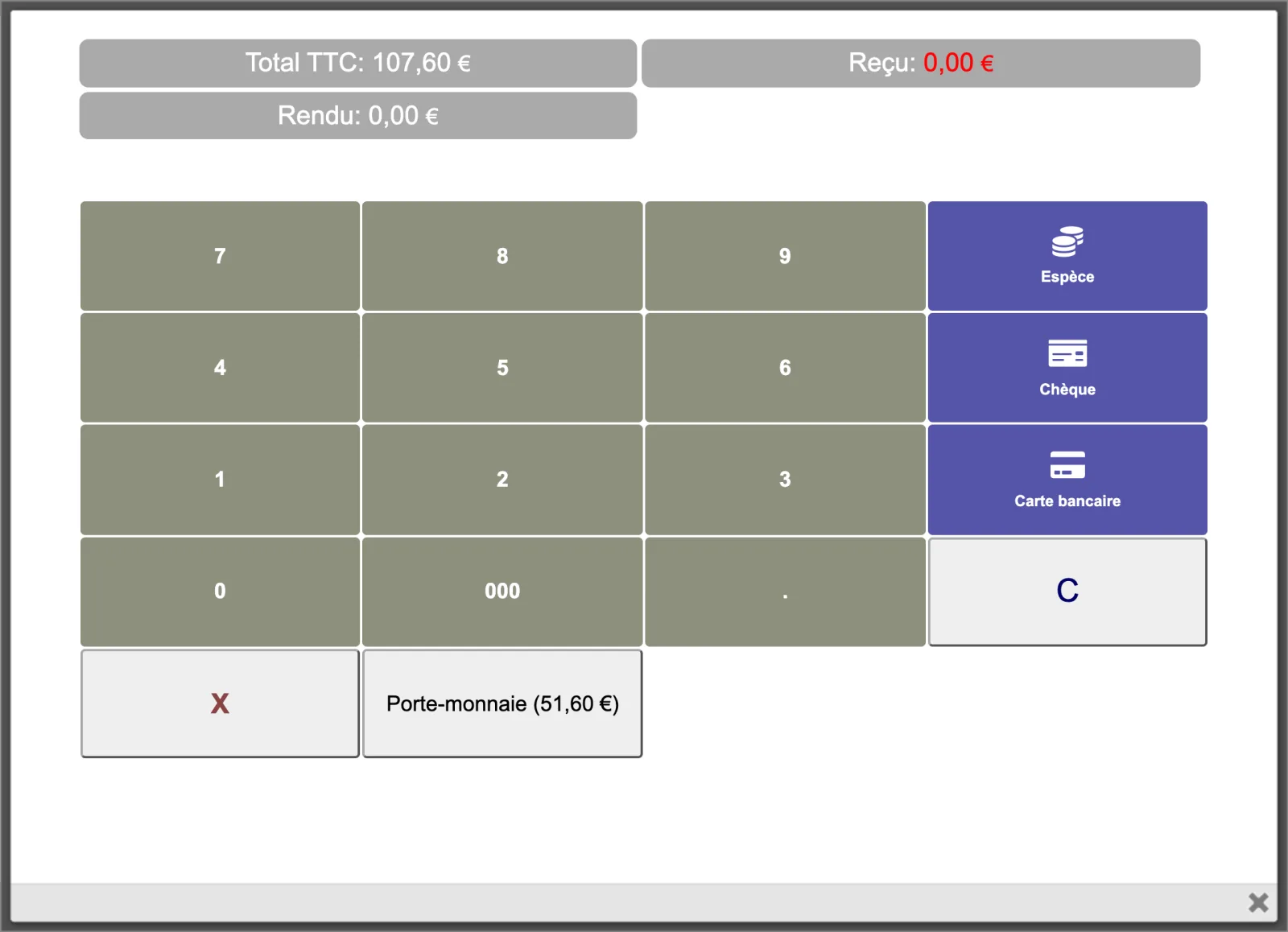
On the TakePOS payment screen, for a €107.60 sale incl. VAT, the “Porte-monnaie (51,60 €)” button (Wallet) appears under the keypad, alongside the “Espèce”, “Chèque” and “Carte bancaire” (cash, cheque, card) payment methods.
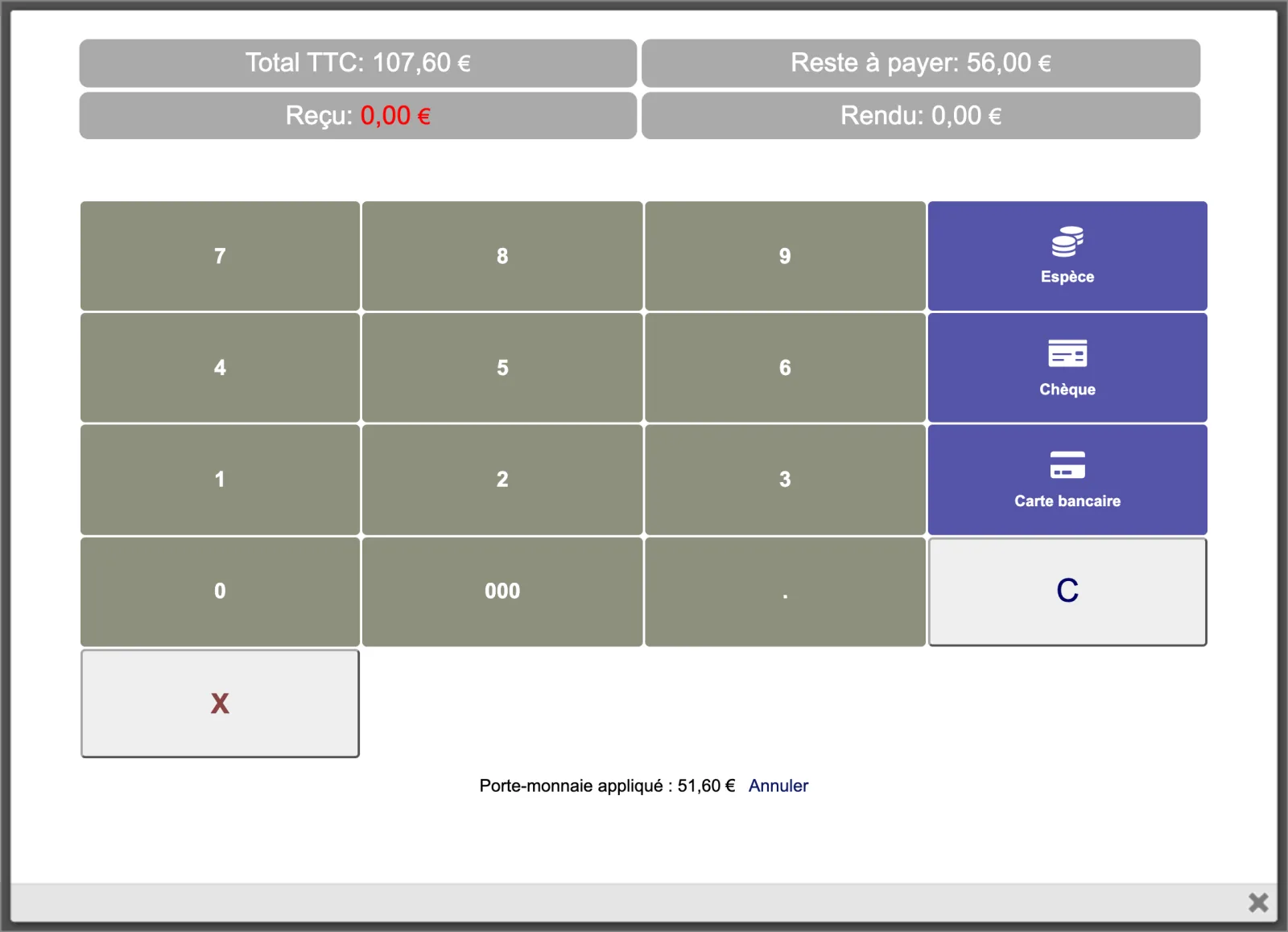
After a click, the balance does not cover the whole sale: €51.60 is applied, and the screen shows “Reste à payer: 56,00 €” (remaining amount), to be paid by another method. The button has disappeared, since the balance is used up. Under the buttons, the line “Porte-monnaie appliqué : 51,60 €” (Wallet applied) carries the “Annuler” (Cancel) link.
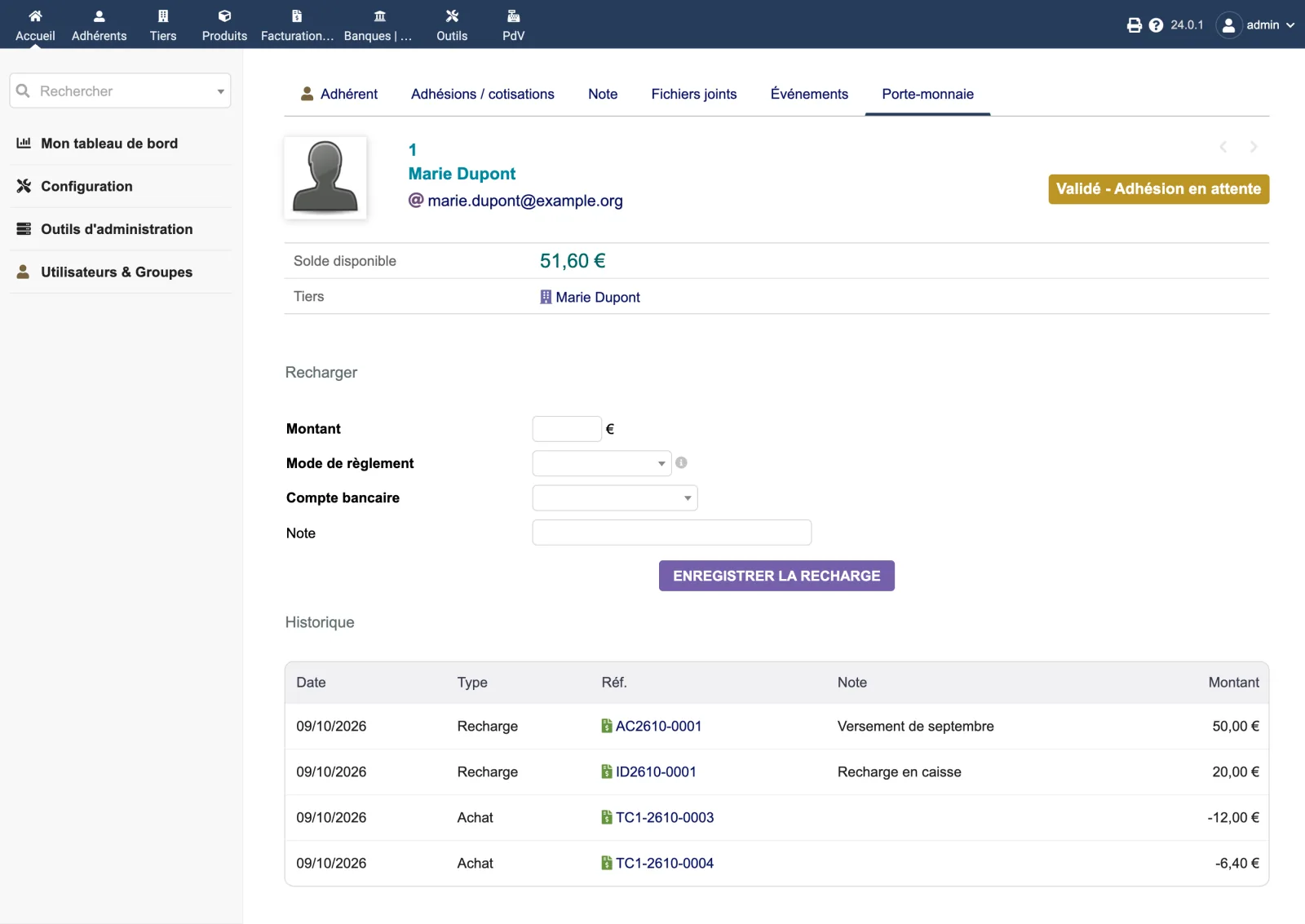
The “Porte-monnaie” (Wallet) tab of a member’s card, on Dolibarr 24.0.1: available balance of €51.60, linked third party, top-up form (amount, payment method, bank account, note), then the history — two top-ups of €50.00 and €20.00, two purchases of €12.00 and €6.40. Each row links to its invoice.
The module’s setup page is reserved for administrators. It opens with a reminder of how VAT is handled.
| Setting | Default | Effect |
|---|---|---|
| Label of the top-up line | empty: “Wallet top-up” | Text of the line of the down payment invoice created at each top-up. |
| Default bank account offered for top-ups | none | Account preselected in the top-up form. Shown only if the Banks & Cash module is enabled. |
| Database tables created | One table: llx_dolixpm_recharge. It keeps one row per top-up (third party, down payment invoice, amount, date, user, note, entity). The balance is not stored there: it is the sum of the Dolibarr available credits coming from those down payment invoices. |
|---|---|
| Permissions | Three permissions: “See wallet balances”, “Top up a wallet”, “Pay with the wallet at the till”. The first opens the tab, the second shows the top-up form, the third shows the button in TakePOS. To pay at the till, the user also needs the Dolibarr permission to create invoices. The setup page is reserved for administrators. |
| Uninstalling |
|
dolixportemonnaie, to drop into htdocs/custom/ or to install from the
zip.fr_FR), English (en_US) and German (de_DE).llx_dolixpm_recharge. It keeps one row per top-up: third party, down
payment invoice, amount, date, user, note, entity. The balance is not stored there: it is the
sum of the Dolibarr available credits coming from those down payment invoices.llx_dolixpm_recharge table and the
module’s settings are not deleted.The module descriptor only declares a minimum version. No upper bound is written in the code: the versions below are those on which the module has actually been run.
| Dolibarr versions | Dolibarr 19.0 minimum. Installed and run on 19.0.4, 20.0.4, 21.0.4, 22.0.5, 23.0.4, 24.0.0 and 24.0.1. |
|---|---|
| Minimum PHP | 7.4 |
| Dolibarr modules to enable | Invoices, POS TakePOS |
| Licence | GPL v3 or later, full source code |
| Languages | French, English, German |
| Menu | No menu entry. “Wallet” tab on the third-party card and on the member card; “Wallet” button on the TakePOS payment screen. |
The details — permissions on the custom folder, shared hosting, upgrades, uninstalling — are on the page Installation and upgrades.
The descriptor requires Dolibarr 19.0 minimum and PHP 7.4 minimum. The module's integration tests have been run on 19.0.4, 20.0.4, 21.0.4, 22.0.5, 23.0.4, 24.0.0 and 24.0.1 with MariaDB, and on 24.0.0 with PostgreSQL. The till screen has been used in a browser on 19.0.4 and 24.0.0. If you have any doubt, write before buying.
It creates one table, llx_dolixpm_recharge, which lists the top-ups. Everything else goes through Dolibarr objects: down payment invoice, payment, bank entry if the Banks & Cash module is enabled, customer available credit. No Dolibarr file is modified.
The module applies the whole balance, and the payment screen shows the remaining amount. The customer pays the rest in cash, by card or by cheque. There is no negative balance.
A top-up is recorded at 0% VAT; VAT is due at purchase time, on the receipt. This is the multi-purpose voucher treatment, valid when your products have different VAT rates. If all your products share the same rate, the balance is a single-purpose voucher: VAT is due at top-up, and version 1.0.0 does not handle that case (French tax guidance BOI-TVA-CHAMP-10-10-40-50). Not relevant if your organisation is not liable for VAT. If in doubt, ask your accountant.
The wallet belongs to the third party. On the member card, the tab shows and tops up the wallet of the third party linked to the member. A member who is not linked to any third party has none: link them to a third party first.
The tab and the till button disappear. Down payment invoices, payments and credits remain in your database; unspent balances remain available credits of the customer. The top-up table and the settings also remain; you can delete them yourself.
Support is provided by the person who wrote the module, at support@dolix.fr. Ordering, payment, the invoice and the download are handled by the DoliStore, where new versions are published.
Taken from the module’s ChangeLog.md file: a single source.
1.0.09 October 2026
First version: top-up from the third-party or member card through a 0% down payment invoice converted into available credit, “Wallet” button on the TakePOS payment screen, full or partial payment, cancellation, automatic release of the balance when the draft sale changes, history, three permissions and setup page.
Write to support@dolix.fr. The person who wrote the module is the one who replies.
Reply within two working days. This is not an on-call service.
To include in your message
This module is on sale on the DoliStore.
Ordering, payment, invoicing and download are handled by the DoliStore.
margeparjour · v1.0.0
You see what a working day brings in before you accept the quote.

dolixdomaine · v1.0.4
A customer changes its name: its addresses move to the new domain in a single operation.

dolixmasse · v1.0.4
You change a field across a series of records without writing an SQL query.
dolixtaches · v1.0.3
A task was created in the wrong project: you move it, with its subtasks, its time spent and its documents.

dolixdoublons · v1.1.3
You find records entered twice and merge them: third parties, contacts and members.
dolixprix · v1.1.1
Your draft quotes and template invoices pick up the catalogue prices, one by one or all at once.

dolixapproche · v1.0.1
You spread freight, customs and the other costs of a shipment over the cost of products and their weighted average price.

dolixresteafacturer · v1.0.1
You see what remains to be invoiced on each customer order, line by line, in quantity and in amount excluding tax.

dolixmaj · v1.0.2
Before upgrading Dolibarr, you know what will block, what will break and what to do first. The module changes nothing.

dolixtva · v1.0.0
The mandatory VAT statement is printed on your invoices by itself: small business exemption, intra-Community supply, reverse charge, export.

dolixjustif · v1.0.0
The expense report PDF also contains its receipts, photos and PDFs, page by page: one single document to hand over.