
Margin per day
margeparjour · v1.0.0
You see what a working day brings in before you accept the quote.
dolixapproche · version 1.0.1
You spread freight, customs and the other costs of a shipment over the cost of products and their weighted average price.
€99 excl. VAT.
Ordering, payment, invoicing and download are handled by the DoliStore.
The carrier and the forwarder invoice separately, and the weighted average price of your products only reflects the purchase price: stock value and margins are wrong.
A truck brings in goods from two suppliers. The carrier, a third supplier, invoices separately. So do the forwarder and customs.
In Dolibarr, a product’s weighted average price (WAP) is computed when stock comes in, from the purchase price only. Landed costs are not spread over any product: stock value is understated and margins are overstated. The only native way is to correct the price at reception, by hand, line by line.
Who it is for: Traders and importers who receive goods from several suppliers in the same truck or container, and pay freight, customs or the forwarder on separate invoices.
This section appears on all 12 module pages, without exception.
The module creates a shipment file: a truck, a container. You add the purchase orders that arrived together, even from different suppliers, then the costs.
The costs: a label, a type — freight, customs duties and taxes, insurance, forwarder, other —, an amount excluding tax and, if you wish, the matching supplier invoice. This link is there to find the document: no accounting entry is changed.
The spread, cost by cost:
| Key | Basis for each line |
|---|---|
| By value | net amount of the order line, discount deducted |
| By quantity | quantity ordered |
| By weight | quantity × weight from the product card, converted to kg from t, g, mg, pound or ounce |
| Equally | one share per product line |
The calculation is done to the cent. Rounding cents go to the lines whose share has the largest remainder: the amount spread always equals the amount of the cost. A negative cost, a credit note for example, is spread the same way. A cost that cannot be spread — a product without a weight for a spread by weight, a zero basis — blocks the application, and the products concerned are named.
Before receiving. The landed cost (net purchase price + costs per unit) is written on the lines of the receptions still in draft. When the reception is validated, Dolibarr itself computes the WAP with this cost, using its own formula. The module does not rewrite that calculation.
After receiving, when the carrier’s invoice arrives later. The WAP is corrected product by product, on the part still in stock only: the share of the costs applied is current stock / stock right after receiving. The part already gone is not revalued, and past margins do not change.
What is possible depends on how your purchases enter stock:
| Stock entry for purchases | Before receiving | After receiving |
|---|---|---|
| Validation of a reception (Receptions module) | yes | yes |
| Dispatch from the purchase order, without the Receptions module | no | yes |
| Validation of the purchase order or the supplier invoice | no | no |
In the last case, the module finds no received quantity and cannot apply anything.
Every changed value is recorded with the old and the new value, the quantity, the stock and the amount. The application can be undone, all or nothing, as long as nothing has moved: reception still in draft, line cost, WAP and cost price unchanged. If a single product has changed, nothing is undone and the reason is shown product by product.
The menu is under ProductsWarehousesLanded costs.
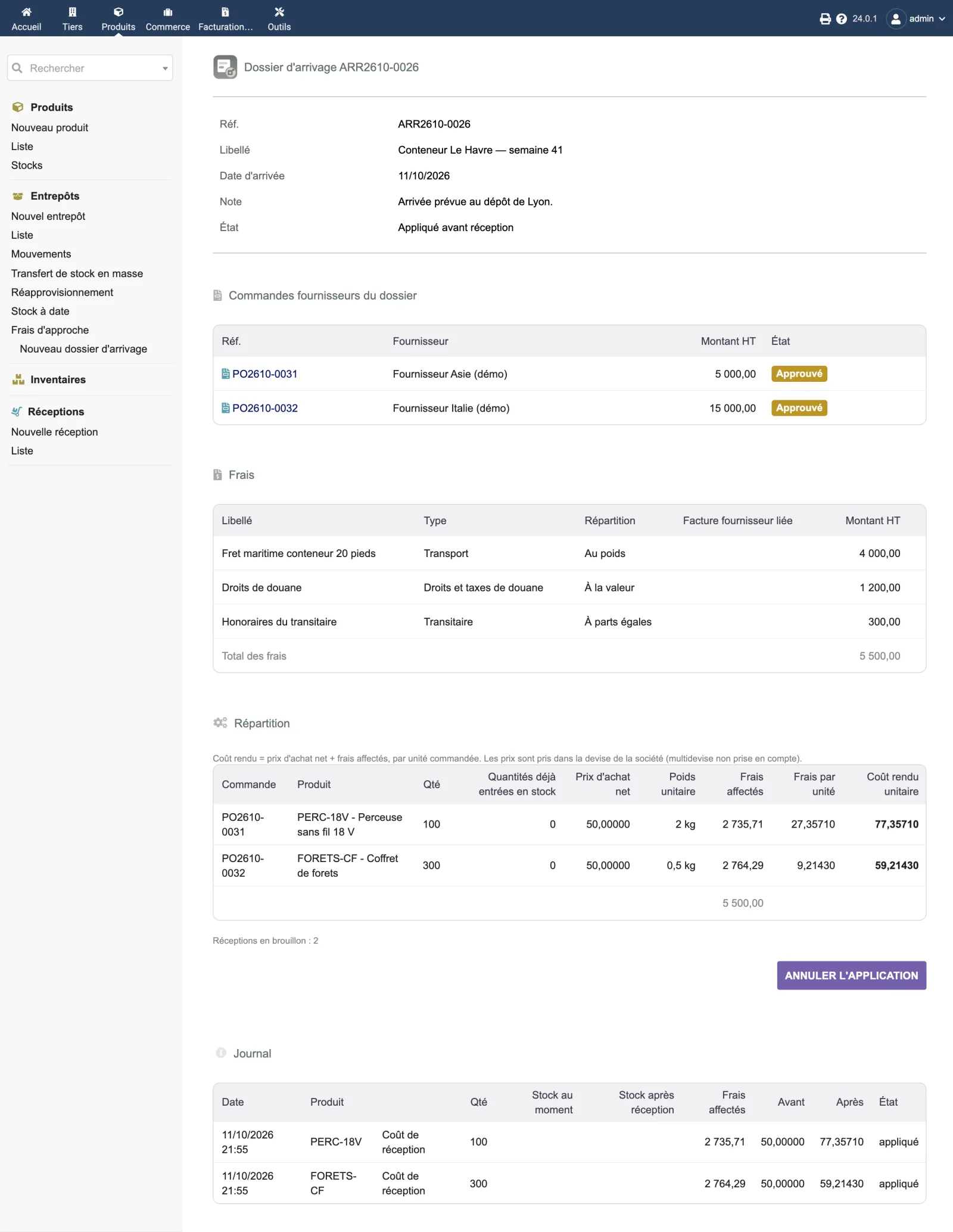
A shipment file fits on one page. In the screenshot, the file “Conteneur Le Havre — semaine 41” groups two orders from two suppliers, 5,000 and 15,000 excluding tax, and three costs: 4,000 of sea freight by weight, 1,200 of customs duties by value, 300 of forwarder fees equally.
The “Répartition” (Allocation) table gives, for each line, the quantity, the quantity already in stock, the net purchase price, the unit weight, the allocated costs, the costs per unit and the landed unit cost: 77.35710 for the drill and 59.21430 for the drill bit set, both bought at 50. The allocated costs add up to 5,500.00 again. The file is “Appliqué avant réception” (Applied before receiving); the log shows, line by line, the reception cost before and after.
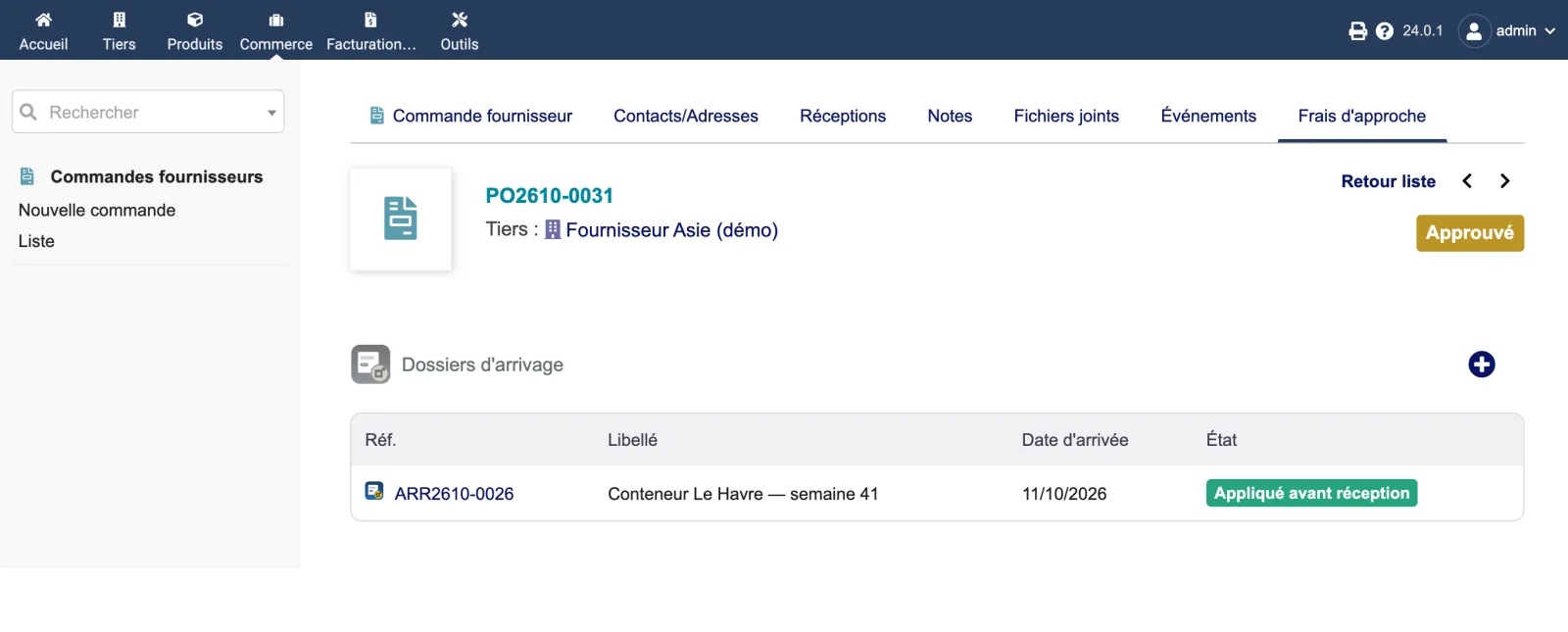
On the purchase order, the “Frais d’approche” (Landed costs) tab lists the shipment files that contain the order, with their status. The + button creates a new file with this order already added.
| Setting | Default | Effect |
|---|---|---|
| Also update the product cost price | disabled | The cost price on the product card takes the landed cost of the last applied shipment. It is set back to its previous value if the application is undone. |
Only the products actually processed are changed. A product on several lines takes the average of its landed costs, weighted by quantity.
| Database tables created | Four tables: llx_dolixapproche_dossier (shipment files: reference, label, arrival date, status, note), llx_dolixapproche_order (purchase orders attached to each file), llx_dolixapproche_frais (costs: label, type, amount excluding tax, spread key, linked supplier invoice) and llx_dolixapproche_journal (every changed value, with the old and new value, quantity, stock and amount, so it can be undone). |
|---|---|
| Permissions | Two permissions: “Read shipment files” and “Create, edit and apply shipment files”. Without the second one, files can still be viewed but no button is displayed. The tab on the purchase order is also subject to the same access checks as Dolibarr's purchase order card. The setup page is restricted to administrators. |
| Uninstalling |
|
The dolixapproche folder, complete and readable source code, under GPL v3 or later: the module
descriptor, the screens (list, shipment file card, purchase order tab, setup page), the
calculation and application classes, the SQL scripts for the tables and the icons.
| Languages | French (fr_FR), English (en_US), German (de_DE) |
| Documentation | README.md and ChangeLog.md in the module folder |
| Minimum Dolibarr version | 19.0, declared in the descriptor |
| Versions the module has been installed and run on | 19.0.4, 20.0.4, 21.0.4, 22.0.5, 23.0.4, 24.0.1 and 24.0.2 |
| Minimum PHP | 7.4 |
| Required Dolibarr modules | Vendors, Stocks |
| Recommended Dolibarr module | Receptions, to apply before receiving |
No maximum version is set in the module.
llx_dolixapproche_dossier (the files), llx_dolixapproche_order
(the attached orders), llx_dolixapproche_frais (the costs) and llx_dolixapproche_journal
(every changed value, with the old one).DOLIXAPPROCHE_UPDATE_COST_PRICE.The module descriptor only declares a minimum version. No upper bound is written in the code: the versions below are those on which the module has actually been run.
| Dolibarr versions | Dolibarr 19.0 minimum. Installed and run on 19.0.4, 20.0.4, 21.0.4, 22.0.5, 23.0.4, 24.0.1 and 24.0.2. |
|---|---|
| Minimum PHP | 7.4 |
| Dolibarr modules to enable | Vendors, Stocks |
| Licence | GPL v3 or later, full source code |
| Languages | French, English, German |
| Menu | Products menuWarehouses“Landed costs”, and “Landed costs” tab on the purchase order card. |
The details — permissions on the custom folder, shared hosting, upgrades, uninstalling — are on the page Installation and upgrades.
The descriptor requires Dolibarr 19.0 minimum and PHP 7.4 minimum. The module has been installed and run on 19.0.4, 20.0.4, 21.0.4, 22.0.5, 23.0.4 and 24.0.1. If you have any doubt about your version, write before buying.
No. Applying after receiving corrects the weighted average price of the products already in stock, on the part still there only. The part already sold is not revalued: past margins do not change. If everything has already gone, the product is skipped and the reason is displayed.
No. No accounting entry and no invoice is changed. The supplier invoice linked to a cost is only there to find the document. The module writes the cost of draft reception lines, the products' weighted average price and, if the option is ticked, their cost price.
Partly. If you dispatch stock entries from the purchase order, only applying after receiving is possible: there is no draft reception to write the cost on. If stock is updated when the purchase order or the supplier invoice is validated, the module sees no received quantity and cannot apply anything.
Yes, as long as nothing has moved: reception still in draft, line cost, weighted average price and cost price unchanged. Undo then restores all the previous values. If a single product has changed, nothing is undone and the reason is shown product by product.
The menu and the tab disappear. Weighted average prices and costs already applied remain: they are data in your database. The module's tables, with the log, also remain; you can delete them yourself.
Support is provided by the person who wrote the module, at support@dolix.fr. Ordering, payment, the invoice and the download are handled by the DoliStore, where new versions are published.
Taken from the module’s ChangeLog.md file: a single source.
1.0.114 October 2026
Fix: a shipment file page opened without a valid file, or “New file” opened without write permission, showed the menus twice and wrote PHP warnings to the server log. The refusal message is now shown once. No data was affected.
1.0.012 October 2026
First version: shipment file grouping one or more purchase orders, from different suppliers if needed; costs spread by value, by quantity, by weight or equally, to the cent; linked supplier invoice for traceability; application before or after receiving; log and all-or-nothing undo; cost price option; tab on the purchase order; interface in French, English and German.
Write to support@dolix.fr. The person who wrote the module is the one who replies.
Reply within two working days. This is not an on-call service.
To include in your message
This module is on sale on the DoliStore.
Ordering, payment, invoicing and download are handled by the DoliStore.
margeparjour · v1.0.0
You see what a working day brings in before you accept the quote.

dolixdomaine · v1.0.4
A customer changes its name: its addresses move to the new domain in a single operation.

dolixmasse · v1.0.4
You change a field across a series of records without writing an SQL query.

dolixtaches · v1.0.3
A task was created in the wrong project: you move it, with its subtasks, its time spent and its documents.

dolixdoublons · v1.1.3
You find records entered twice and merge them: third parties, contacts and members.

dolixprix · v1.1.1
Your draft quotes and template invoices pick up the catalogue prices, one by one or all at once.

dolixresteafacturer · v1.0.1
You see what remains to be invoiced on each customer order, line by line, in quantity and in amount excluding tax.

dolixmaj · v1.0.2
Before upgrading Dolibarr, you know what will block, what will break and what to do first. The module changes nothing.

dolixtva · v1.0.0
The mandatory VAT statement is printed on your invoices by itself: small business exemption, intra-Community supply, reverse charge, export.

dolixjustif · v1.0.0
The expense report PDF also contains its receipts, photos and PDFs, page by page: one single document to hand over.

dolixportemonnaie · v1.0.0
Your customers or members pay an amount in advance, and TakePOS spends it at each visit to the till, until it runs out.