
Margin per day
margeparjour · v1.0.0
You see what a working day brings in before you accept the quote.
dolixresteafacturer · version 1.0.1
You see what remains to be invoiced on each customer order, line by line, in quantity and in amount excluding tax.
€39 excl. VAT.
Ordering, payment, invoicing and download are handled by the DoliStore.
In Dolibarr, an order only has a yes/no “Billed” status. As soon as you invoice it in several steps, nothing tells you what is left to invoice: you have to open the order and add up its invoices by hand.
In Dolibarr, an order only has a yes/no “Billed” status. As long as an order is invoiced in one go, that is enough.
As soon as it is invoiced in several steps — work delivered in stages, a down payment, a 30 % invoice, a credit note for a faulty window — nothing tells you what is left to invoice. You have to open the order, open each of its invoices and add them up by hand, line by line. And an invoice that groups several orders makes the calculation harder still.
Who it is for: Businesses that invoice the same order in several steps: work delivered in stages, down payments, percentage invoices, grouped invoicing of several orders.
This section appears on all 12 module pages, without exception.
For each customer order and each line, the module computes the quantity and amount excluding tax already invoiced, and what remains. It is read only: no order or invoice is changed.
Under CommerceSales OrdersRemaining to bill, three views:
| View | Columns |
|---|---|
| By order | reference, third party, date, total excl. tax, billed excl. tax, remaining to bill excl. tax, share billed, number of invoices, status, alerts |
| By line | reference, third party, date, description, quantity ordered, billed, remaining, total excl. tax, billed excl. tax, remaining to bill excl. tax |
| By customer | third party, number of orders, total excl. tax, billed excl. tax, remaining to bill excl. tax, number of orders to check |
Filters: reference, third party, status, order dates, “Only with an amount remaining”, “Include orders classified billed”. Sorting on the columns, a grand total of all filtered rows — not just the current page — and a CSV export of the view displayed (semicolon separator, UTF-8, decimals in the format of the language).
Each sales order gets a “Remaining to bill” tab: the summary, the line-by-line detail, the invoices examined — with the reason when one is not counted — and the invoice lines that match no line of the order.
| Case | Handling |
|---|---|
| Partial invoice | quantities and amounts deducted line by line |
| Percentage invoice | Dolibarr reduces the quantity: it is deducted pro rata |
| Credit note on an invoice of the order | counted as negative on the lines concerned |
| Down payment invoice | reduces the remaining amount until it is deducted; the deduction line on the final invoice offsets it |
Down payment consumed as a payment (FACTURE_DEPOSITS_ARE_JUST_PAYMENTS) |
not counted twice |
| One invoice for several orders | spread in order sequence (date, then reference), each line capped at its quantity |
| Same product on several lines | spread in line order |
| Invoice created from a shipment | attached to the order of the shipment (option, on by default) |
| Draft invoice | not counted by default, flagged (option to count it) |
| Abandoned invoice | never counted |
Dolibarr does not keep, in an invoice line, the order line it comes from: only the link between the two documents exists. The module therefore matches lines by product, and free lines by start of label and unit price. The “start” of the label matters because grouped invoicing adds the order reference and date to the text of each line.
Invoice lines absent from the order — added fees, for example — are listed separately in the tab and do not reduce the remaining amount.
When a figure is uncertain, the module flags it rather than showing a wrong amount.
| Alert | Meaning |
|---|---|
| Situation invoice | a situation invoice is linked; its amounts are not taken into account, the remaining amount has to be checked by hand |
| Shared invoice | an invoice shared by several orders contains lines that match none of them |
| Free line to check | a free line of the order remains to bill while a free invoice line was not matched (label or price changed?) |
| Over-billed | the amount invoiced exceeds the order amount |
| Classified billed | the order is classified “billed” although an amount remains |
| Draft invoice | a draft invoice is linked; it is not counted until it is validated |
With the “Only with an amount remaining” filter, an order with nothing left is still shown if it carries a situation, shared-invoice or free-line alert.
The screenshots were taken with the interface in French.
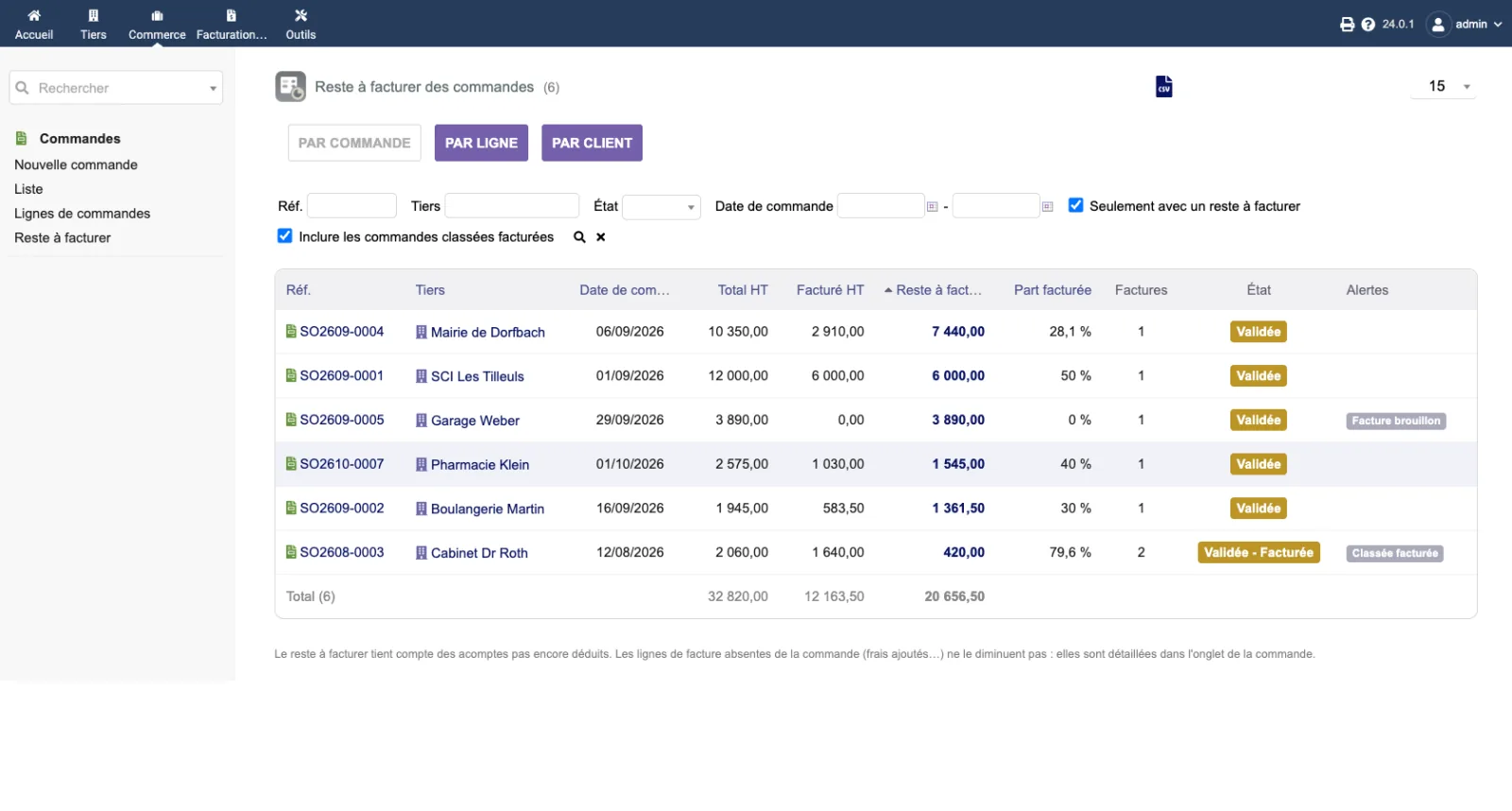
The by-order view: six demonstration orders sorted by remaining amount. The order from the Mairie de Dorfbach is 28.1 % billed and €7,440.00 excl. tax remains. The Garage Weber order carries the “Facture brouillon” (Draft invoice) alert; the Cabinet Dr Roth order, with status “Validée - Facturée” (Validated - Billed), carries the “Classée facturée” (Classified billed) alert: the order is classified billed although €420.00 remains. The total row adds up the six orders.
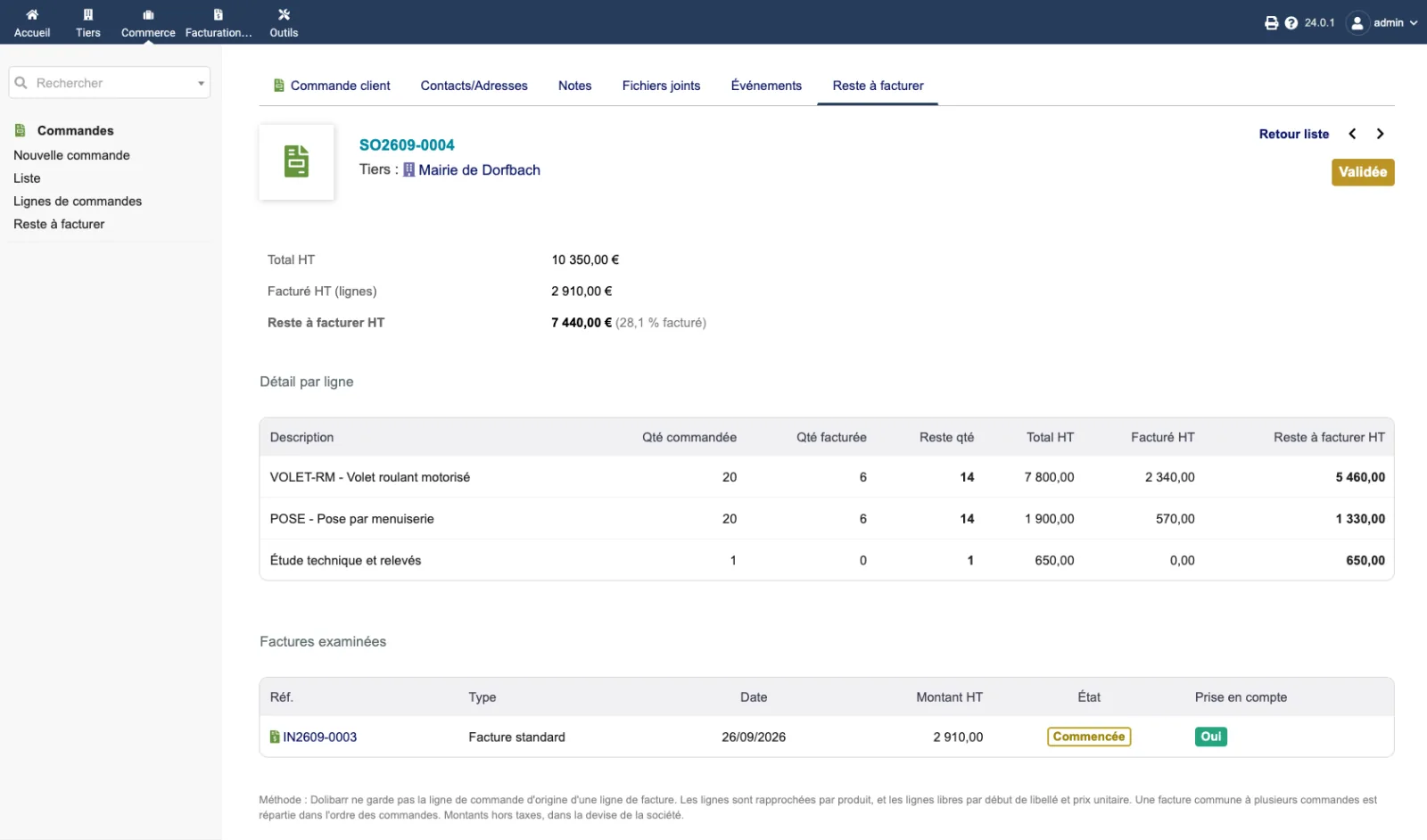
The “Reste à facturer” (Remaining to bill) tab of order SO2609-0004: total excl. tax €10,350.00, billed €2,910.00, remaining €7,440.00 (28.1 % billed). The detail shows 6 motorised roller shutters and 6 installations billed out of 20, and the technical survey, a free line, not yet billed. Below, the invoice examined, counted, and the method note.
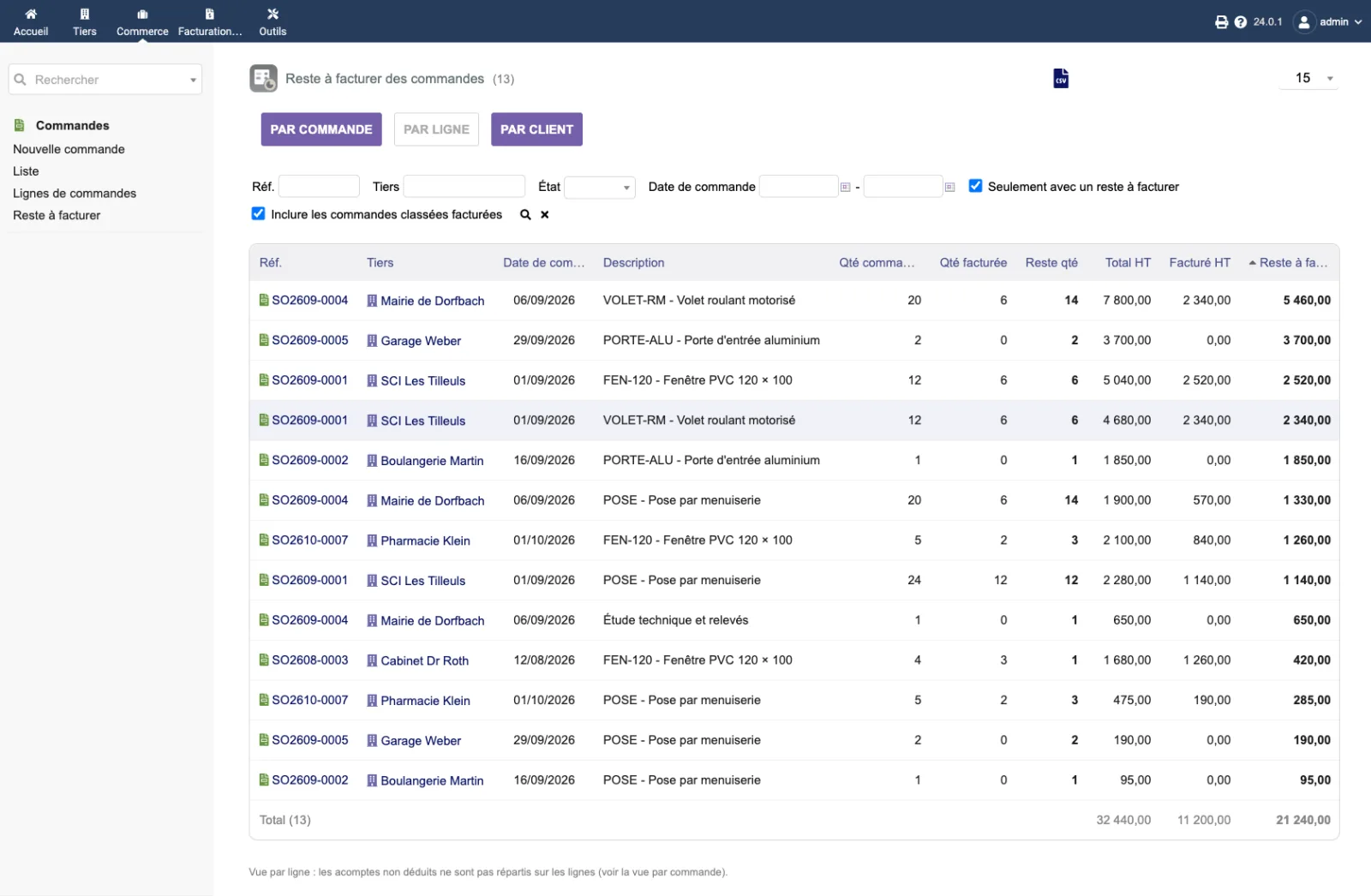
The by-line view: thirteen order lines with an amount remaining, each with the quantity ordered, billed and remaining. The remaining total (€21,240.00) is higher than in the by-order view (€20,656.50): the €583.50 down payment of Boulangerie Martin is not spread over its lines, as the note at the bottom of the page points out.
The setup page, reserved for administrators, has two options:
| Setting | Default | Effect |
|---|---|---|
| Count draft invoices | no | By default, a draft invoice is not counted: it is only flagged on the order. |
| Count invoices created from a shipment | yes | An invoice created from a shipment is linked to the shipment, not to the order. When checked, it is attached to the order of the shipment. |
=, +, - or @ is neutralised so that the
spreadsheet does not interpret it as a formula.| Database tables created | No table. The module reads orders, invoices and the links between documents; it writes nothing to the database. Its two settings are stored as Dolibarr constants: DOLIXRAF_INCLUDE_DRAFTS and DOLIXRAF_INCLUDE_SHIPMENTS. |
|---|---|
| Permissions | One permission: “Read the remaining amount to bill on orders”. The Dolibarr permissions “Read customers orders” and “Read customer invoices (and payments)” are also required: without them, the list, the export and the tab are refused. A sales representative without the permission to see all customers only sees their own customers; an external user, only their own company. The setup page is reserved for administrators. |
| Uninstalling |
|
The dolixresteafacturer folder, in readable PHP, under the GPL v3 or later licence: the module
descriptor, the list, the order tab, the setup page, the calculation class and its shared
functions, the icons.
fr_FR), English (en_US) and German (de_DE).README.md describing the calculation, the alerts and the limits (in French).ChangeLog.md.DOLIXRAF_INCLUDE_DRAFTS and DOLIXRAF_INCLUDE_SHIPMENTS.The module descriptor only declares a minimum version. No upper bound is written in the code: the versions below are those on which the module has actually been run.
| Dolibarr versions | Dolibarr 19.0 minimum. Installed and run on 19.0.4, 20.0.4, 21.0.4, 22.0.5, 23.0.4, 24.0.1 and 24.0.2. |
|---|---|
| Minimum PHP | 7.4 |
| Dolibarr modules to enable | Sales Orders, Invoices |
| Licence | GPL v3 or later, full source code |
| Languages | French, English, German |
| Menu | Commerce menuSales Orders“Remaining to bill”. A “Remaining to bill” tab on each sales order. |
The details — permissions on the custom folder, shared hosting, upgrades, uninstalling — are on the page Installation and upgrades.
The descriptor requires Dolibarr 19.0 minimum and PHP 7.4 minimum. The module has been installed and run on 19.0.4, 20.0.4, 21.0.4, 22.0.5, 23.0.4 and 24.0.1. If you are on another version and have any doubt, write before buying.
No. It only reads orders, invoices and the links between documents. It creates no table. Nor does it change an order's “Billed” status: it only flags an order classified billed while an amount remains.
Dolibarr does not record it: an invoice line does not keep the order line it comes from, only the link between the two documents exists. The module therefore matches by product, and free lines by start of label and unit price. A free line whose label or price was changed on the invoice is not matched: it appears in the tab, and the “Free line to check” alert is shown.
A down payment invoice reduces the order's remaining amount until it is deducted. When the final invoice deducts it, the two offset each other. If the down payment is consumed as a payment (core option FACTURE_DEPOSITS_ARE_JUST_PAYMENTS), it is no longer counted. A credit note attached to an invoice of the order is counted as negative on the lines concerned.
No. Its lines are spread between the linked orders, in order sequence (date, then reference), each order line capped at its quantity. Lines of that invoice that match no order are assigned to none, and the “Shared invoice” alert says so.
The menu and the tab disappear. Since the module wrote nothing to your orders or invoices, there is nothing to restore. The module's two settings remain stored.
Support is provided by the person who wrote the module, at support@dolix.fr. Ordering, payment, the invoice and the download are handled by the DoliStore, where new versions are published.
Taken from the module’s ChangeLog.md file: a single source.
1.0.114 October 2026
Display fix: on a 1280 px screen with the left menu, the list no longer overflows to the right (filters and help text cut off); when not all columns fit, only the table scrolls. Narrower Third party and Description columns, full text in the tooltip.
1.0.012 October 2026
First version: remaining amount to bill on customer orders, in quantity and amount excluding tax, line by line. List with three views (by order, by line, by customer) with filters, sorting, grand total and CSV export. “Remaining to bill” tab on the order. Partial invoices, percentage invoices, credit notes, down payments, invoices shared by several orders and invoices created from a shipment are taken into account. Six alerts. Core restrictions respected. Interface in French, English and German.
Write to support@dolix.fr. The person who wrote the module is the one who replies.
Reply within two working days. This is not an on-call service.
To include in your message
This module is on sale on the DoliStore.
Ordering, payment, invoicing and download are handled by the DoliStore.
margeparjour · v1.0.0
You see what a working day brings in before you accept the quote.

dolixdomaine · v1.0.4
A customer changes its name: its addresses move to the new domain in a single operation.

dolixmasse · v1.0.4
You change a field across a series of records without writing an SQL query.

dolixtaches · v1.0.3
A task was created in the wrong project: you move it, with its subtasks, its time spent and its documents.

dolixdoublons · v1.1.3
You find records entered twice and merge them: third parties, contacts and members.

dolixprix · v1.1.1
Your draft quotes and template invoices pick up the catalogue prices, one by one or all at once.

dolixapproche · v1.0.1
You spread freight, customs and the other costs of a shipment over the cost of products and their weighted average price.

dolixmaj · v1.0.2
Before upgrading Dolibarr, you know what will block, what will break and what to do first. The module changes nothing.

dolixtva · v1.0.0
The mandatory VAT statement is printed on your invoices by itself: small business exemption, intra-Community supply, reverse charge, export.

dolixjustif · v1.0.0
The expense report PDF also contains its receipts, photos and PDFs, page by page: one single document to hand over.

dolixportemonnaie · v1.0.0
Your customers or members pay an amount in advance, and TakePOS spends it at each visit to the till, until it runs out.