
Margin per day
margeparjour · v1.0.0
You see what a working day brings in before you accept the quote.
dolixdoublons · version 1.1.3
You find records entered twice and merge them: third parties, contacts and members.
€79 excl. VAT.
Ordering, payment, invoicing and download are handled by the DoliStore.
The same company exists twice in your database, under two spellings, and you no longer know which one is up to date.
After a few years, the same company ends up entered twice. “Cabinet Vaillant” and “SARL Cabinet Vaillant”, the same email written with a capital letter, the same phone number written with spaces. The quotes are on one record, the invoices on the other. The customer’s turnover is wrong, and nobody knows any more which of the two records is up to date.
Sorting by name does not bring them side by side: the legal form, an accent or a space is enough to separate them in the list.
Who it is for: Databases several years old, files imported from a spreadsheet, organisations where several people create records without coordinating.
This section appears on all 12 module pages, without exception.
The module compares your records on criteria that you choose, and shows you groups of records that are genuinely identical once the formatting is stripped out.
What it can scan: third parties, contacts and addresses, and — if the Members module is enabled — members.
The criteria:
| Criterion | Objects | What is ignored |
|---|---|---|
| Same email | third parties, contacts, members | case and spaces |
| Same name | third parties | accents, punctuation, legal forms (SARL, SAS, EURL, GmbH, Ltd…) |
| Same first and last name | contacts, members | accents, punctuation, order of first and last name |
| Same phone | third parties, contacts, members | format: 01 23 45 67 89, +33 1 23 45 67 89, 0033… give the same key |
| Same SIRET, SIREN or VAT number | third parties | spaces, punctuation, case |
Matching is strict equality after normalisation, not a similarity score. Two records are only grouped if one of their values is genuinely identical. So there is no “duplicate probability” to interpret, and empty fields never form a group.
The scan is read-only. Nothing is changed until you have chosen a record to keep, ticked a record to merge, clicked and confirmed.
The module merges the three objects it scans. The path is not the same for third parties as for the other two.
For a third party, the module relies on Dolibarr’s native merge. The duplicate’s quotes, orders, invoices, contacts, categories and attached documents are moved to the record you keep, whose empty fields are filled in with those of the duplicate. The duplicate is then deleted.
Dolibarr cannot merge contacts, and has only merged members since version 23: two duplicate contacts have to be copied over and deleted by hand, hoping nothing was missed. The module writes this merge itself.
Everything that pointed to the deleted record is moved to the kept record:
| What moves to the kept record | Contacts | Members |
|---|---|---|
| Roles on quotes, orders, invoices, projects and other documents | yes | — |
| Links to third parties | yes | — |
| Categories | yes | yes |
| Agenda events and reminders | yes | — |
| Notifications and alerts | yes | — |
| Mass emailing campaign targets | yes | — |
| Contributions | — | yes |
| Partnerships | — | yes |
| Complementary attributes | yes | yes |
| Linked user account | yes | yes |
The empty fields of the kept record — address, phone numbers, job title, date of birth, social networks — are filled in with those of the duplicate, and the two notes are joined end to end. The kept record keeps its own link: merging two contacts held by two different third parties does not touch the third parties.
The operation runs in a transaction. If a single step fails, nothing is applied: both records stay in place and a message says so.
When the kept record already carries the same link as the duplicate — the same category, the same link to a third party, a contribution with the same date — the duplicate’s redundant row is set aside rather than making the operation fail.
It is an irreversible operation. The module asks for an explicit confirmation that says so, requires the Dolibarr create and delete permissions on the object concerned in addition to its own permission, and re-checks both records on the server before writing anything.
The screen fits on one page, under Third partiesDuplicates.
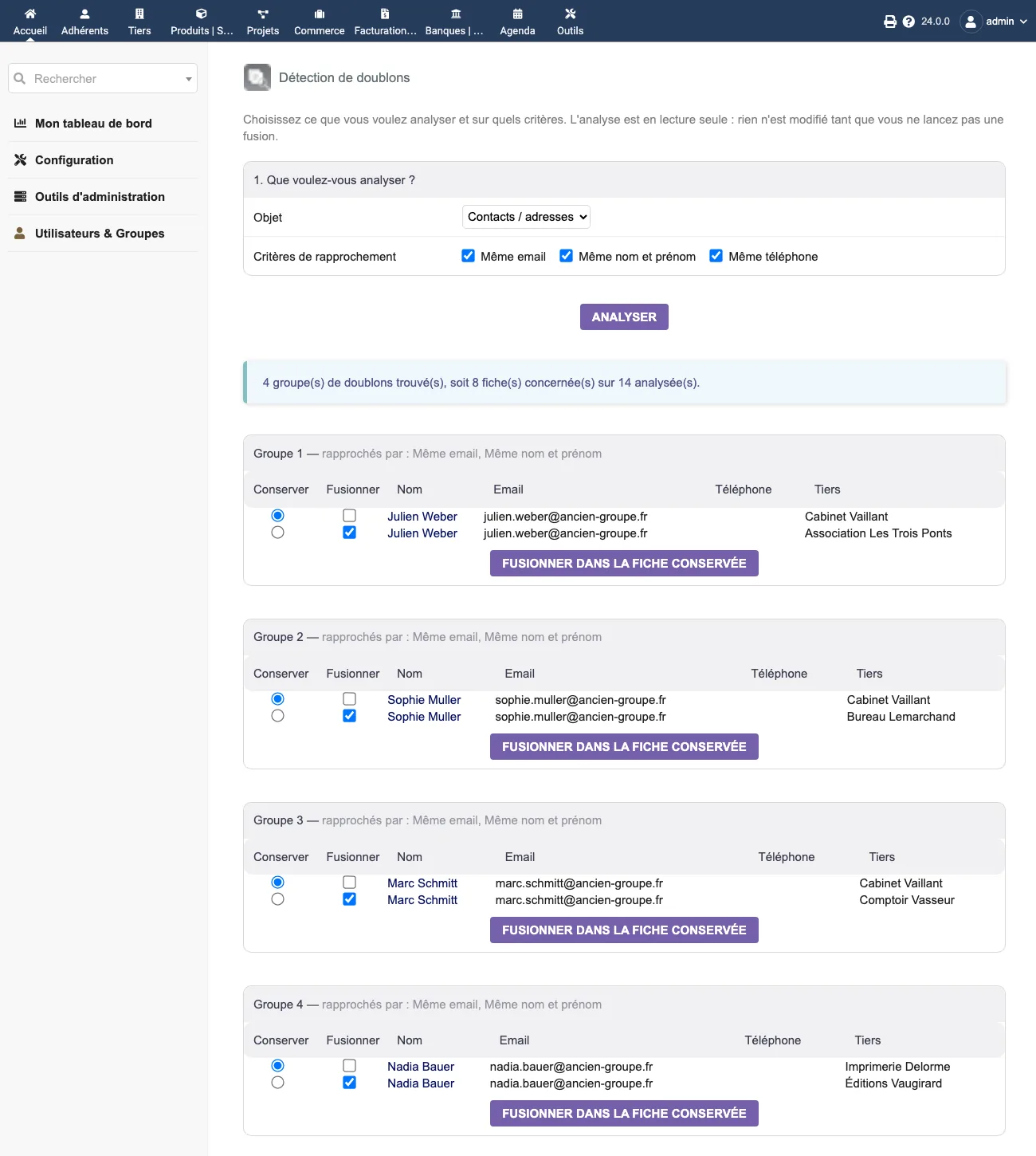
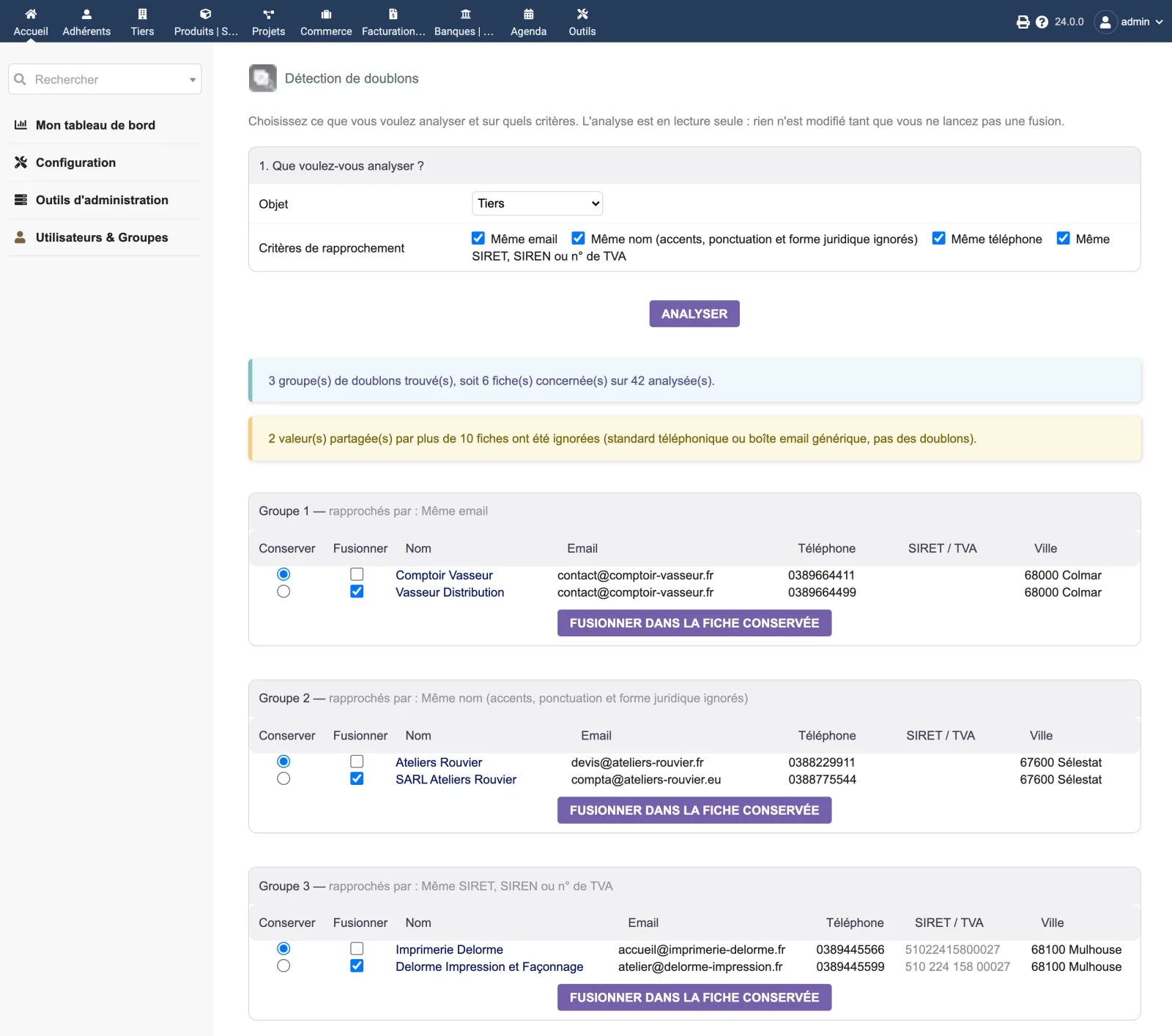
At the top, the object to scan and the criteria checkboxes. The Scan button displays a banner such as “3 duplicate group(s) found, covering 6 record(s) out of 14 scanned.”, then one table per group.
Each group shows as its title the criteria that matched these records, and lists the records with their clickable name, email, phone, identifiers and town. A “Keep” column and a “Merge” column let you designate the master record.
In the screenshot, group 1 matches “Cabinet Vaillant” and “SARL Cabinet Vaillant” on all four criteria at once, even though their emails are not written with the same case and their phone numbers are not entered in the same format.
The choice of object changes the list scanned and the criteria offered. On Contacts / addresses, each group matches the same person entered several times — often on two different third parties — and carries the same merge button.
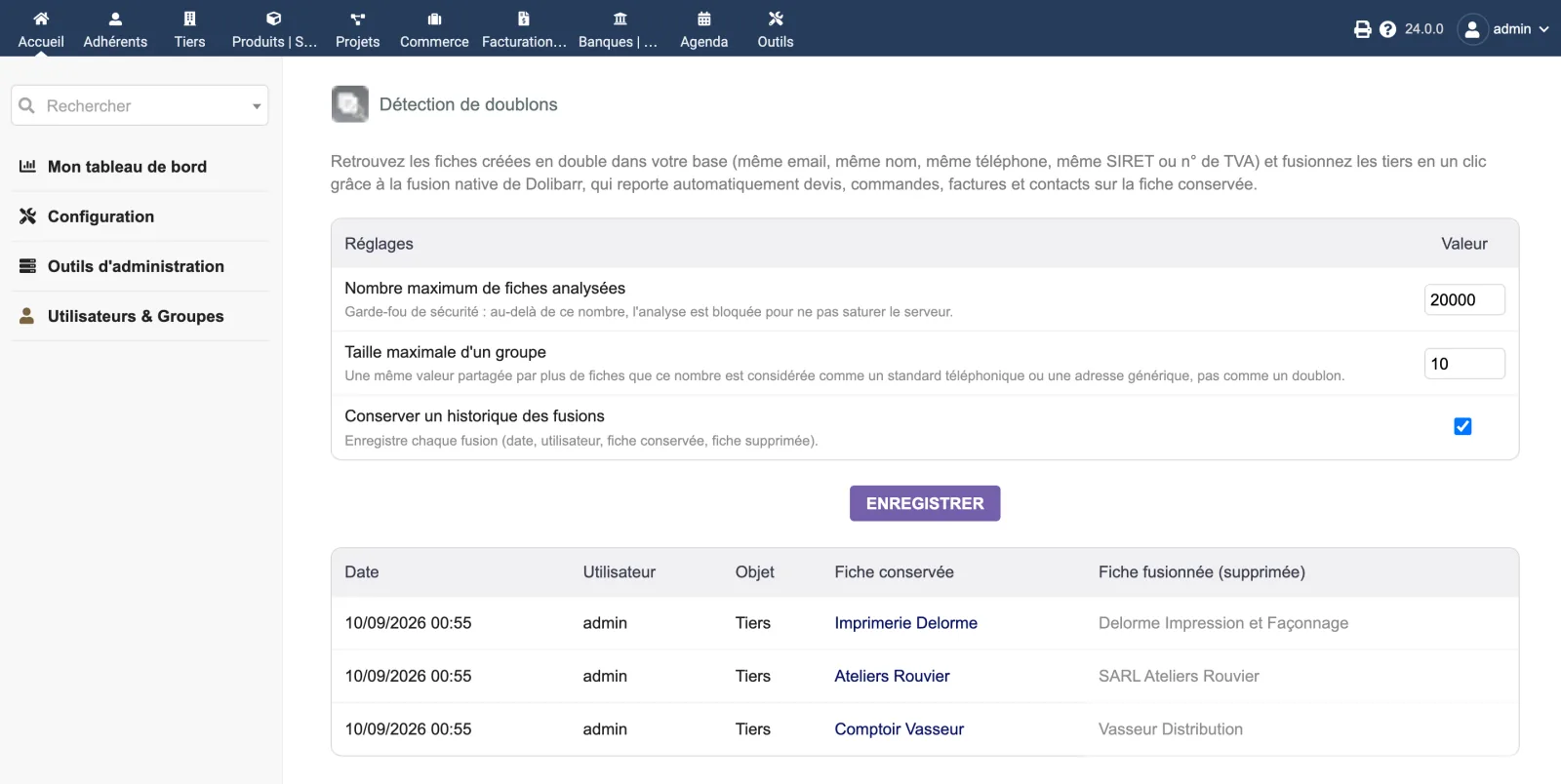
The setup page brings together the two safeguards, the history setting and the table of merges already carried out.
| Setting | Default | Effect |
|---|---|---|
| Maximum records scanned | 20 000 | Above this, the scan is blocked so as not to overload the server. |
| Maximum group size | 10 | A value shared by more records than this number is treated as a switchboard number or a generic address: it is set aside, and the number of values set aside is displayed. |
| Keep a merge history | enabled | Logs every merge: date, user, object type, kept record, deleted record. |
The second setting is the one that prevents the giant false group: without it, a switchboard
number 03 88 00 00 00 shared by forty records of the same local authority would form a group
of forty “duplicates”.
| Database tables created | One table: llx_dolixdoublons_log. It records the merge history (date, user, object type, kept record, merged record, names of both records, entity). |
|---|---|
| Permissions | One permission: “Use duplicate finder”. Merging also requires Dolibarr's standard permissions on the object: create/modify AND delete. Without the delete permission, the scan can still be viewed but the merge buttons are not displayed. |
| Uninstalling |
|
llx_dolixdoublons_log. It only contains the merge history.The module descriptor only declares a minimum version. No upper bound is written in the code: the versions below are those on which the module has actually been run.
| Dolibarr versions | Dolibarr 19.0 minimum. Installed and run on 23.0.4 and 24.0.0. |
|---|---|
| Minimum PHP | 7.4 |
| Dolibarr modules to enable | Third Parties |
| Licence | GPL v3 or later, full source code |
| Languages | French, English |
| Menu | Third parties menu“Duplicates”. |
The details — permissions on the custom folder, shared hosting, upgrades, uninstalling — are on the page Installation and upgrades.
The descriptor requires Dolibarr 19.0 minimum and PHP 7.4 minimum. The module has been installed and run on 23.0.4 and 24.0.0. If you are on an older version and have any doubt, write before buying.
No. The scan only reads and groups. Nothing is written until you have chosen a record to keep, ticked a record to merge, clicked the button and confirmed the warning window.
It is moved to the kept record by Dolibarr's own merge method: quotes, orders, invoices, contacts, categories. The empty fields of the kept record are filled in with those of the duplicate. Only then is the duplicate deleted. The operation is irreversible: make a backup before a merge campaign.
Yes. The Dolibarr core does not merge contacts, and has only merged members since version 23. Merging a contact or a member is written in the module. It moves to the kept record everything that pointed to the deleted record: roles on quotes, orders, invoices and projects, links to third parties, categories, agenda events, notifications, mass emailing targets, complementary attributes, and for a member its contributions and partnerships. Any linked user account follows too. The empty fields of the kept record are filled in with those of the duplicate, the notes are joined end to end, then the duplicate is deleted. The whole thing runs in a transaction: if one step fails, nothing is applied.
Matching is strict equality after normalisation, not a similarity score: two records are only grouped if one of their values is genuinely identical once the formatting is stripped out. Values shared by more records than the group cap — a switchboard number, a generic mailbox — are set aside and reported.
The menu disappears. Merges already carried out remain: they are data in your database. The history table and the settings also remain; you can delete them yourself.
Support is provided by the person who wrote the module, at support@dolix.fr. Ordering, payment, the invoice and the download are handled by the DoliStore, where new versions are published.
Taken from the module’s ChangeLog.md file: a single source.
1.1.310 September 2026
Technical: the anti-CSRF token check function now has a name prefixed by the module, so that a function of the same name added to Dolibarr one day cannot prevent the page from opening. An empty token is explicitly refused.
1.1.210 September 2026
Important fix: the merge form always sent the “third party” object type, whatever the type scanned. A merge started from contacts or members was processed as a third-party merge. The type actually displayed is now sent, and the merging of contacts and members, written since 1.1.0, is genuinely reachable from the screen. Fix: the setup screen returned a 500 error on saving, because Dolibarr's settings-writing function was called without its library being loaded. Settings now save normally.
1.1.110 September 2026
PostgreSQL compatibility fix: detection of optional columns now goes through Dolibarr's abstraction layer, since on PostgreSQL a failed query aborts the current transaction. No data was altered.
1.1.010 September 2026
Merging of contacts and merging of members, which Dolibarr does not offer natively: everything that points to the deleted record is moved to the kept record — documents and linked items, links, events, categories, notifications, contributions, partnerships and associated user account — in a transaction. Detection of duplicate members, offered when the Members module is enabled. Handling of unique-key conflicts during a merge. Compatibility across versions: columns missing depending on the Dolibarr version are detected and ignored. The history now records the type of object merged.
1.0.09 September 2026
First version: detection of duplicate third parties and contacts on four criteria, normalisation before matching, read-only scan, merging of third parties using Dolibarr's native method, safeguards, history and setup page.
Write to support@dolix.fr. The person who wrote the module is the one who replies.
Reply within two working days. This is not an on-call service.
To include in your message
This module is on sale on the DoliStore.
Ordering, payment, invoicing and download are handled by the DoliStore.
margeparjour · v1.0.0
You see what a working day brings in before you accept the quote.

dolixdomaine · v1.0.4
A customer changes its name: its addresses move to the new domain in a single operation.

dolixmasse · v1.0.4
You change a field across a series of records without writing an SQL query.

dolixtaches · v1.0.3
A task was created in the wrong project: you move it, with its subtasks, its time spent and its documents.

dolixprix · v1.1.1
Your draft quotes and template invoices pick up the catalogue prices, one by one or all at once.

dolixapproche · v1.0.1
You spread freight, customs and the other costs of a shipment over the cost of products and their weighted average price.

dolixresteafacturer · v1.0.1
You see what remains to be invoiced on each customer order, line by line, in quantity and in amount excluding tax.

dolixmaj · v1.0.2
Before upgrading Dolibarr, you know what will block, what will break and what to do first. The module changes nothing.

dolixtva · v1.0.0
The mandatory VAT statement is printed on your invoices by itself: small business exemption, intra-Community supply, reverse charge, export.

dolixjustif · v1.0.0
The expense report PDF also contains its receipts, photos and PDFs, page by page: one single document to hand over.

dolixportemonnaie · v1.0.0
Your customers or members pay an amount in advance, and TakePOS spends it at each visit to the till, until it runs out.