
Margin per day
margeparjour · v1.0.0
You see what a working day brings in before you accept the quote.
dolixtva · version 1.0.0
The mandatory VAT statement is printed on your invoices by itself: small business exemption, intra-Community supply, reverse charge, export.
€79 excl. VAT.
Ordering, payment, invoicing and download are handled by the DoliStore.
Your company is German, Austrian, Belgian or Luxembourgish: Dolibarr prints no VAT statement, and you type it by hand, invoice after invoice.
An invoice without VAT has to say why. A supply to a business customer in another EU country, a reverse-charged service, an export, a small business under the VAT exemption: each case has its statement, and each country has its own text.
Dolibarr only prints an automatic statement for a French company. A German, Austrian, Belgian or Luxembourg company gets nothing: the statement has to be typed by hand, invoice after invoice, and the right one has to be chosen.
Even for a French company, since version 21, Dolibarr prints for the exemption “TVA non applicable, article L. 223-3 du CIBS”. That article is not in force: the move to the Code des impositions sur les biens et services has been postponed to 1 January 2027.
Who it is for: Companies established in Germany, Austria, Belgium, Luxembourg or France that invoice businesses in other EU countries or customers outside the EU, and small businesses under the VAT exemption scheme.
This section appears on all 12 module pages, without exception.
When the PDF is produced, the module looks at the invoice and works out the situation:
It then prints the legal statement of your company’s country, in the language of the invoice.
| Situation | Detection | Example, German company |
|---|---|---|
| Small business VAT exemption | company not liable for VAT | Steuerbefreiung für Kleinunternehmer gemäß § 19 UStG. |
| Intra-EU supply of goods (exempt) | customer in another EU country with a VAT number, product-type line at 0% | Steuerfreie innergemeinschaftliche Lieferung (§ 4 Nr. 1 Buchst. b, § 6a UStG). |
| Services to an EU business (reverse charge) | same, service-type line at 0% | Steuerschuldnerschaft des Leistungsempfängers. |
| Export of goods outside the EU | customer outside the EU, product-type line at 0% | Steuerfreie Ausfuhrlieferung (§ 4 Nr. 1 Buchst. a, § 6 UStG). |
| Services to a customer outside the EU | customer outside the EU, service-type line at 0% | Nicht im Inland steuerbare Leistung. |
| Domestic reverse charge (construction…) | never automatic: chosen on the invoice | Steuerschuldnerschaft des Leistungsempfängers (§ 13b UStG). |
An invoice that mixes goods and services at 0% gets both statements.
Countries covered for the invoicing company: France, Belgium, Luxembourg, Germany, Austria.
Languages of the statements: French, German, English, and Dutch for a Belgian company. Each
text cites its legal basis; the official sources, consulted on 9 October 2026, are listed in the
SOURCES.md file shipped with the module.
A “Printed VAT statement” line shows in advance the statement that will be printed, or explains why there is none. It also flags an EU customer without a VAT number — without it, the sale is not exempt — or a customer whose country is not set.
A “VAT statement” attribute is added to invoices. Left empty, the module chooses by itself. Otherwise, you force a situation — domestic reverse charge in construction, which the module cannot guess — or “No statement”. It can still be changed on a validated invoice, to regenerate its PDF.
__DOLIXTVA_MENTION__ variable, which you place in the invoice footer free
text or in an ODT template.Dolibarr already prints its own exemption statement: the module does not duplicate it. An option corrects it to “TVA non applicable, art. 293 B du CGI”, in French, English and German.
The module has no screen of its own: its effect shows on the printed invoice.
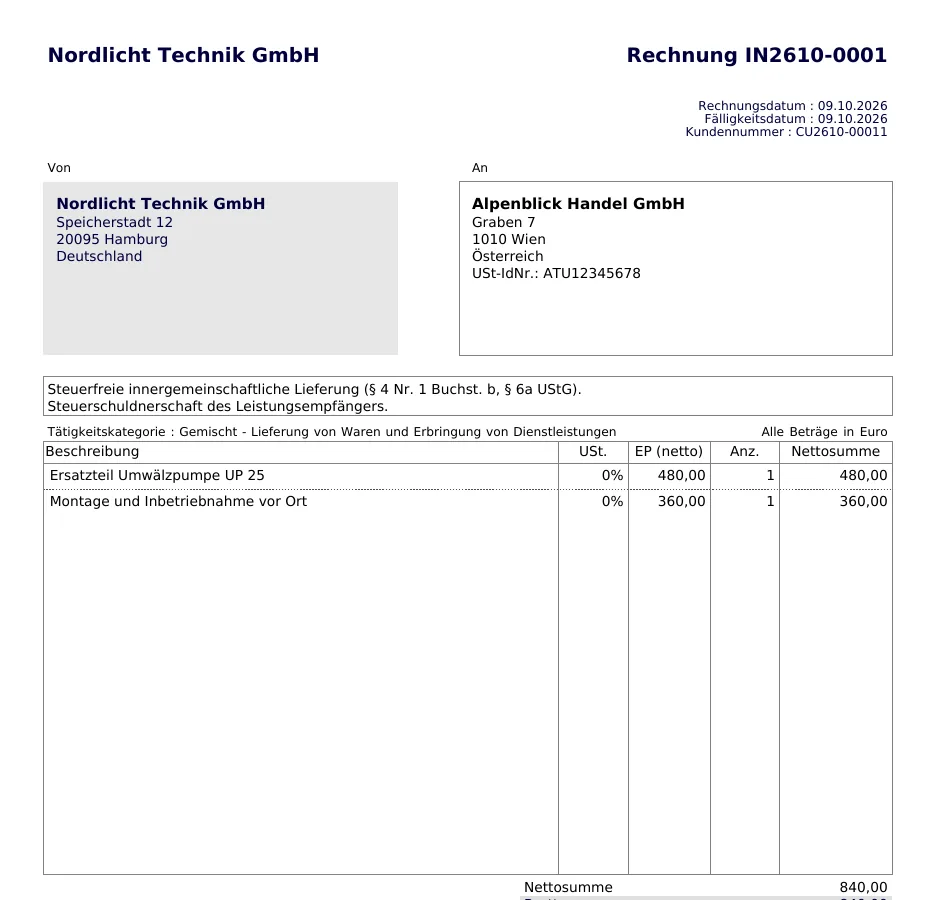
A German company invoices an Austrian customer who has a VAT number: a spare part and an on-site job, both at 0%. In the notes area, above the lines, the module has printed both statements in German: “Steuerfreie innergemeinschaftliche Lieferung (§ 4 Nr. 1 Buchst. b, § 6a UStG).” for the part, “Steuerschuldnerschaft des Leistungsempfängers.” for the job.
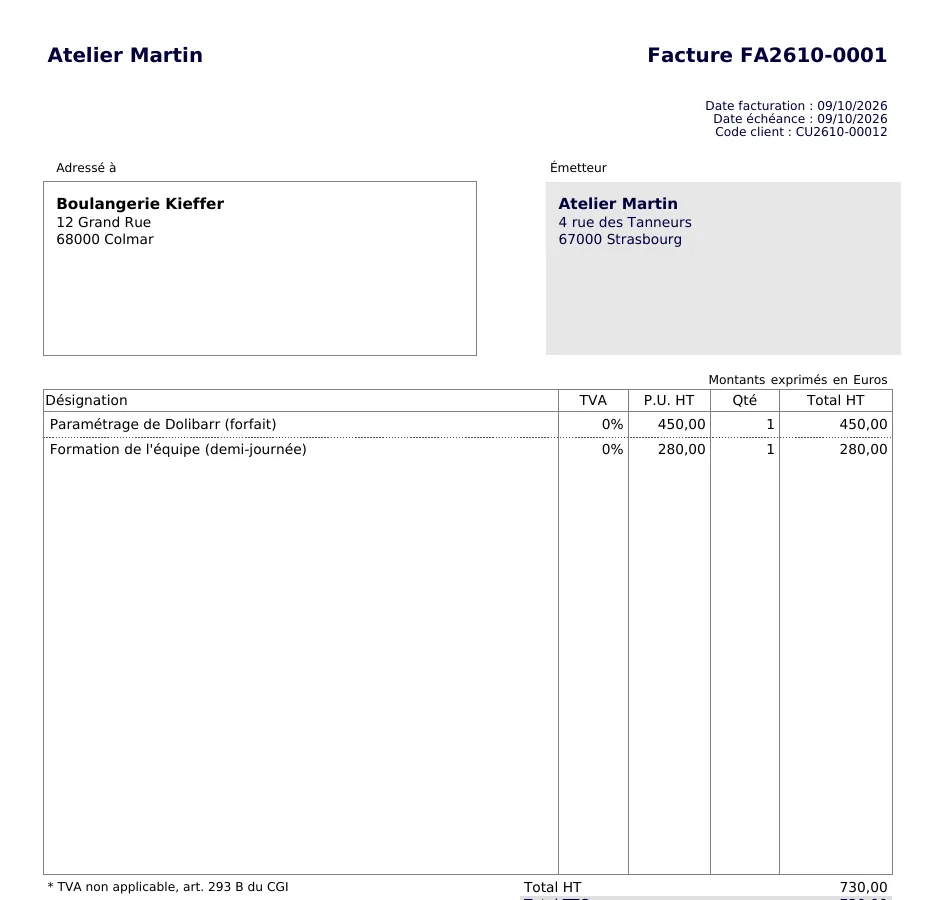
A French company under the VAT exemption, two lines at 0%. Bottom left, the statement Dolibarr prints now reads “* TVA non applicable, art. 293 B du CGI”. The notes area stays empty: the module does not add its own exemption statement for a French company.
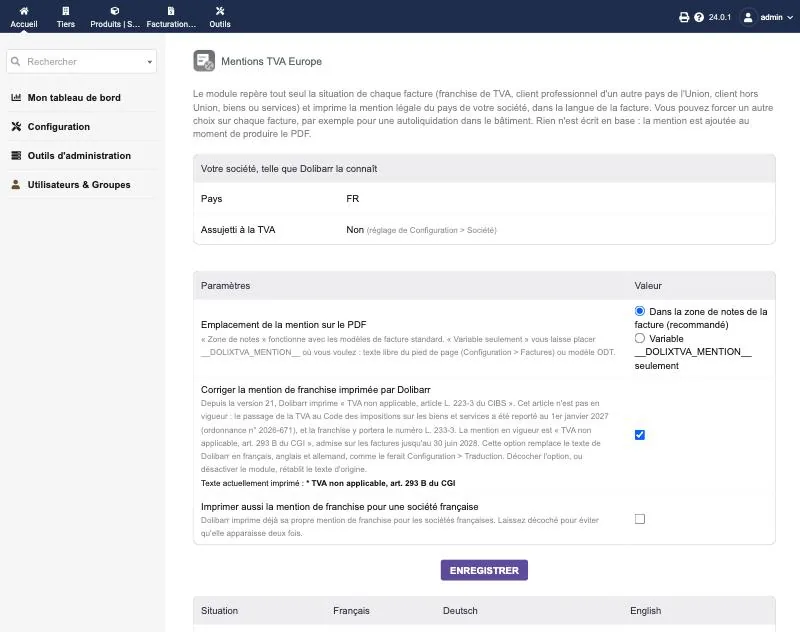
The setup page, under Dolibarr 24.0.1, for a French company not liable for VAT: what Dolibarr knows about your company (country, VAT liability), where the statement goes, the correction of the exemption statement — ticked, with the text currently printed — and the module’s own exemption option, unticked. Further down, the page shows the text of each situation in French, German and English.
In SetupModules/ApplicationsEU VAT Mentions. The page is reserved for administrators.
| Setting | Default | Effect |
|---|---|---|
| Where the statement goes on the PDF | notes area | Or “Variable __DOLIXTVA_MENTION__ only”: nothing is added to the notes area, the statement only appears where you place the variable. |
| Correct the exemption statement Dolibarr prints (France) | unticked | French company only. Replaces Dolibarr’s text with “* VAT not applicable, art. 293 B CGI (France)” and its French and German equivalents, as SetupTranslation would do. |
| Also print the exemption statement for a French company | unticked | French company only. Useful with an ODT or custom template: Dolibarr’s PDF templates already print their own statement. |
Country and VAT liability are not set here: the module reads them in SetupCompany/Organization.
| Database tables created | No table. On activation, the module adds a “VAT statement” complementary attribute to invoices (field dolixtva_case, so a column of llx_facture_extrafields) and stores its settings as constants. If you turn on the correction of the French statement, the corrected text is stored in Dolibarr's overwritten translations (table llx_overwrite_trans), as SetupTranslation would do. |
|---|---|
| Permissions | No permission of its own. The module adds no page and no menu: the statement follows Dolibarr's permissions on invoices. The setup page is reserved for administrators. |
| Uninstalling |
|
dolixtva folder, to be placed in htdocs/custom/ or uploaded as a zip from
HomeSetupModules/Applications, “Deploy/install external app/module” tab.langs/: fr_FR, en_US, de_DE, and nl_NL for the
statements of a Belgian company only (the rest of the interface in Dutch comes from English).README.md, ChangeLog.md, and SOURCES.md: the official sources of each statement.llx_facture_extrafields). Only the choice you make there is saved on the invoice.llx_overwrite_trans).The module descriptor only declares a minimum version. No upper bound is written in the code: the versions below are those on which the module has actually been run.
| Dolibarr versions | Dolibarr 19.0 minimum. Tested on 19.0.4, 20.0.4, 21, 22, 23.0.4 and 24.0.1. |
|---|---|
| Minimum PHP | 7.4 |
| Dolibarr modules to enable | Invoices |
| Licence | GPL v3 or later, full source code |
| Languages | French, English, German, Dutch |
| Menu | No menu. On the invoice card, a “Printed VAT statement” line and the “VAT statement” attribute. Settings: SetupModules/ApplicationsEU VAT Mentions. |
The details — permissions on the custom folder, shared hosting, upgrades, uninstalling — are on the page Installation and upgrades.
The descriptor requires Dolibarr 19.0 minimum and PHP 7.4 minimum. The module's test suite passed without errors on 19.0.4, 20.0.4, 21, 22, 23.0.4 and 24.0.1, with the printed text checked in each PDF. If you have any doubt about your version, write before buying.
It checks whether your company is liable for VAT, then the invoice lines at 0%: goods or services. It then looks at the customer's country and VAT number. Customer in another EU country with a number: intra-Community supply or reverse charge. Customer outside the EU: export, or services outside the EU. Customer in the same country: nothing automatic. The “Printed VAT statement” line on the invoice card shows the result before you produce the PDF.
The module cannot guess it: a sale at 0% to a customer in the same country can have several causes. Choose “Domestic reverse charge (construction…)” in the invoice's “VAT statement” attribute. The same attribute lets you force any situation, or print no statement at all.
For a French company, Dolibarr already prints its own exemption statement, and the module does not duplicate it. Since version 21, that text cites “article L. 223-3 du CIBS”, an article that is not in force: the move to the Code des impositions sur les biens et services has been postponed to 1 January 2027. An option in the module replaces it with “TVA non applicable, art. 293 B du CGI”, in French, English and German. Unticking the option, or disabling the module, restores the original text.
No. The statement is added to the public note in memory, just before the PDF is produced, then the original note is put back. The stored public note is never changed. Only the choice made in the “VAT statement” attribute is saved on the invoice.
Statements are no longer added to new PDFs. The correction of the French statement, if you had turned it on, is removed. The “VAT statement” attribute and the settings remain in the database. PDFs already produced keep their statement.
Support is provided by the person who wrote the module, at support@dolix.fr. Ordering, payment, the invoice and the download are handled by the DoliStore, where new versions are published.
Taken from the module’s ChangeLog.md file: a single source.
1.0.09 October 2026
First version: mandatory VAT statement printed automatically on invoices and credit notes, for companies established in France, Belgium, Luxembourg, Germany and Austria, in the language of the document (French, German, English; Dutch for Belgium). Six situations, detected from the company's VAT status, the customer's country and VAT number, and the type of the lines at 0%, with a forced choice possible invoice by invoice. Preview of the statement on the invoice card. __DOLIXTVA_MENTION__ variable for the footer and ODT templates. Option to correct the exemption statement that Dolibarr 21 to 24 prints for French companies. Sourced texts, consulted on 9 October 2026.
Write to support@dolix.fr. The person who wrote the module is the one who replies.
Reply within two working days. This is not an on-call service.
To include in your message
This module is on sale on the DoliStore.
Ordering, payment, invoicing and download are handled by the DoliStore.
margeparjour · v1.0.0
You see what a working day brings in before you accept the quote.

dolixdomaine · v1.0.4
A customer changes its name: its addresses move to the new domain in a single operation.

dolixmasse · v1.0.4
You change a field across a series of records without writing an SQL query.
dolixtaches · v1.0.3
A task was created in the wrong project: you move it, with its subtasks, its time spent and its documents.

dolixdoublons · v1.1.3
You find records entered twice and merge them: third parties, contacts and members.
dolixprix · v1.1.1
Your draft quotes and template invoices pick up the catalogue prices, one by one or all at once.

dolixapproche · v1.0.1
You spread freight, customs and the other costs of a shipment over the cost of products and their weighted average price.
dolixresteafacturer · v1.0.1
You see what remains to be invoiced on each customer order, line by line, in quantity and in amount excluding tax.

dolixmaj · v1.0.2
Before upgrading Dolibarr, you know what will block, what will break and what to do first. The module changes nothing.
dolixjustif · v1.0.0
The expense report PDF also contains its receipts, photos and PDFs, page by page: one single document to hand over.

dolixportemonnaie · v1.0.0
Your customers or members pay an amount in advance, and TakePOS spends it at each visit to the till, until it runs out.