“Dolibarr config file content seems to be not correctly defined”
The "Dolibarr config file content seems to be not correctly defined" message reproduced cause by cause on Dolibarr 24: what the brackets tell you, server moves, the missing file, scheduled jobs, and why re-running /install on an existing instance is not harmless.
You open Dolibarr and the page only shows two lines:
Error: Dolibarr config file content seems to be not correctly defined (…).
Please run dolibarr setup by calling page /install.
This message does not mean the database is damaged. It says one thing only: Dolibarr did find its
configuration file conf/conf.php, but after reading it, it cannot find its own code. Everything else
depends on what is written in the brackets.
Every case below was triggered on purpose on 18 October 2026 on a fresh Dolibarr 24.0.2 installation.
Read the brackets
The message comes from a single check in filefunc.inc.php: Dolibarr reads the
$dolibarr_main_document_root line of conf.php and checks that a core/lib/functions.lib.php file
exists there. Two versions of the message follow from it.
| Brackets | What it means | Causes we met |
|---|---|---|
… can't be unknown) |
conf.php gives no path |
empty file; line deleted or commented out; from the command line, file unreadable for the account running the script |
(file /some/path/… not found) |
the path is given, but the code isn’t there | Dolibarr was moved (new server, host renaming its folders); or the file disappeared |
On older versions the brackets may be missing: the diagnosis below is the same, you just need to open
conf.php to know which case you are in.
Case 1: “can’t be unknown”, the file gives no path
Open htdocs/conf/conf.php (according to the code, Debian and Red Hat packages put it in
/etc/dolibarr/conf.php).
- The file is empty, right after installing: that is the situation in threads 49980 and 51134 of
the French forum (the second one with the
.debpackage). In this case only, do what the message says: open Dolibarr’s address followed by/install(for examplehttp://localhost/dolibarr/install) and follow the wizard. That is what got both people going. If Dolibarr was already in use, an empty file means it was overwritten: take the one from your last backup (and read the section on/installbefore re-running the wizard). - The file is filled in but the
$dolibarr_main_document_root=line is missing or starts with//: put it back, with the folder that containsindex.phpand thecorefolder. We triggered the error simply by adding//in front of this line.
Case 2: “file … not found”, compare the path
Look at the path shown, then at Dolibarr’s real folder on the server.

The path is different: Dolibarr was moved, or the host changed its folder layout (French forum
threads 51071 at the provider Free, 49565 after a server change). Fix the lines of conf.php that
contain the old path:
$dolibarr_main_document_root='/new/path/htdocs';
$dolibarr_main_document_root_alt='/new/path/htdocs/custom';
$dolibarr_main_data_root='/new/path/documents';
To find the right path without SSH access: open /install in the browser. Even when the installation
is locked by install.lock, Dolibarr 24.0.2 then shows a warning giving both paths: “You are running
files from directory (/the/real/path/) that differs from the directory already defined into the
existing conf.php file”. We checked it with the lock in place.
On shared hosting, the PHP log often also shows a warning open_basedir restriction in effect. File(/old/path/…) is not within the allowed path(s): same cause, same fix. In our test this warning
only appeared in the server log, not on screen.
The path is right: then the core/lib/functions.lib.php file is missing. We reproduced it by
deleting the file: the message then shows the real path. Possible causes: an interrupted update or
FTP upload, or a tool that deletes files. In French forum thread 46065, the file disappeared every
morning and an over-zealous antivirus was suspected, without certainty. Fix: copy the files of the
same version of Dolibarr again (official archive), without touching conf/conf.php or the documents
folder, then look for what deletes the file.
A trailing slash in the path (/var/www/html/) is not a problem: we tested it.
What does not give this message
Two similar failures look different, which helps you avoid looking in the wrong place:
conf.phpmissing or unreadable by the web server: no message, Dolibarr redirects to/install. Ifinstall.lockis present, you then see “The install/upgrade pages have been disabled for security”. See install.lock and the install page.- A typo in
conf.php(a quote forgotten after an edit): blank page or error 500. The PHP log saysPHP Parse error: syntax error … in …/conf/conf.php on line 16. Careful, the line quoted is often the one after the mistake: in our test, the quote was missing on line 15. See Error 500 or blank page.
Should you run /install as the message says?
For a new installation, yes. For a Dolibarr already in use, no, not before you understand the
cause. We emptied conf.php, removed the lock and re-ran the wizard on the existing database, with
the same database settings:
- the data were still there (the test third party, the admin account with its old password: the wizard only reported that the admin login already existed);
- but the wizard wrote a new
conf.php, with a new instance key ($dolibarr_main_instance_unique_id). The data Dolibarr encrypts with this key become unreadable: in our test, the stored SMTP password could no longer be decrypted, which breaks email sending (see Dolibarr not sending emails).
Putting the old key back into the new conf.php made everything readable again. If you have already
re-run the wizard, get that line from an old copy of conf.php (see Back up and restore
Dolibarr). We only tested an almost empty test database:
on a real one, make a backup before anything else.
After a move: the login page without styling
Once the path is fixed, a second trap awaits those who change host: the $dolibarr_main_url_root
line. If the old address contained a subfolder (for example https://old-host/dolibarr/htdocs) and
the new one doesn’t, the login page shows up without any styling, and after logging in the browser
lands on “Not Found”.
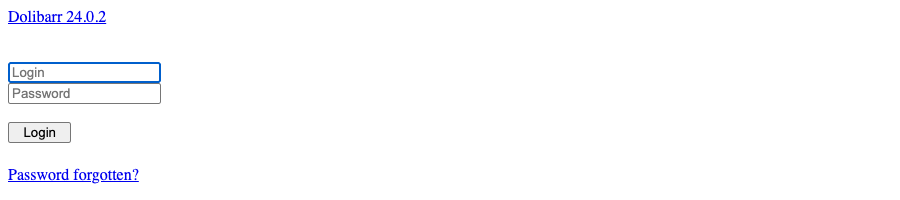
Put in $dolibarr_main_url_root the exact address you type to open Dolibarr, without a trailing
slash. With a simple domain name change and no subfolder we saw no display problem, but update it
anyway.
Scheduled jobs show the error, not the browser
If the site works but the message arrives by email or in the cron log, it is often a matter of
account. We made conf.php readable only by its owner root: run under the web server account
(www-data), cron_run_jobs.php printed “can’t be unknown”; run as root, it worked. Run the job
under the account that can read conf.php, usually the web server’s (see the cron line in the guide
Install Dolibarr on Ubuntu or Debian).
Still stuck?
If the message persists after these checks, or if you have no copy of the old conf.php, the €90
diagnosis is precisely about looking at your instance with you for an
hour, then giving you in writing the cause and what fixing it would cost.