
Margin per day
margeparjour · v1.0.0
You see what a working day brings in before you accept the quote.
dolixdernierprix · version 1.0.0
You pick a product on a proposal, order or invoice: the last price and discount granted to that customer are shown, and applied in one click.
€59 excl. VAT.
Ordering, payment, invoicing and download are handled by the DoliStore.
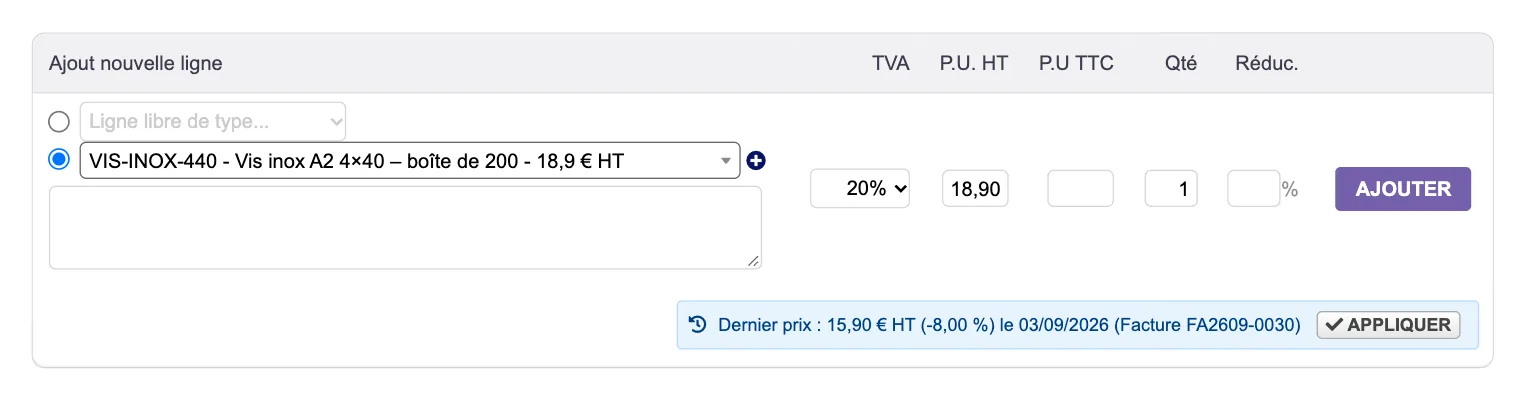
In B2B, prices are negotiated customer by customer. When you add a product to a proposal, order or invoice, Dolibarr suggests the catalogue price, or a customer price entered by hand: it does not show the price you charged that customer last time. To find it, you have to leave the form and reopen their past documents.
In B2B, prices are negotiated customer by customer. When you add a product to a proposal, order or invoice, Dolibarr suggests the catalogue price, or a customer price you entered by hand. It does not show the price you charged that customer last time.
To find it, you have to leave the form, reopen the customer’s past invoices, note the unit price and the discount, then come back and type them in.
Who it is for: Businesses that sell to professionals at prices negotiated customer by customer, and often enter the same products for the same customers.
This section appears on all 21 module pages, without exception.
On a draft customer proposal, order or invoice, as soon as you choose a product or service in the add-line form, the module looks for the last sale of that item to that customer. If it finds one, a badge appears below the line:
“Dernier prix : 15,90 € HT (-8,00 %) le 03/09/2026 (Facture FA2609-0030)”
The badge gives the unit price excl. VAT, the line discount, the date and the reference of the source document. The interface is in French, English or Spanish, depending on your Dolibarr language.
One click copies the unit price excl. VAT into the current line, and the percentage discount if the copy option is ticked. The VAT rate is not copied: the line keeps the one Dolibarr suggests today. You then add the line as usual.
In the settings, automatic mode copies the last price as soon as the product is chosen, without a click. Dolibarr still enforces the product’s minimum price. By default, the module is in suggestion mode: it shows the badge, and you decide.
It is the one on the most recent line for this customer and product, by document date, among the types chosen in the settings: invoices, orders, proposals.
The tabs only show validated documents. The document type and maximum age settings only apply to the badge and automatic mode.
The screenshots show the French interface.
The add-line form of a draft proposal. The product “VIS-INOX-440” (stainless screws, box of 200) is chosen: Dolibarr suggests its catalogue price, €18.90. Below the line, the badge says this customer paid €15.90 excl. VAT with an 8% discount on 03/09/2026, on invoice FA2609-0030. The “Appliquer” (Apply) button is to the right of the badge.
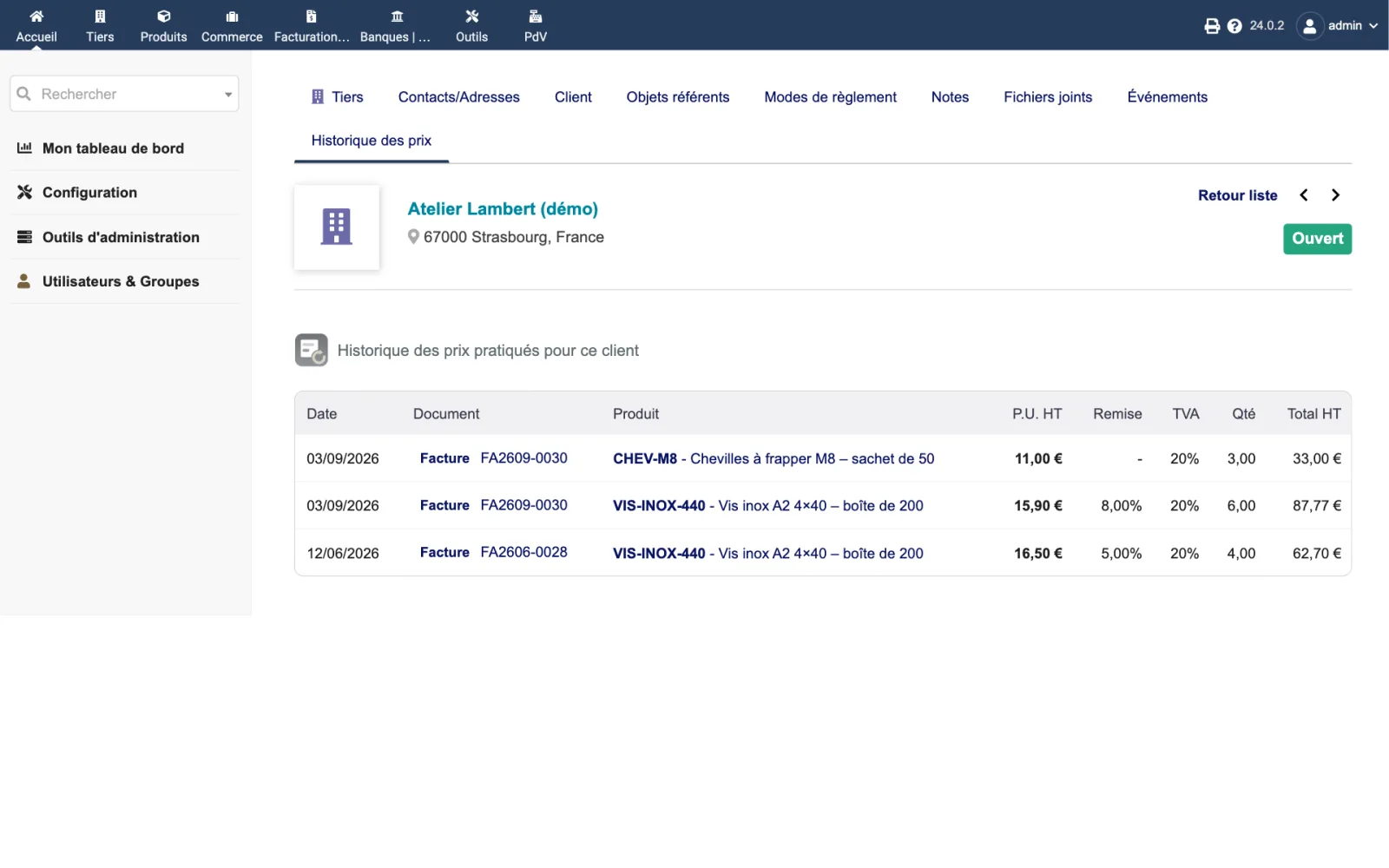
The “Historique des prix” (Price history) tab of the demo customer Atelier Lambert, on Dolibarr 24.0.2: three lines, two from invoice FA2609-0030 of 03/09/2026 and one from invoice FA2606-0028 of 12/06/2026. The screw price went from €16.50 (5% discount) to €15.90 (8% discount).
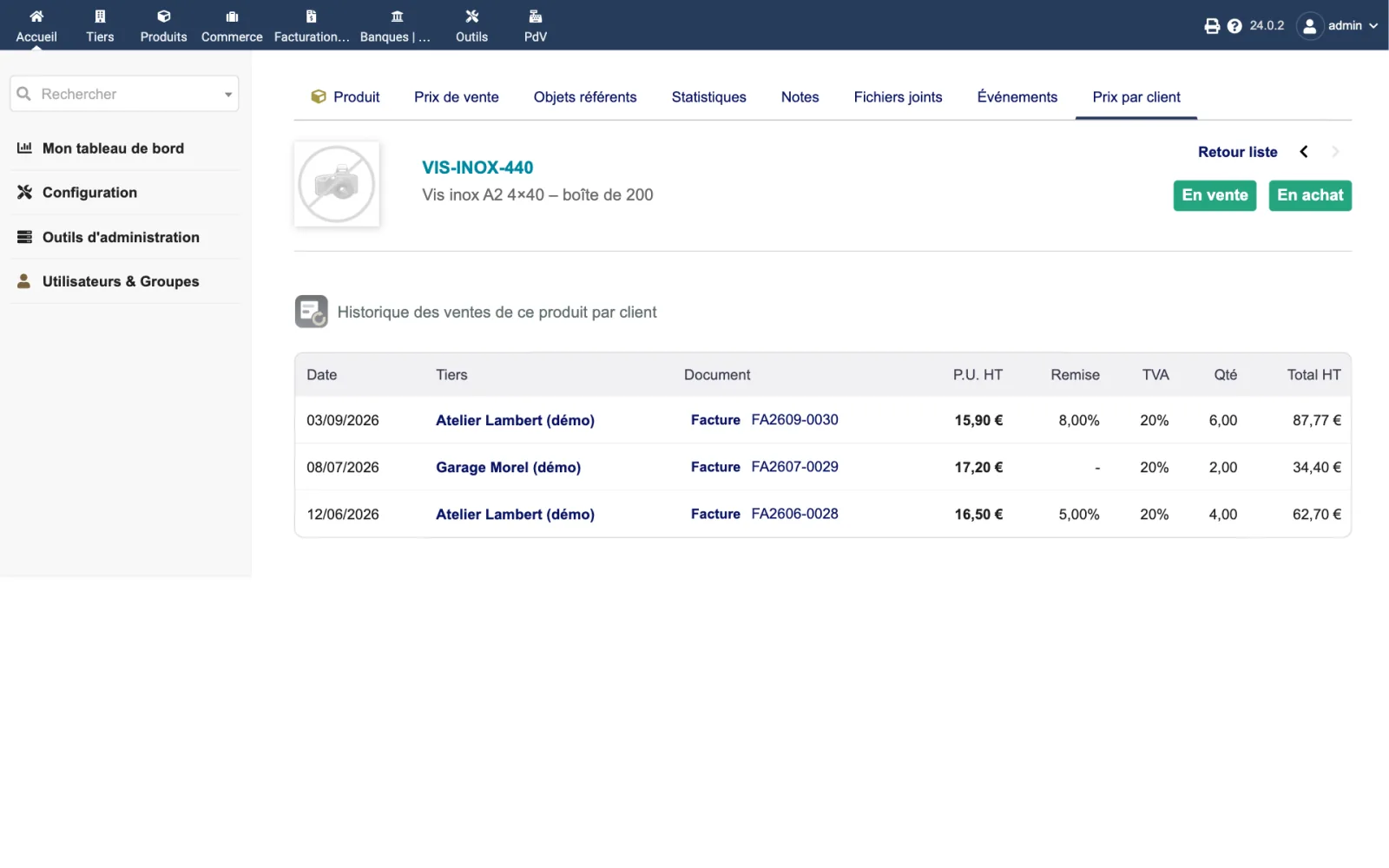
The “Prix par client” (Prices by customer) tab of the product VIS-INOX-440: three sales to two demo customers, at €15.90 (−8%), €17.20 and €16.50 (−5%), each with a link to its invoice.
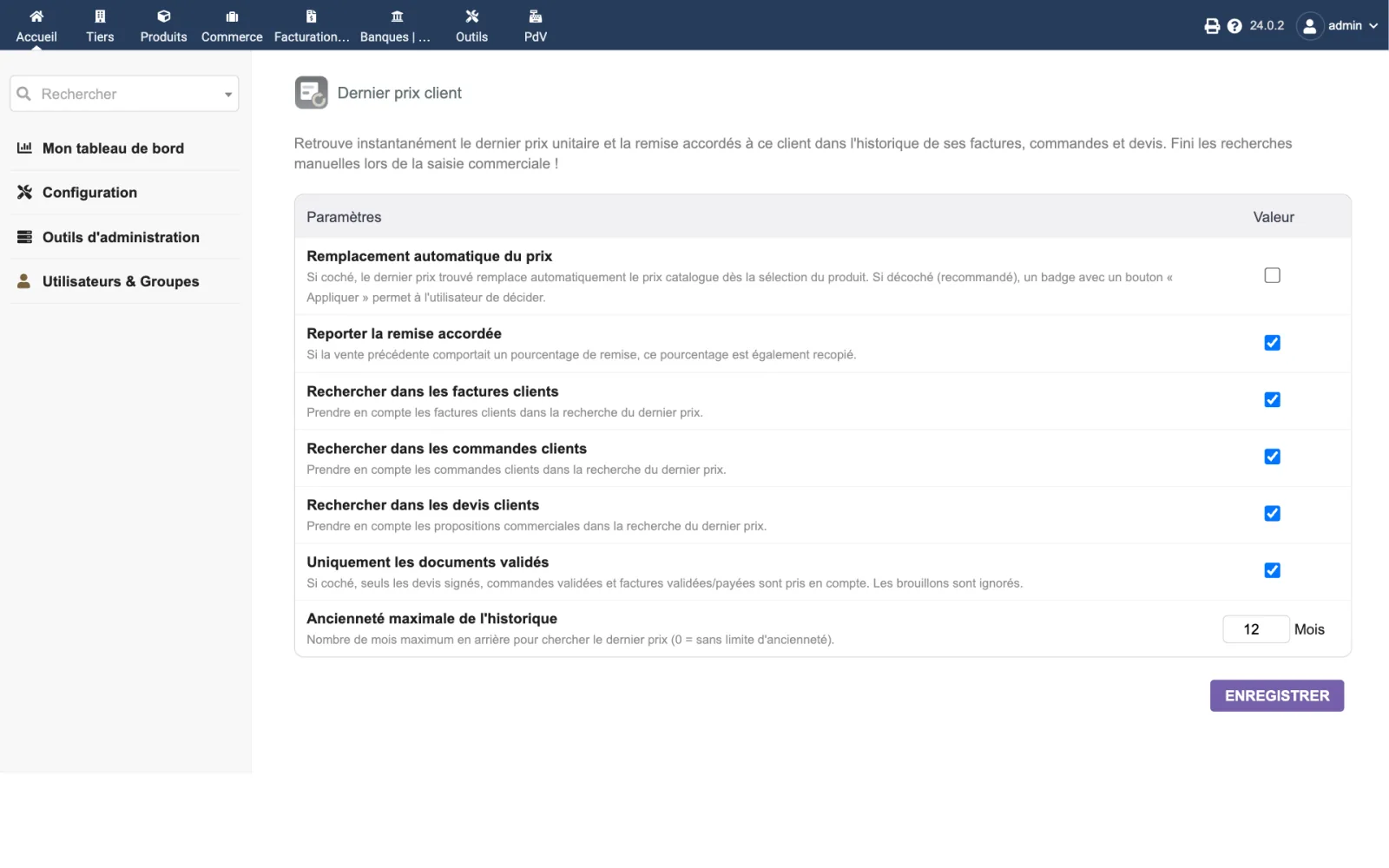
The setup page is reserved for administrators.
| Setting | Default | Effect |
|---|---|---|
| Automatic price replacement | no | Ticked, the last price is copied as soon as the product is chosen. Unticked (recommended), the badge and the “Apply” button leave the choice to you. |
| Copy previous line discount | yes | The discount percentage of the source line is copied with the price. |
| Search customer invoices | yes | Invoices are searched for the badge. |
| Search customer orders | yes | Orders are searched for the badge. |
| Search commercial proposals | yes | Proposals are searched for the badge. |
| Validated documents only | yes | Drafts are ignored. Unticked, every status counts except cancelled orders; credit notes and down payment invoices stay excluded. |
| Maximum history age | 0 | In months. 0: no limit. |
In the screenshot, the maximum age was set to 12 months; it is 0 by default.
| Database tables created | No table. The module reads the lines of customer invoices, orders and proposals; it writes nothing into these documents. Its settings are stored as Dolibarr constants: DOLIXDERNIERPRIX_SEARCH_INVOICES, DOLIXDERNIERPRIX_SEARCH_ORDERS, DOLIXDERNIERPRIX_SEARCH_PROPALS, DOLIXDERNIERPRIX_ONLY_VALIDATED, DOLIXDERNIERPRIX_AUTO_APPLY, DOLIXDERNIERPRIX_COPY_DISCOUNT and DOLIXDERNIERPRIX_MAX_AGE_MONTHS. |
|---|---|
| Permissions | One permission: “View and apply last customer price”. It opens the badge and both tabs. Dolibarr permissions apply on top: only the document types the user may read (invoices, orders, proposals) are searched, and only for customers the user may see. A sales representative without the permission to see all customers only sees their own customers; an external user, only their company. The product card tab also requires the permission to read products or services. The setup page is reserved for administrators. |
| Uninstalling |
|
The dolixdernierprix folder, in readable PHP, under the GPL v3 or later licence: the module
descriptor, the badge hooks, the search class, the badge endpoint, the two tabs, the setup page and
the icons.
fr_FR), English (en_US) and Spanish (es_ES).README.md and a ChangeLog.md.DOLIXDERNIERPRIX_…).The module descriptor only declares a minimum version. No upper bound is written in the code: the versions below are those on which the module has actually been run.
| Dolibarr versions | Dolibarr 19.0 minimum. Installed and run on 19.0.4 and 24.0.2; versions 20 to 23 not tested. |
|---|---|
| Minimum PHP | 7.4 |
| Dolibarr modules to enable | Commercial proposals, Sales Orders or Invoices |
| Licence | GPL v3 or later, full source code |
| Languages | French, English, Spanish |
| Menu | No menu entry. Badge below the add-line form of draft customer proposals, orders and invoices; “Historique des prix” (Price history) tab on the third-party card; “Prix par client” (Prices by customer) tab on the product card. |
The details — permissions on the custom folder, shared hosting, upgrades, uninstalling — are on the page Installation and upgrades.
The descriptor requires Dolibarr 19.0 minimum and PHP 7.4 minimum. The module has been installed and run on 19.0.4 and 24.0.2, under PHP 8.2. Versions 20 to 23 have not been tested: if you are on one of them, or have any doubt, write before buying.
No. It reads the lines of your invoices, orders and proposals. The “Appliquer” (Apply) button only fills in the fields of the line being entered: you are the one who adds it to the document. No table is created, no Dolibarr file is modified.
The most recent line for this customer and product, by document date, among the types chosen in the settings. By default only validated documents count: invoices validated or paid, orders validated, in progress or delivered, proposals validated, signed or billed. Credit notes, down payment invoices and the document being entered are ignored. The price shown is the line's unit price excl. VAT; its discount is shown separately.
The VAT rate of the old document is not copied: the line keeps the rate Dolibarr suggests today for this product and customer. The history tabs show the rate of each past line.
The badge and the tabs follow Dolibarr permissions. Only the document types they may read are searched, and only for customers they may see: without the permission to see all customers, their own customers; for an external user, their company.
The badge and both tabs disappear. The module wrote nothing into your documents: there is nothing to restore. The module's settings remain stored.
Support is provided by the person who wrote the module, at support@dolix.fr. Ordering, payment, the invoice and the download are handled by the DoliStore, where new versions are published.
Taken from the module’s ChangeLog.md file: a single source.
1.0.018 October 2026
First version: last-price badge on customer proposals, orders and invoices, “Apply” button, optional automatic mode, “Price history” tab on the third-party card and “Prices by customer” tab on the product card. Settings for the documents searched, validated documents only, maximum age and copying the discount. Credit notes and down payment invoices ignored. Interface in French, English and Spanish.
Write to support@dolix.fr. The person who wrote the module is the one who replies.
Reply within two working days. This is not an on-call service.
To include in your message
This module is on sale on the DoliStore.
Ordering, payment, invoicing and download are handled by the DoliStore.
margeparjour · v1.0.0
You see what a working day brings in before you accept the quote.

dolixdomaine · v1.0.5
A customer changes its name: its addresses move to the new domain in a single operation.

dolixmasse · v1.0.5
You change a field across a series of records without writing an SQL query.
dolixtaches · v1.0.3
A task was created in the wrong project: you move it, with its subtasks, its time spent and its documents.

dolixdoublons · v1.1.5
You find records entered twice and merge them: third parties, contacts and members.

dolixprix · v1.1.2
Your draft quotes and template invoices pick up the catalogue prices, one by one or all at once.

dolixapproche · v1.0.2
You spread freight, customs and the other costs of a shipment over the cost of products and their weighted average price.

dolixresteafacturer · v1.0.1
You see what remains to be invoiced on each customer order, line by line, in quantity and in amount excluding tax.

dolixmaj · v1.0.2
Before upgrading Dolibarr, you know what will block, what will break and what to do first. The module changes nothing.

dolixtva · v1.0.0
The mandatory VAT statement is printed on your invoices by itself: small business exemption, intra-Community supply, reverse charge, export.

dolixjustif · v1.0.0
The expense report PDF also contains its receipts, photos and PDFs, page by page: one single document to hand over.

dolixportemonnaie · v1.0.2
Your customers or members pay an amount in advance, and TakePOS spends it at each visit to the till, until it runs out.

dolixmondialrelay · v1.0.0
You choose the recipient's Point Relais® or Locker on the shipment, and the module creates the Mondial Relay label with your Sendcloud account.

dolixdlc · v1.0.0
You see in time the lots in stock whose sell-by or eat-by date is near or past, and you can prevent the validation of a shipment that contains a lot past its sell-by date.

dolixhabillage · v0.3.0
Make TakePOS look like a modern till: category tabs, large product grid, basket on the right, Charge button, trade looks or your logo colours.
dolixtags · v1.0.0
The tags of your proposals, orders, invoices, third parties, contacts, products and projects are shown in colour in a column of the list, without opening each card.
dolixcotisations · v1.0.0
A membership fee for each member, and all subscriptions renewed at once, with invoice, payment and email.
dolixconsignes · v1.0.1
You see how many returnable kegs, crates or pallets each customer holds, what those deposits are worth, and which ones have not come back in time.

dolixdepotvente · v1.0.2
For each consignor, you see what was sold and your commission, and the statement prepares the invoices as drafts.
dolixblgroupe · v1.0.1
One single PDF delivery note for several shipments of the same customer, signed only once.