
Margin per day
margeparjour · v1.0.0
You see what a working day brings in before you accept the quote.
dolixcotisations · version 1.0.0
A membership fee for each member, and all subscriptions renewed at once, with invoice, payment and email.
€29 excl. VAT.
Ordering, payment, invoicing and download are handled by the DoliStore.
In Dolibarr, the amount suggested for a subscription is the member type's amount, and subscriptions have to be renewed one member card after another.
In Dolibarr, the amount suggested for a subscription is the member type’s amount. An association where everyone pays a different amount — reduced rate, free contribution, supporting fee — has to correct it by hand every time, or create one type per amount.
And renewing everyone’s subscription means opening each member card. The mass action that creates subscriptions in Dolibarr 24 applies a single amount to the whole selection, with no invoice, no payment, no bank entry and no email.
Who it is for: Associations, clubs and societies that manage their members in Dolibarr and whose members do not all pay the same amount: reduced rate, free contribution, supporting fee.
This section appears on all 21 module pages, without exception.
The module adds a “Custom membership fee” field to the member card. Dolibarr’s “New subscription” form then suggests this amount instead of the type’s amount.
With no custom amount, the form suggests the amount of the member’s last subscription (setting enabled by default), otherwise the amount of their type.
The Members“Bulk renewal” menu opens the renewal page. You can also reach it from the member list, with the “Renew memberships (each member’s amount)” mass action.
A summary (number of subscriptions, total, action) asks for confirmation. Then a report lists, member by member, the subscription and invoice created, with their links, and the email status.
The module records each subscription and its complementary actions with Dolibarr’s own functions, those of the native form. Numbering, VAT, the subscription product and the invoice PDF follow your setup.
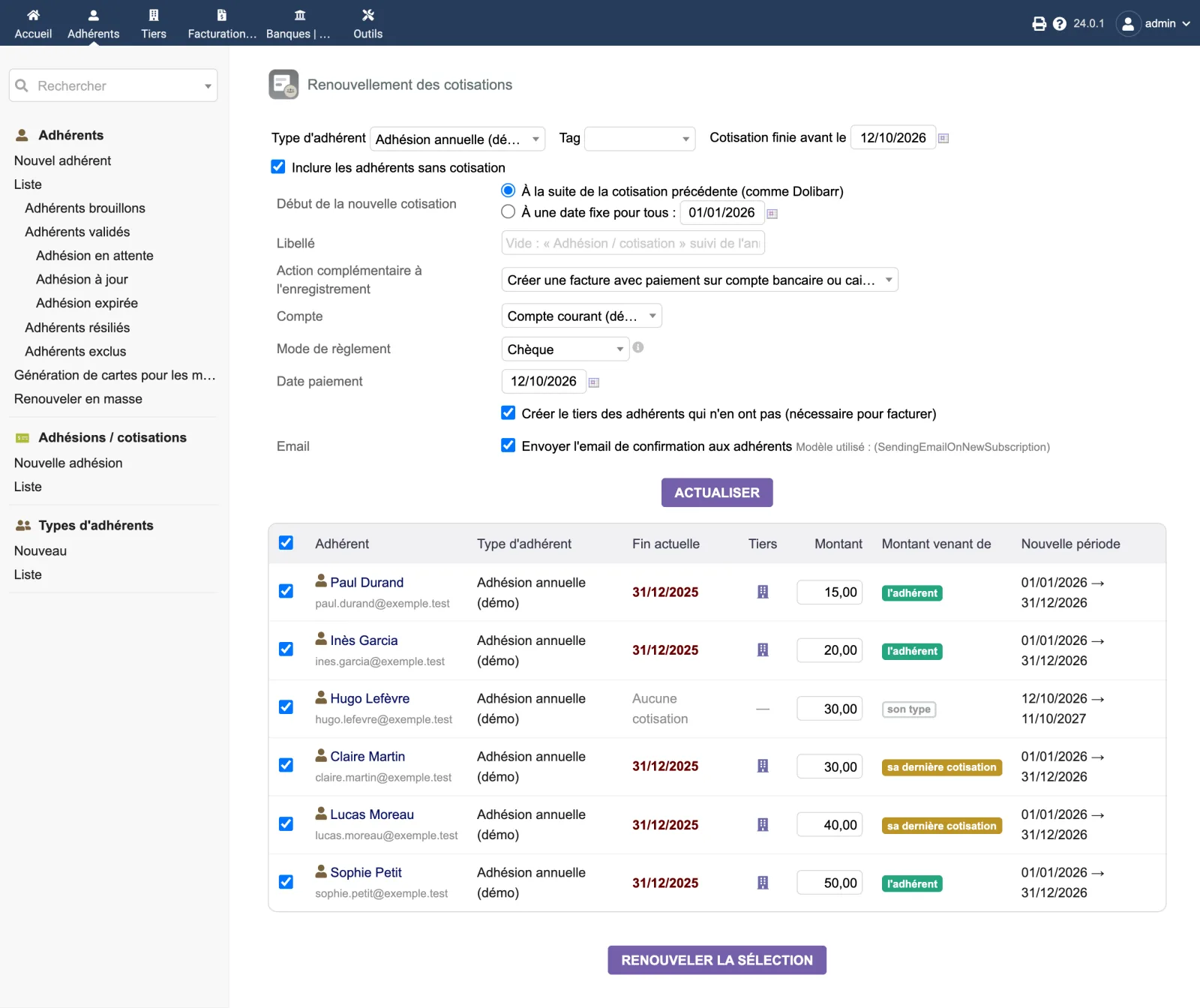
The “Renouvellement des cotisations” (Membership renewal) page, on Dolibarr 24.0.1: filters and options at the top, complementary action “invoice with payment”, confirmation email ticked. Six members, each with their own amount, from 15.00 to 50.00: three amounts come from the member (“l’adhérent”), two from their last subscription (“sa dernière cotisation”), one from their type (“son type”). The member without a subscription starts on 12/10/2026; the others resume on 01/01/2026, after their subscription ended on 31/12/2025.
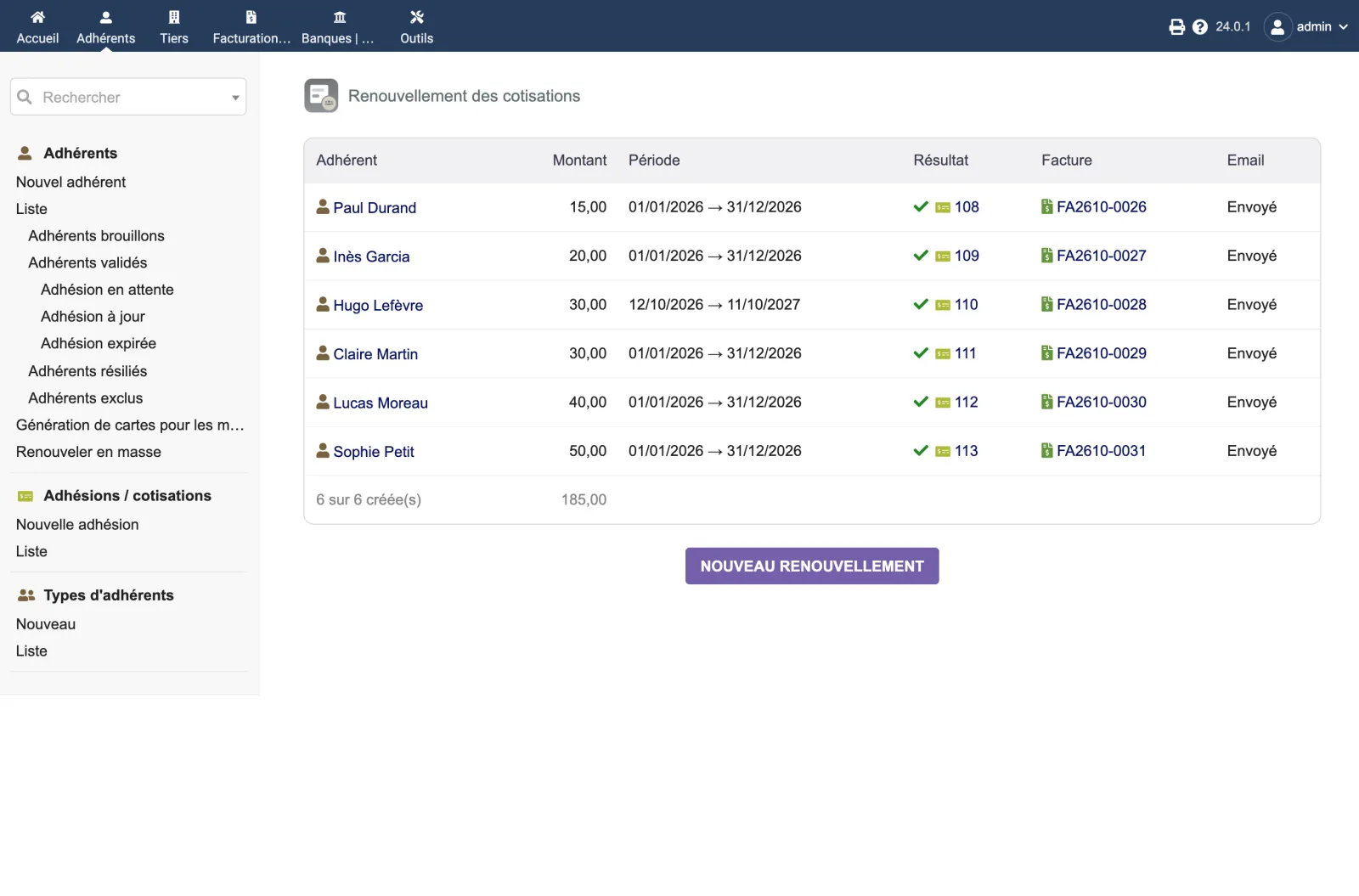
The report after confirmation: “6 sur 6 créée(s)” (6 of 6 created), 185.00 in total. For each member, the subscription created, its invoice (FA2610-0026 to FA2610-0031) and the email marked “Envoyé” (sent).
The module’s setup page is reserved for administrators.
| Setting | Default | Effect |
|---|---|---|
| Suggest the last subscription amount | enabled | With no custom amount, suggests the member’s last subscription amount instead of their type’s amount. |
The other settings are those of the Members module, applied as they are: confirmation email template, product used on invoices, subscription VAT, start forced to the first day, end on 31 December. The setup page recalls them, with a link to the Members module setup.
| Database tables created | No table. The module folder has no sql/ directory. On activation, the module adds a complementary field to members, “Custom membership fee” (code dolixcot_amount), and stores one setting, DOLIXCOT_USE_LAST_AMOUNT. The subscriptions, bank entries, invoices and payments created are ordinary Dolibarr objects. |
|---|---|
| Permissions | Two permissions: “See the membership renewal page” and “Renew memberships in bulk”. The first opens the page and the mass action of the member list; without the second, the page is shown without a button. To renew, the user also needs the Dolibarr permission to create subscriptions. The page shows validated members with their email: grant the first permission only to people who can already see members. The setup page is reserved for administrators. |
| Uninstalling |
|
dolixcotisations, to drop into htdocs/custom/ or to install from the zip.fr_FR), English (en_US) and German (de_DE).README.md and a version history (ChangeLog.md) in the module folder.dolixcot_amount), and stores one setting, DOLIXCOT_USE_LAST_AMOUNT.The module descriptor only declares a minimum version. No upper bound is written in the code: the versions below are those on which the module has actually been run.
| Dolibarr versions | Dolibarr 19.0 minimum. Installed and run on 19.0.4, 20.0.4, 21.0.4, 22.0.5, 23.0.4 and 24.0.1. |
|---|---|
| Minimum PHP | 7.4 |
| Dolibarr modules to enable | Members |
| Licence | GPL v3 or later, full source code |
| Languages | French, English, German |
| Menu | Members menu“Bulk renewal”. “Renew memberships (each member's amount)” mass action on the member list. “Custom membership fee” field on the member card. |
The details — permissions on the custom folder, shared hosting, upgrades, uninstalling — are on the page Installation and upgrades.
The descriptor requires Dolibarr 19.0 minimum and PHP 7.4 minimum. The module's integration test has been run on 19.0.4, 20.0.4, 21.0.4, 22.0.5, 23.0.4 and 24.0.1 with MariaDB, and from the zip on a fresh 24.0.1. The interface has been used in a browser on 24.0.1. If you have any doubt, write before buying.
It creates no table. It adds one complementary field to members, “Custom membership fee”. Everything else goes through Dolibarr's own functions: subscription, bank entry, invoice, payment. No Dolibarr file is modified.
From the custom amount on their card, if it is filled in. Otherwise, from the amount of their last subscription, if the setting is enabled (it is by default). Otherwise, from the amount of their type. The page shows where each amount comes from, and you can change it line by line before confirming.
Nothing is recorded for that member: no subscription, no invoice. The report shows the error, and the other members of the selection are processed normally.
A renewal runs only once: a double click or the browser's back button is refused, and nothing is done again. A member already covered until the end of the proposed period is skipped.
The page, the menu entry and the mass action disappear, and the subscription form suggests the type's amount again. The “Custom membership fee” field and the amounts entered stay in the database, hidden while the module is disabled. The subscriptions, invoices and payments created remain in your database.
Support is provided by the person who wrote the module, at support@dolix.fr. Ordering, payment, the invoice and the download are handled by the DoliStore, where new versions are published.
Taken from the module’s ChangeLog.md file: a single source.
1.0.012 October 2026
First version: “Custom membership fee” field on the member card, suggested by the native subscription form (otherwise the last subscription amount, as an option, otherwise the type's amount). Bulk renewal by type, tag, expiry or no subscription, or from the member list; amount editable line by line; start after the previous subscription or on a fixed date. Bank entry, invoice or invoice with payment; optional third-party creation; confirmation email with the invoice attached. All or nothing per member, up-to-date members skipped, single run. Interface in French, English and German.
Write to support@dolix.fr. The person who wrote the module is the one who replies.
Reply within two working days. This is not an on-call service.
To include in your message
This module is on sale on the DoliStore.
Ordering, payment, invoicing and download are handled by the DoliStore.
margeparjour · v1.0.0
You see what a working day brings in before you accept the quote.

dolixdomaine · v1.0.5
A customer changes its name: its addresses move to the new domain in a single operation.

dolixmasse · v1.0.5
You change a field across a series of records without writing an SQL query.

dolixtaches · v1.0.3
A task was created in the wrong project: you move it, with its subtasks, its time spent and its documents.

dolixdoublons · v1.1.5
You find records entered twice and merge them: third parties, contacts and members.

dolixprix · v1.1.2
Your draft quotes and template invoices pick up the catalogue prices, one by one or all at once.

dolixapproche · v1.0.2
You spread freight, customs and the other costs of a shipment over the cost of products and their weighted average price.

dolixresteafacturer · v1.0.1
You see what remains to be invoiced on each customer order, line by line, in quantity and in amount excluding tax.

dolixmaj · v1.0.2
Before upgrading Dolibarr, you know what will block, what will break and what to do first. The module changes nothing.

dolixtva · v1.0.0
The mandatory VAT statement is printed on your invoices by itself: small business exemption, intra-Community supply, reverse charge, export.

dolixjustif · v1.0.0
The expense report PDF also contains its receipts, photos and PDFs, page by page: one single document to hand over.

dolixportemonnaie · v1.0.2
Your customers or members pay an amount in advance, and TakePOS spends it at each visit to the till, until it runs out.

dolixmondialrelay · v1.0.0
You choose the recipient's Point Relais® or Locker on the shipment, and the module creates the Mondial Relay label with your Sendcloud account.

dolixdlc · v1.0.0
You see in time the lots in stock whose sell-by or eat-by date is near or past, and you can prevent the validation of a shipment that contains a lot past its sell-by date.

dolixhabillage · v0.3.0
Make TakePOS look like a modern till: category tabs, large product grid, basket on the right, Charge button, trade looks or your logo colours.
dolixtags · v1.0.0
The tags of your proposals, orders, invoices, third parties, contacts, products and projects are shown in colour in a column of the list, without opening each card.
dolixconsignes · v1.0.1
You see how many returnable kegs, crates or pallets each customer holds, what those deposits are worth, and which ones have not come back in time.

dolixdepotvente · v1.0.2
For each consignor, you see what was sold and your commission, and the statement prepares the invoices as drafts.

dolixblgroupe · v1.0.1
One single PDF delivery note for several shipments of the same customer, signed only once.
dolixdernierprix · v1.0.0
You pick a product on a proposal, order or invoice: the last price and discount granted to that customer are shown, and applied in one click.