
Margin per day
margeparjour · v1.0.0
You see what a working day brings in before you accept the quote.
dolixconsignes · version 1.0.1
You see how many returnable kegs, crates or pallets each customer holds, what those deposits are worth, and which ones have not come back in time.
€59 excl. VAT.
Ordering, payment, invoicing and download are handled by the DoliStore.
A brewery, a drinks wholesaler or a supplier delivering on pallets charges a deposit and refunds it when the packaging comes back. Dolibarr invoices and refunds, but does not tell how much packaging each customer still holds, nor since when.
A brewery, a drinks wholesaler or a supplier delivering on pallets charges a deposit with its products, and refunds it when the packaging comes back.
Dolibarr invoices and refunds without any trouble, but does not tell how much packaging each customer still holds, nor since when.
Who it is for: Breweries, drinks wholesalers, suppliers delivering on pallets, and any business that charges a deposit on kegs, crates, bottles or pallets and refunds it on return.
This section appears on all 21 module pages, without exception.
The module keeps a register of returnable packaging per customer, from your customer invoices and credit notes. There is no double entry: you invoice and refund the deposit as usual.
Two fields are added to the product card:
Returns settle the oldest deliveries first. Packaging is overdue when it has been at the customer for longer than its return delay. With a delay of 0, nothing is flagged as overdue.
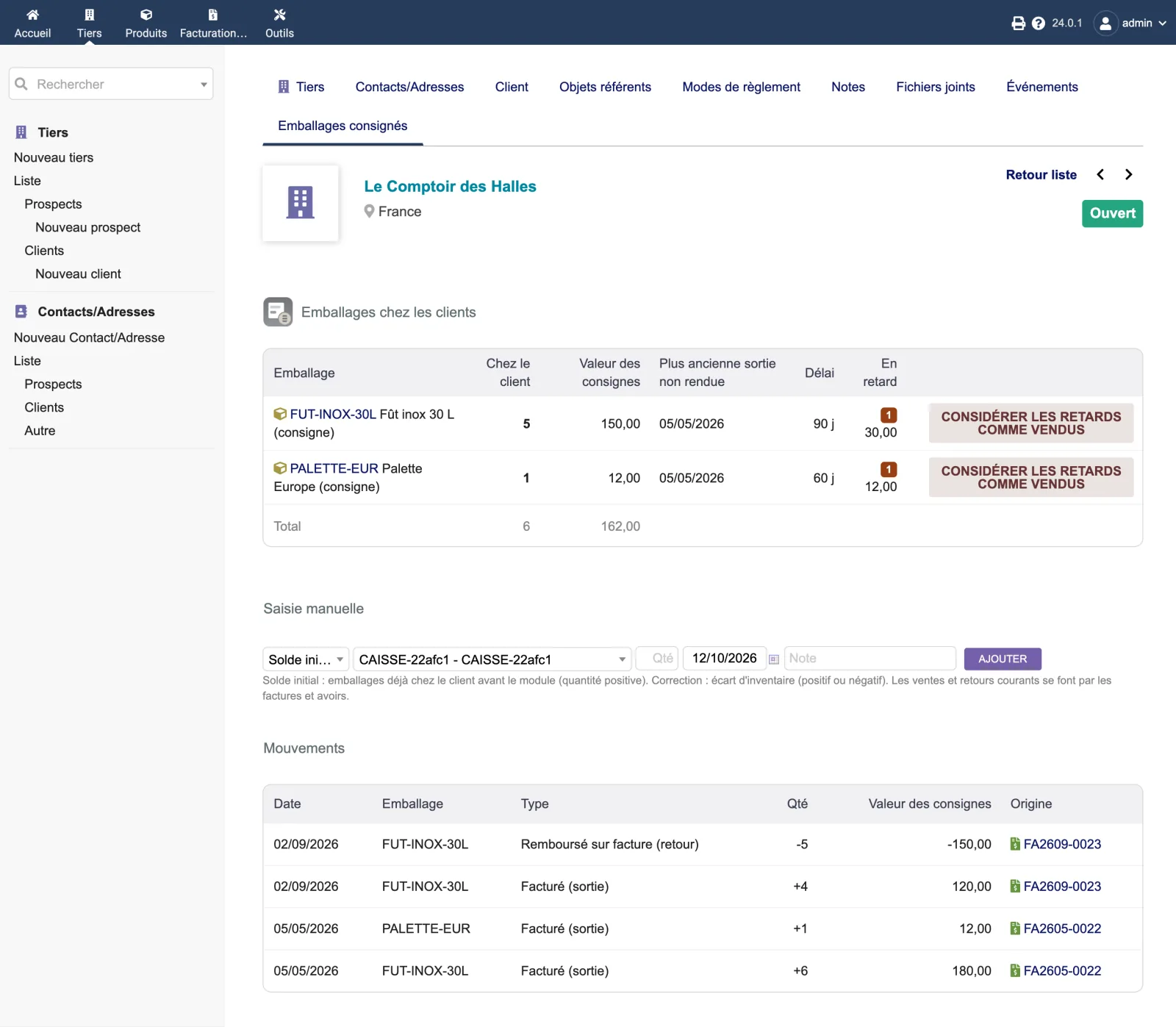
The “Returnable packaging” tab of the third-party card shows, for each packaging: the quantity at the customer, the deposit value, the oldest unreturned delivery, the delay and the overdue quantity. Below, the history of movements, with a link to each invoice. A negative balance — more packaging returned than invoiced — is flagged with a warning.
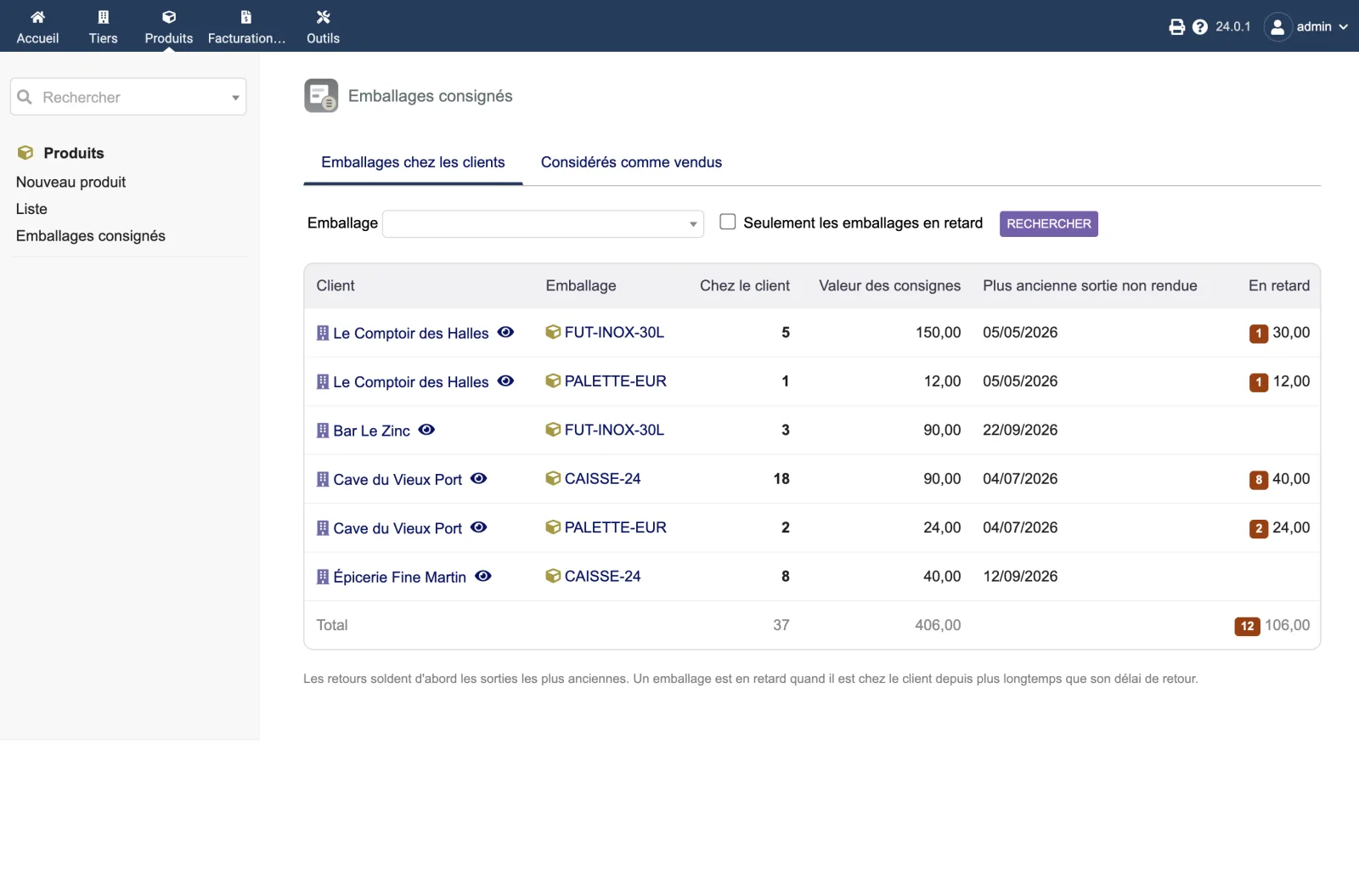
In the ProductsReturnable packaging menu: all customers holding packaging, a filter by packaging, the “Overdue packaging only” checkbox and a total line.
On the customer’s tab:
A product not marked “Returnable packaging” is refused. Everyday sales and returns go through invoices and credit notes.
The “Consider overdue as sold” button, after confirmation, takes the overdue packaging out of the customer’s balance and records it in the “Considered as sold” report: date, customer, packaging, quantity, value, note, over the chosen period. This report is meant for the accountant.
No invoice is created: the customer has already paid the deposit. It is an accounting entry to be made.
The module sets no rate: it uses the one you choose on the packaging product.
Under French tax guidance (BOFiP BOI-TVA-SECT-90-30 §§ 30-40, CGI art. 267 III), the deposit may be excluded from the VAT base if VAT is not invoiced and the packaging is returned within the usual delay of the trade; after that delay, unreturned packaging is considered sold at the deposit price. Check with your accountant.
The overview, on Dolibarr 24.0.1: six customer and packaging lines. Le Comptoir des Halles holds 5 FUT-INOX-30L kegs (150.00 in deposits), 1 of them overdue; Cave du Vieux Port, 18 crates, 8 of them overdue. Total: 37 items of packaging, 406.00, of which 12 overdue for 106.00.
The “Emballages consignés” tab of Le Comptoir des Halles: 5 kegs (90-day delay) and 1 pallet (60-day delay), each with 1 overdue item and the “Consider overdue as sold” button. Below, manual entry, then the movements: 6 kegs and 1 pallet invoiced on 05/05/2026 on FA2605-0022, 4 kegs invoiced and 5 refunded on 02/09/2026 on FA2609-0023.
The module’s setup page is reserved for administrators.
| Setting | Default | Effect |
|---|---|---|
| Default return delay | 0: no overdue flag | Used for packaging with no delay of its own. |
The same page recalls the three set-up steps, carries the “Rebuild the register from invoices” button and the VAT reminder. The rebuild rereads all validated invoices and credit notes containing returnable packaging and recreates their movements. Opening balances, corrections and packaging considered as sold are kept.
| Database tables created | One table: llx_dolixconsignes_mvt. It keeps one row per packaging movement: customer, packaging product, signed quantity (+ at the customer, − returned or considered as sold), deposit value, type (invoice, credit note, opening balance, correction, considered as sold), date, source invoice and line, note, user, entity. Two fields are added to products (dolixcons_consigne and dolixcons_delai), and the default return delay is stored as a Dolibarr constant: DOLIXCONS_DEFAULT_DELAY. |
|---|---|
| Permissions | Two permissions, not granted by default: “See returnable packaging” opens the menu, the overview, the “Considered as sold” report and the third-party tab; “Enter movements and settle unreturned packaging” shows manual entry and the “Consider overdue as sold” button. The tab also applies Dolibarr's access check on the third party. The overview and the report only show the customers the user can see in Dolibarr: a sales representative without the permission to see all third parties only sees their own customers. The setup page is reserved for administrators. |
| Uninstalling |
|
The dolixconsignes folder, in readable PHP, under the GPL v3 or later licence: the module
descriptor, the invoice trigger, the register class, the third-party tab, the overview, the setup
page, the table schema, the icons.
fr_FR), English (en_US) and German (de_DE).README.md describing how it works, VAT and limits.ChangeLog.md.llx_dolixconsignes_mvt. One row per movement: customer, packaging
product, signed quantity (+ at the customer, − returned or considered as sold), deposit value,
type, date, source invoice and line, note, user, entity.dolixcons_consigne and dolixcons_delai.DOLIXCONS_DEFAULT_DELAY.The module descriptor only declares a minimum version. No upper bound is written in the code: the versions below are those on which the module has actually been run.
| Dolibarr versions | Dolibarr 19.0 minimum. Installed and run on 19.0.4, 20.0.4, 21.0.4, 22.0.5, 23.0.4, 24.0.1 and 24.0.2. |
|---|---|
| Minimum PHP | 7.4 |
| Dolibarr modules to enable | Third Parties, Products, Invoices |
| Licence | GPL v3 or later, full source code |
| Languages | French, English, German |
| Menu | Products menu“Returnable packaging”: “Packaging at customers” overview and “Considered as sold” report. “Returnable packaging” tab on the third-party card. |
The details — permissions on the custom folder, shared hosting, upgrades, uninstalling — are on the page Installation and upgrades.
The descriptor requires Dolibarr 19.0 minimum and PHP 7.4 minimum. Version 1.0.1 has been installed from its zip and its integration test (34 checks) passes on 19.0.4, 20.0.4, 21.0.4, 22.0.5, 23.0.4, 24.0.1 and 24.0.2; the interface has been used in a browser on version 24. If you are on another version and have any doubt, write before buying.
No. It reads customer invoices and credit notes when they are validated and records the packaging in its own table. It creates no invoice, modifies no line and makes no stock movement.
As usual in Dolibarr: with a negative line, in quantity or in price, using the packaging product, on the customer's next invoice, or with a credit note. On validation, the packaging is counted as returned. The module's manual entry is for the opening balance and stock-count corrections, not for everyday returns.
If the deposits were invoiced in Dolibarr with a packaging product, tick “Returnable packaging” on that product, then run “Rebuild the register from invoices” on the setup page. Otherwise, enter an “Opening balance” on each customer's tab, with the delivery date if you know it: that date is what counts for overdue packaging.
Once its delay has passed, it shows as “Overdue” in the customer's tab and in the overview. The “Consider overdue as sold” button, after confirmation, takes it out of the customer's balance and records it in the “Considered as sold” report, meant for your accountant. No invoice is created: the customer has already paid the deposit. The accounting entry still has to be made.
The module sets no rate: it uses the one you choose on the packaging product. Under French tax guidance (BOFiP BOI-TVA-SECT-90-30 §§ 30-40, CGI art. 267 III), the deposit may be excluded from the VAT base if VAT is not invoiced and the packaging is returned within the usual delay of the trade; after that delay, unreturned packaging is considered sold at the deposit price. Check with your accountant.
The menu and the tab disappear. The movement register and the two product fields remain in your database. Your invoices were not modified by the module: there is nothing to restore.
Support is provided by the person who wrote the module, at support@dolix.fr. Ordering, payment, the invoice and the download are handled by the DoliStore, where new versions are published.
Taken from the module’s ChangeLog.md file: a single source.
1.0.125 October 2026
Dolibarr permissions respected: the overview and the “Considered as sold” report now only show the customers the user can see in Dolibarr (sales representative without the permission to see all third parties: their own customers; external user: their company). The customer tab already applied this check. Tested on 19.0.4 to 24.0.2.
1.0.012 October 2026
First version: “Returnable packaging” and “Return delay” fields on products. Register per customer fed by validated invoices and credit notes (deliveries, returns through a negative line or a credit note); follows invoices set back to draft, deleted or replaced; down payments ignored. Tab on the customer card and overview: balances, deposit value, age (first out, first returned), overdue packaging. Manual entry (opening balance, correction), register rebuild from invoices. Settlement of unreturned packaging (“considered as sold”) and report for the accountant. Interface in French, English and German.
Write to support@dolix.fr. The person who wrote the module is the one who replies.
Reply within two working days. This is not an on-call service.
To include in your message
This module is on sale on the DoliStore.
Ordering, payment, invoicing and download are handled by the DoliStore.
margeparjour · v1.0.0
You see what a working day brings in before you accept the quote.

dolixdomaine · v1.0.5
A customer changes its name: its addresses move to the new domain in a single operation.

dolixmasse · v1.0.5
You change a field across a series of records without writing an SQL query.

dolixtaches · v1.0.3
A task was created in the wrong project: you move it, with its subtasks, its time spent and its documents.

dolixdoublons · v1.1.5
You find records entered twice and merge them: third parties, contacts and members.

dolixprix · v1.1.2
Your draft quotes and template invoices pick up the catalogue prices, one by one or all at once.

dolixapproche · v1.0.2
You spread freight, customs and the other costs of a shipment over the cost of products and their weighted average price.

dolixresteafacturer · v1.0.1
You see what remains to be invoiced on each customer order, line by line, in quantity and in amount excluding tax.

dolixmaj · v1.0.2
Before upgrading Dolibarr, you know what will block, what will break and what to do first. The module changes nothing.

dolixtva · v1.0.0
The mandatory VAT statement is printed on your invoices by itself: small business exemption, intra-Community supply, reverse charge, export.

dolixjustif · v1.0.0
The expense report PDF also contains its receipts, photos and PDFs, page by page: one single document to hand over.

dolixportemonnaie · v1.0.2
Your customers or members pay an amount in advance, and TakePOS spends it at each visit to the till, until it runs out.

dolixmondialrelay · v1.0.0
You choose the recipient's Point Relais® or Locker on the shipment, and the module creates the Mondial Relay label with your Sendcloud account.

dolixdlc · v1.0.0
You see in time the lots in stock whose sell-by or eat-by date is near or past, and you can prevent the validation of a shipment that contains a lot past its sell-by date.

dolixhabillage · v0.3.0
Make TakePOS look like a modern till: category tabs, large product grid, basket on the right, Charge button, trade looks or your logo colours.
dolixtags · v1.0.0
The tags of your proposals, orders, invoices, third parties, contacts, products and projects are shown in colour in a column of the list, without opening each card.
dolixcotisations · v1.0.0
A membership fee for each member, and all subscriptions renewed at once, with invoice, payment and email.
dolixdepotvente · v1.0.2
For each consignor, you see what was sold and your commission, and the statement prepares the invoices as drafts.

dolixblgroupe · v1.0.1
One single PDF delivery note for several shipments of the same customer, signed only once.
dolixdernierprix · v1.0.0
You pick a product on a proposal, order or invoice: the last price and discount granted to that customer are shown, and applied in one click.