· updated
How to set up Indian GST in Dolibarr
Dolibarr already knows Indian GST: CGST and SGST for sales in your state, IGST for other states. What to switch on, how to pick the right rate on each line, where to put HSN and SAC codes so they print on the PDF, and what does not work: prices entered with tax, the 40% rate, e-invoice IRN and e-way bills. Tested on Dolibarr 24.0.2 and 23.0.4.
Want someone to look at your instance? Diagnosis, fixed price €90.
What was checked (versions, tests, code read)
Tests on 02/11/2026 on fresh Dolibarr 24.0.2 and 23.0.4 installs (official Docker images, MariaDB 11.4), driven by a browser like a user: company in Maharashtra with currency INR, second and third taxes enabled, one customer in Maharashtra and one in Karnataka, products with HSN codes, a service with a SAC code, invoices validated and their PDF (default template) read, the hidden option MAIN_SALETAX_AUTOSWITCH_I_CS_FOR_INDIA tested on four product/customer cases, a product price entered with tax, 40% rates added to the dictionary. GST law: CBIC notifications 10/2023 and 78/2020 (Central Tax) and the 56th GST Council release read. Not tested: GST returns, purchase invoices, credit notes, the accounting module, third-party modules.
Dolibarr is a free ERP used in many countries, and it already knows Indian GST: its tax dictionary has CGST + SGST rates for sales inside your state and IGST rates for sales to other states. They are just not switched on, and a few things work differently from what an Indian accountant expects.
We tested everything below on 2 November 2026, on fresh installs of Dolibarr 24.0.2 and 23.0.4 (same results on both), with a company in Pune (Maharashtra), one customer in Maharashtra and one in Karnataka. Screenshots are from 24.0.2. This page says what we saw, what we did not test, and what Dolibarr does not do.
In short
- Rates: ready in Dolibarr. Codes
C+S-18(9% CGST + 9% SGST) andI-18(18% IGST), same for 5, 12 and 28. There is no 40% rate: add it yourself (step 6). - Switch on the second and third taxes in your company setup, or CGST and SGST will not be calculated.
- Intra-state or inter-state: by default you choose the rate on each invoice line. A hidden option can switch CGST + SGST to IGST for customers in other states.
- HSN / SAC codes: they can print on the PDF invoice, with a small setup.
- Enter prices before tax. Prices entered “with tax” ignore CGST and SGST.
- Not in Dolibarr: e-invoice IRN, e-way bills, GST returns. If your turnover is above ₹5 crore, you need something else for the IRN.
1. Company: country, state, currency, GSTIN
Go to Home > Setup > Company/Organization:
- Country: India. State/Province: your state. Dolibarr lists the states with two-letter codes (“MH - Maharashtra”), not the GST state codes (27).
- Main currency: Indian Rupee. Check it: on our test company in India it was still set to Euros.
- VAT ID: your GSTIN. It prints at the bottom of the PDF as “VAT ID: 27AAACT1234A1Z5”. The label says “VAT ID”, not “GSTIN”.
Note from our test: on the official Docker image, the automatic install stopped before loading the Indian states, so the State list was empty. We loaded them from Dolibarr’s own data file. We did not check whether a normal install (web installer or package) has the same problem: if your State list is empty, this is why.
2. Switch on CGST and SGST
Lower on the same page, in Second type of tax and Third type of tax, choose Use second tax and Use third tax, then Save. Dolibarr calls CGST its “second tax” and SGST its “third tax”. IGST is the main rate.
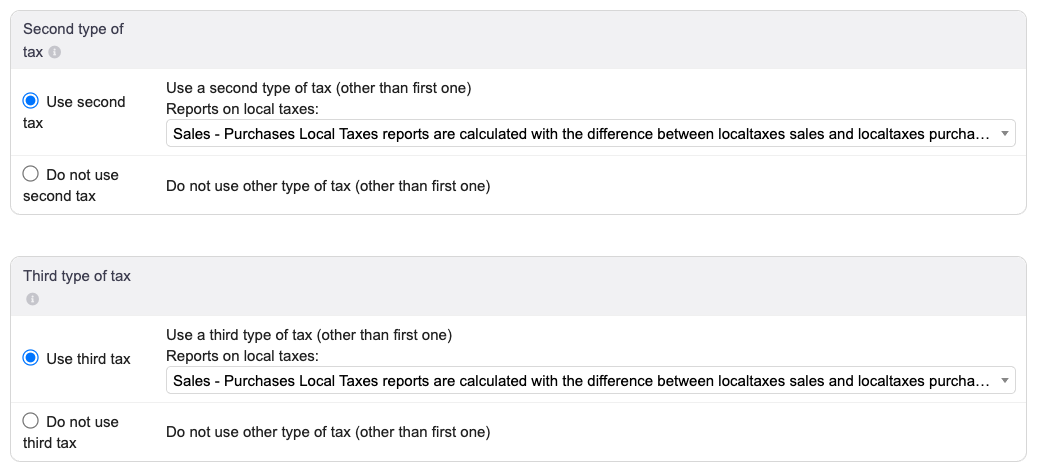
Without this, the C+S rates calculate nothing. We tried: with both taxes switched off, a 50,000 ₹ line at
C+S-18 gave 0 tax and a total of 50,000 ₹.
3. The GST rates in the dictionary
Home > Setup > Dictionaries > VAT Rates or Sales Tax Rates, filtered on India, shows nine rates:
| Code | Main rate (IGST) | Tax 2 (CGST) | Tax 3 (SGST) | Use |
|---|---|---|---|---|
C+S-5, C+S-12, C+S-18, C+S-28 |
0 | half | half | Sale inside your state |
I-5, I-12, I-18, I-28 |
full rate | 0 | 0 | Sale to another state |
| (no code) | 0 | 0 | 0 | Disabled by default |
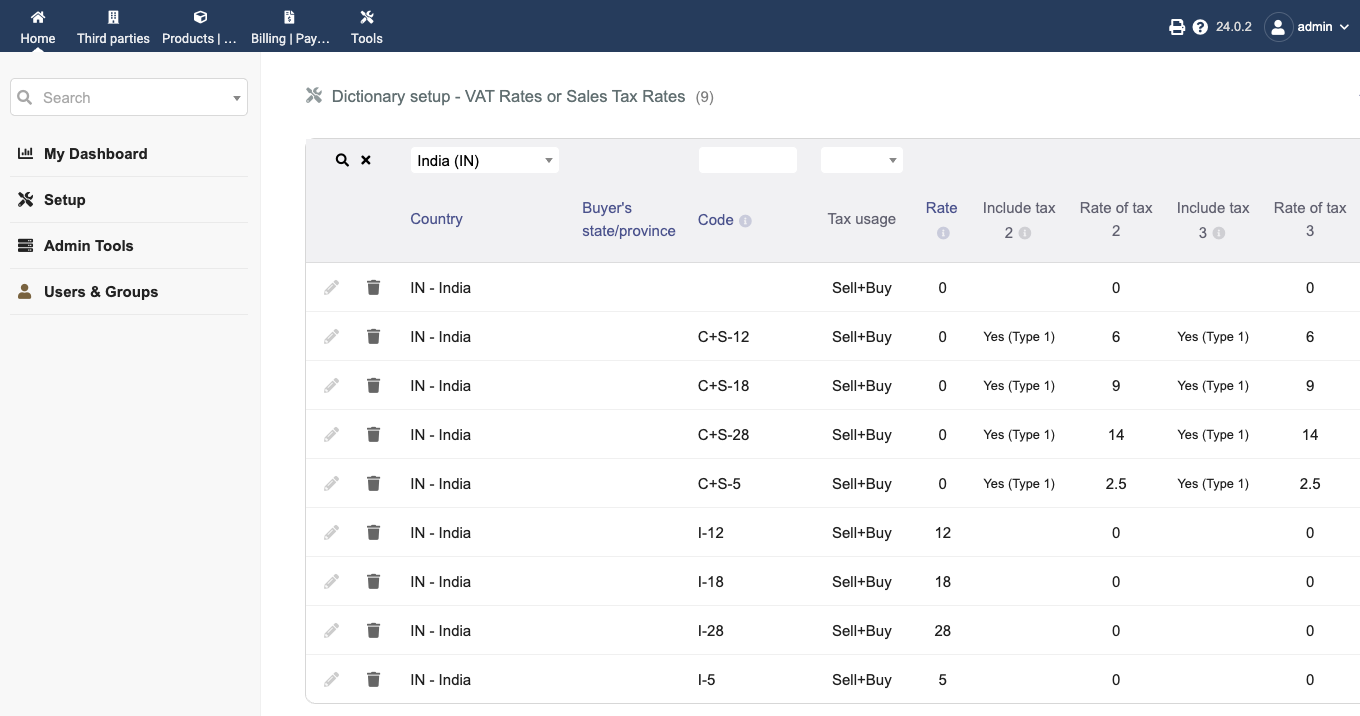
On a product card and on an invoice line, they appear as 9/9 (C+S-18) and 18 (I-18).
The rates in Dolibarr are older than the GST reform of 22 September 2025, which moved most goods and services to two main rates, 5% and 18%, with a 40% rate for a short list (tobacco, pan masala, aerated drinks, luxury cars…) according to the 56th GST Council release. Check the rate of each of your products: the 12% and 28% codes are still in Dolibarr’s list.
4. Products and services, with HSN and SAC codes
On the product card, choose the default sales tax from the list. We recommend the C+S rate (for example
9/9 (C+S-18)) for everything, because of the option in step 5.
HSN code for goods. The product card has a Customs nomenclature field (Dolibarr’s name for the HS code).
We typed 84713010: it prints under the line on the PDF invoice, as “(Customs nomenclature: 84713010)”.
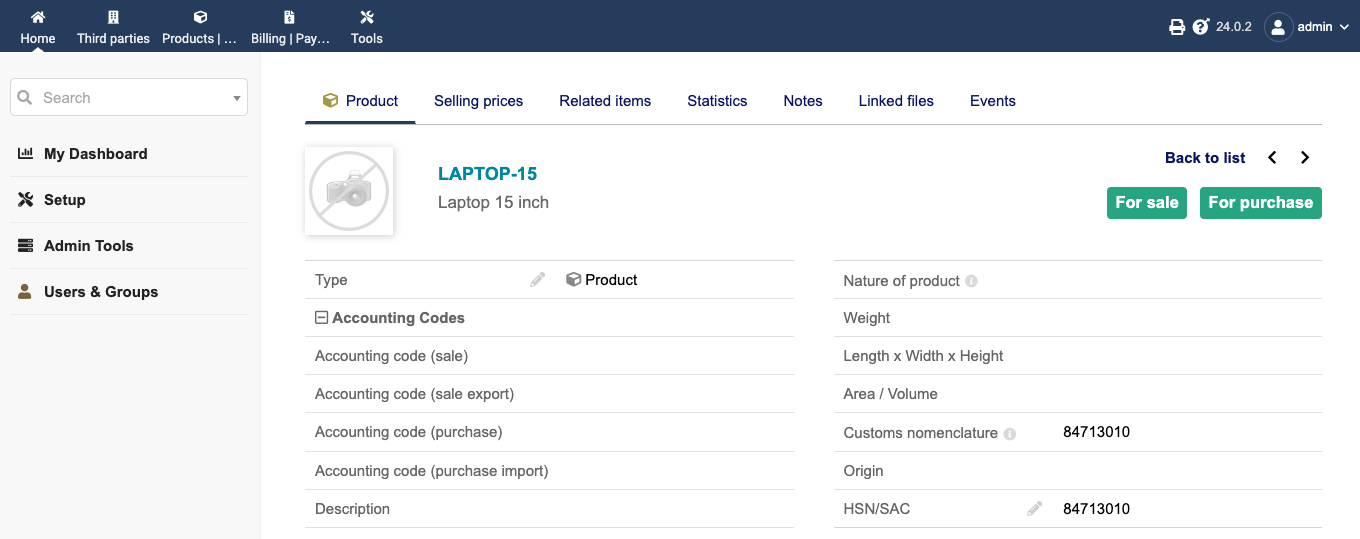
SAC code for services, or an HSN column. Services have no Customs nomenclature field. What worked for both:
- In the setup of the Products module (Home > Setup > Modules), tab Additionnal fields (spelled so in
24.0.2; “Complementary attributes” in 23.0.4): add an attribute, label
HSN/SAC, attribute codehsnsac, type String. It applies to products and services. - In the setup of the Invoices module, tab Additionnal fields (lines): add an attribute with the
same code
hsnsac, and put1in On PDF (shown in a column). - Fill HSN/SAC on each product and service.
When you pick a product on an invoice line, Dolibarr fills the line’s HSN/SAC with the product’s value, and the default PDF template prints it in its own column.
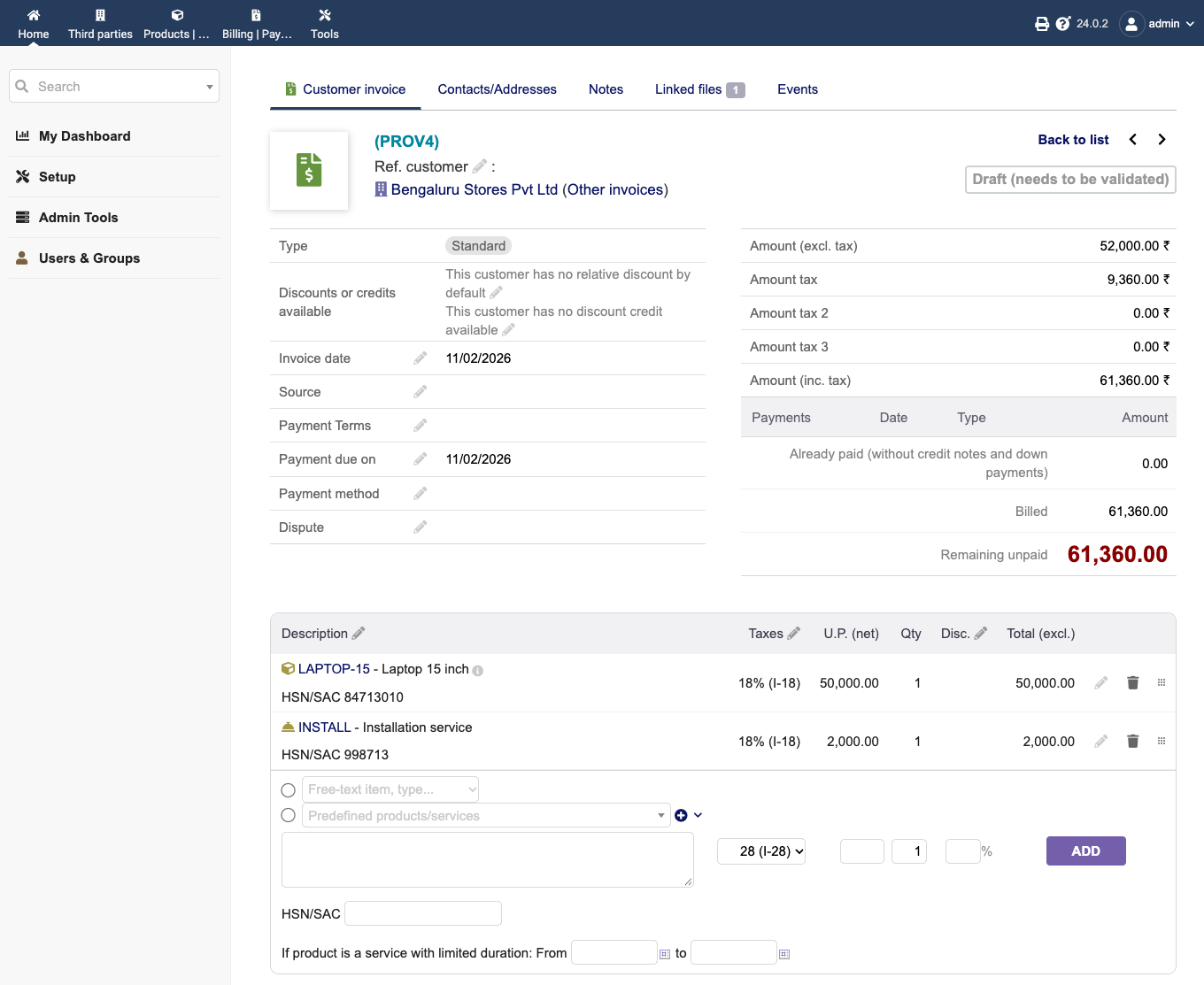
How many digits you must print depends on your turnover (4 digits up to ₹5 crore for B2B invoices, 6 above), under Notification 78/2020 – Central Tax. Dolibarr does not check it.
5. Intra-state or inter-state: the rate on each line
On a customer in your own state, a product set to C+S-18 gives the right result: on 100,000 ₹ before tax, CGST
9,000 ₹ and SGST 9,000 ₹, total 118,000 ₹.
On a customer in another state, Dolibarr proposed the same C+S-18 rate. You have to choose 18 (I-18) in
the line’s Sales tax list before clicking Add. With it, the invoice shows IGST 18,000 ₹ and nothing in CGST and SGST.
The hidden option. Dolibarr has a setting for this, not shown in any setup screen:
MAIN_SALETAX_AUTOSWITCH_I_CS_FOR_INDIA. Add it in Home > Setup > Other setup with the value 1. We tested the
four cases:
| Product’s default rate | Customer | Rate proposed on the line |
|---|---|---|
C+S-18 |
same state | C+S-18 (right) |
C+S-18 |
other state | I-18 (right) |
I-18 |
other state | I-18 (right) |
I-18 |
same state | I-18 (wrong, should be C+S-18) |
The wrong case is a bug in Dolibarr. We reported and fixed it:
pull request #42574 was merged on 4 November 2026 into the
23.0 branch. On that date, no released version contained it yet (the latest were 23.0.4 and 24.0.2). We tested the
fix on 23.0.4 and 24.0.2: the fourth case then proposes C+S-18, and the other cases do not change.
Until your version includes the fix, the option is useful if all your products are set to a C+S rate. Fill the State on every customer:
a customer without a state was treated as another state and got I-18. The option only changes the rate proposed
when you pick a product; the list stays editable, so glance at it before clicking Add.
6. Adding the 40% rate
In the dictionary (step 3), click + and add two lines for India: code C+S-40, rate 0, tax 2 and tax 3 at
20 with type “Yes (Type 1)”, like the other C+S lines; then code I-40, rate 40. They appeared in the
product and invoice lists, and a product at C+S-40 gave, on 1,000,000 ₹, 200,000 ₹ CGST and 200,000 ₹ SGST.
7. The PDF invoice
With the default template, an intra-state invoice shows the CGST and SGST totals, plus a line “Total IGST 0% (C+S-18) 0.00”. An inter-state invoice shows a single “Total IGST 18% (I-18)” line.
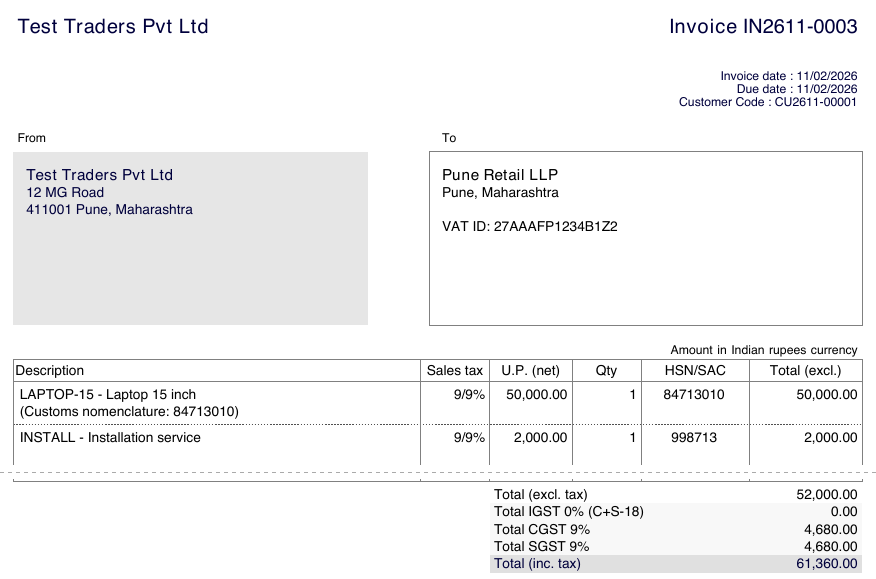
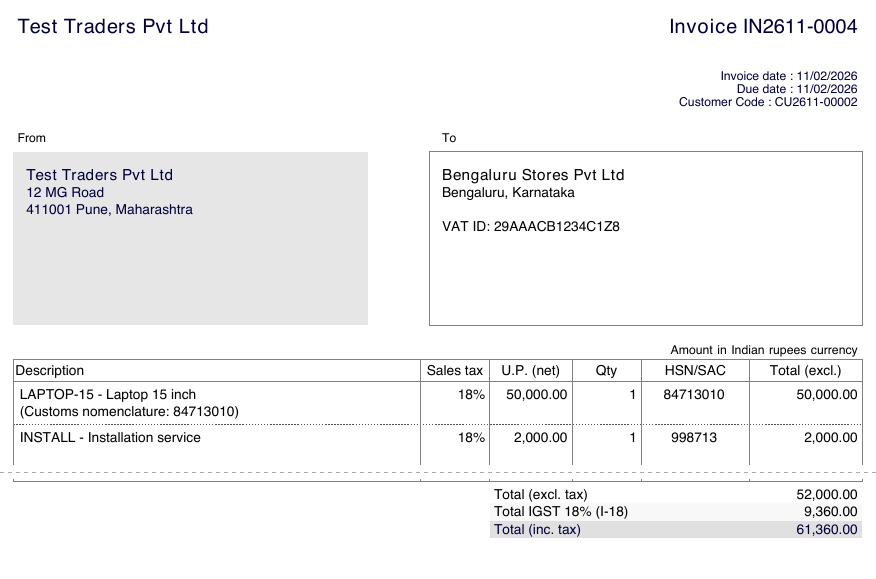
What the default template does not print, and you may need on a tax invoice: the words “Tax Invoice” (it says “Invoice”), a “GSTIN” label (it says “VAT ID”), a “Place of supply” line (only the customer’s state in the address), the amount in words. Getting them would mean a custom PDF template; we did not build or test one.
8. Known limits
Prices entered with tax. On invoice lines, Dolibarr shows only the price before tax (U.P. (net)) as soon as the
second or third tax is used. Its code says why: these taxes are not yet taken into account in prices with
tax. On the product card, the “Inc. tax” choice is still offered, and it is wrong: 11,800 entered with tax and C+S-18 was saved as 11,800 before
tax, and the invoice charged 11,800 + 18% = 13,924 ₹. Always enter prices before tax.
E-invoice (IRN) and e-way bill. We found no code for either in Dolibarr 24.0.2. Since 1 August 2023, e-invoicing (IRN from the Invoice Registration Portal) is mandatory for businesses whose aggregate turnover exceeded ₹5 crore in any financial year since 2017-18 (Notification 10/2023 – Central Tax). Above that threshold, Dolibarr alone is not enough: you need a module or another tool to get the IRN. We did not test any.
GST returns. We did not test Dolibarr’s tax reports, nor anything related to GSTR-1 or GSTR-3B.
How this was verified
On 2 November 2026, on fresh Dolibarr 24.0.2 and 23.0.4 installs (official Docker images, MariaDB 11.4), driven by a browser like a user: company in Pune with currency INR and GSTIN, second and third taxes enabled, customers in Maharashtra and Karnataka, products with HSN codes, a service with a SAC code, invoices created, validated and their PDF (default template) read, the hidden option tested on the four cases above, a price entered with tax, 40% rates added. Results checked on screen, in the PDF and in the database. GST law read on 2 November 2026: CBIC notifications 10/2023 and 78/2020 (Central Tax) and the 56th GST Council release. Not tested: GST returns, purchase invoices, credit notes, the accounting module, third-party modules.
See also
Frequently asked questions
Does Dolibarr support Indian GST?
Yes, for the tax calculation. Dolibarr ships Indian rates in its VAT dictionary: codes C+S-5, C+S-18… put half the rate in CGST and half in SGST, codes I-5, I-18… put the full rate in IGST. You must enable the second and third taxes in Setup > Company. We found nothing in Dolibarr 24.0.2 to generate e-invoices (IRN) or e-way bills.
Does Dolibarr choose IGST automatically for customers in another state?
Not by default: in our test, Dolibarr proposed the product's CGST+SGST rate for a customer in another state, and we had to pick IGST by hand. A hidden option, MAIN_SALETAX_AUTOSWITCH_I_CS_FOR_INDIA, switches CGST+SGST to IGST when the customer's state differs from yours. It worked when products were set to a CGST+SGST rate, but not the other way round: a product set to IGST stayed IGST for a customer in your own state. This bug is fixed in Dolibarr's 23.0 branch since 4 November 2026 (pull request 42574), but no released version contained the fix yet on that date.
Where do I put the HSN code in Dolibarr?
For goods, the Customs nomenclature field of the product prints under the line on the PDF invoice. For services there is no such field, so we created a complementary attribute HSN/SAC on products and on invoice lines with the same code: Dolibarr copies the code to the line and prints it in its own column on the PDF.
Can I enter prices including GST in Dolibarr?
Not reliably. Dolibarr hides the price-with-tax column on invoice lines when the second or third tax is used. On the product card the option is still there, but a price of 11,800 entered with tax and the C+S-18 rate was saved as 11,800 before tax, and the invoice then charged 13,924. Enter prices before tax.