Margin per day
margeparjour · v1.0.2
You see what a working day brings in before you accept the quote.
dolixmultibarcode · version 1.0.1
Several barcodes for one product: supplier code, old code, in-store label, pack code. Scanned in TakePOS, each code adds the product to the ticket with its quantity: the code of a pack of 6 adds 6 units.
Sold directly to businesses in France
Direct purchase, with immediate download and an invoice by email, is open to businesses and associations established in France, on the French page of this module. From elsewhere, write to support@dolix.fr.
Try it without installing anything: the online demo (login demo, password demo; sample data, reset every night; the demo is in French).
In Dolibarr, a product has a single barcode. In a shop, the same item often carries several: the new supplier's code, the old code still on the stock, the in-store label, the pack code. Scanned at the till, a code Dolibarr does not know means searching for the product by hand, and the pack of 6 is counted by hand.
In Dolibarr, a product has a single barcode. In a shop, the same item often carries several: the new supplier’s code, the old code still on the stock, the in-store label, the pack code.
Scanned at the till, a code Dolibarr does not know means searching for the product by hand. And the pack of 6 is counted by hand.
Who it is for: Shops that use TakePOS at the till and whose items carry several barcodes: change of supplier, old stock, in-store labels, packs or cases sold as a lot.
This section appears on all 29 module pages, without exception.
The product card, and the service card, get a “Barcodes” tab. It recalls the product’s main barcode, then lists its additional codes. Each code has:
A code is deleted with one click on the bin icon.
Scan any of these codes, or type it in the till’s search: the product is added to the ticket with the code’s quantity, at the product’s unit price. A pack-of-6 code adds 6 units at once.
TakePOS filters still apply: the product must be for sale, in the till’s root category if one is set, and in stock if the “products in stock only” option is on.
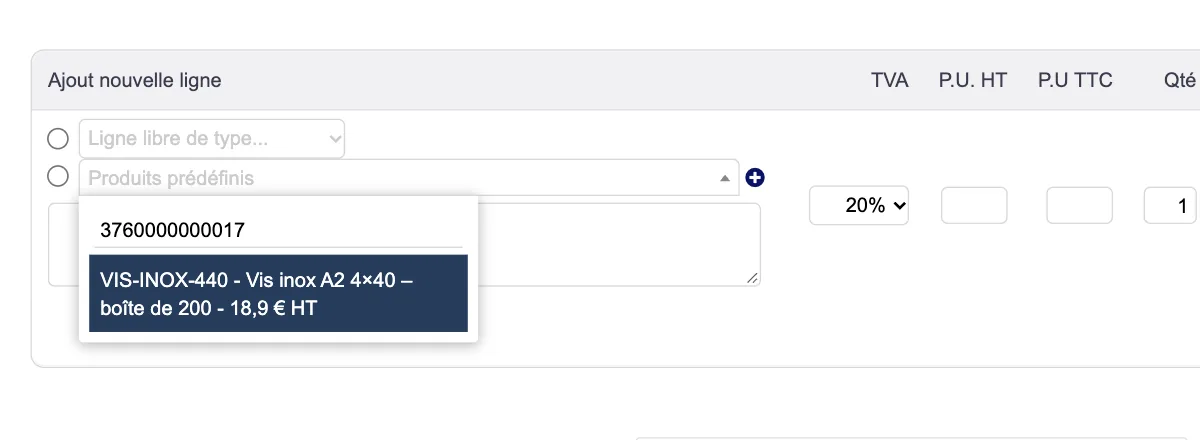
The product selection of a line also recognises these codes:
When a code is added:
No Dolibarr file is modified: the module uses the hooks provided by Dolibarr.
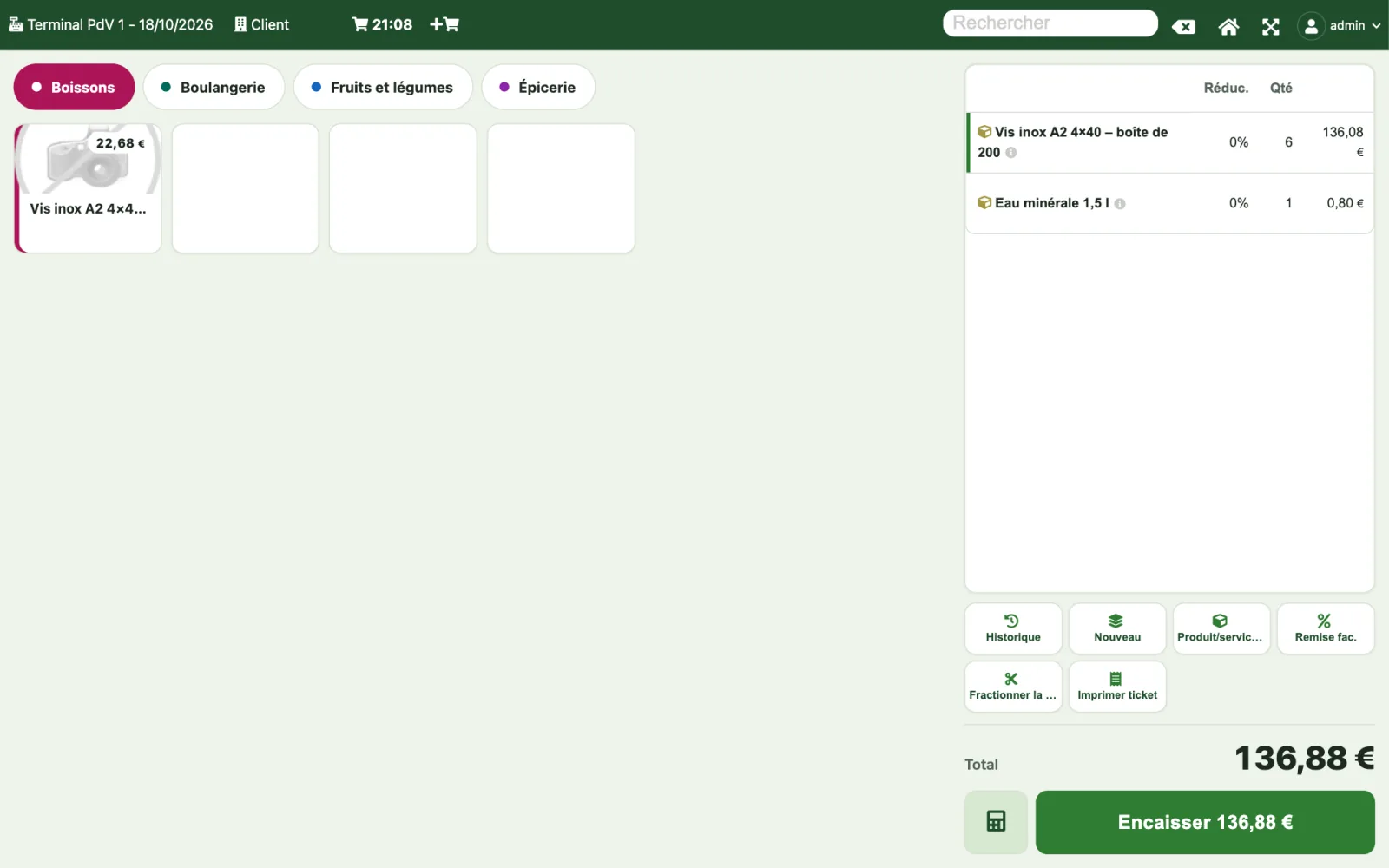
The TakePOS till in Dolibarr 24.0.2, with demo data, right after scanning the code of a pack of 6: the box of screws is on the ticket with a quantity of 6, for €136.08 (6 × €22.68).
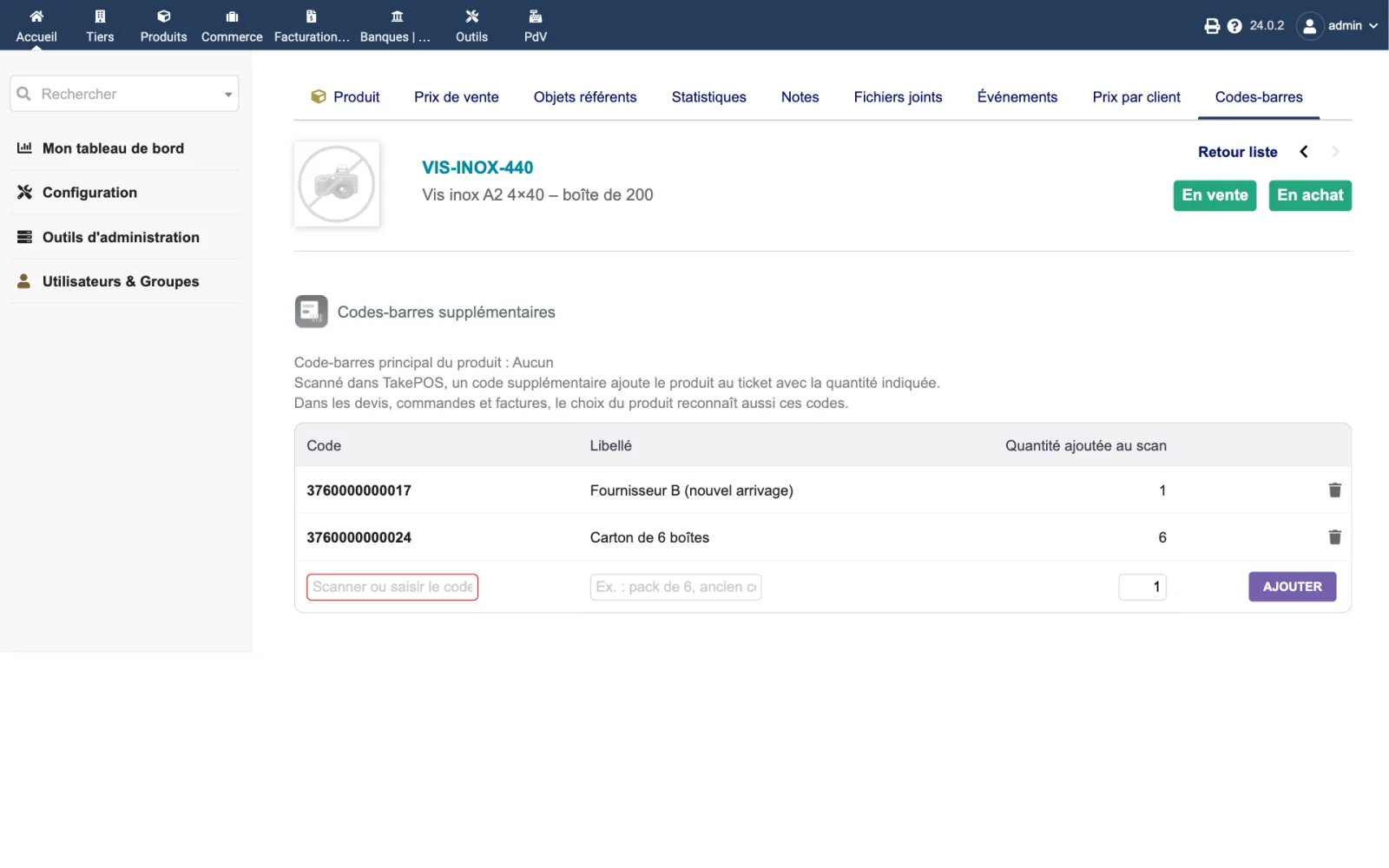
The “Barcodes” tab of the same product: supplier B’s code (quantity 1) and the code of the pack of 6 boxes (quantity 6), then the line to add a code. The product has no main barcode.
A new proposal line: the supplier code, typed in the product search, finds the box of screws.
A single setting, on the module’s setup page (reserved for administrators):
| Setting | Default | Effect |
|---|---|---|
| Check the check digit of EAN-8, EAN-13 and UPC-A codes | ticked | Rejects an 8, 12 or 13-digit code whose last digit (check digit) is wrong, usually a typing error. Untick it for in-house codes of that length that do not follow the standard. |
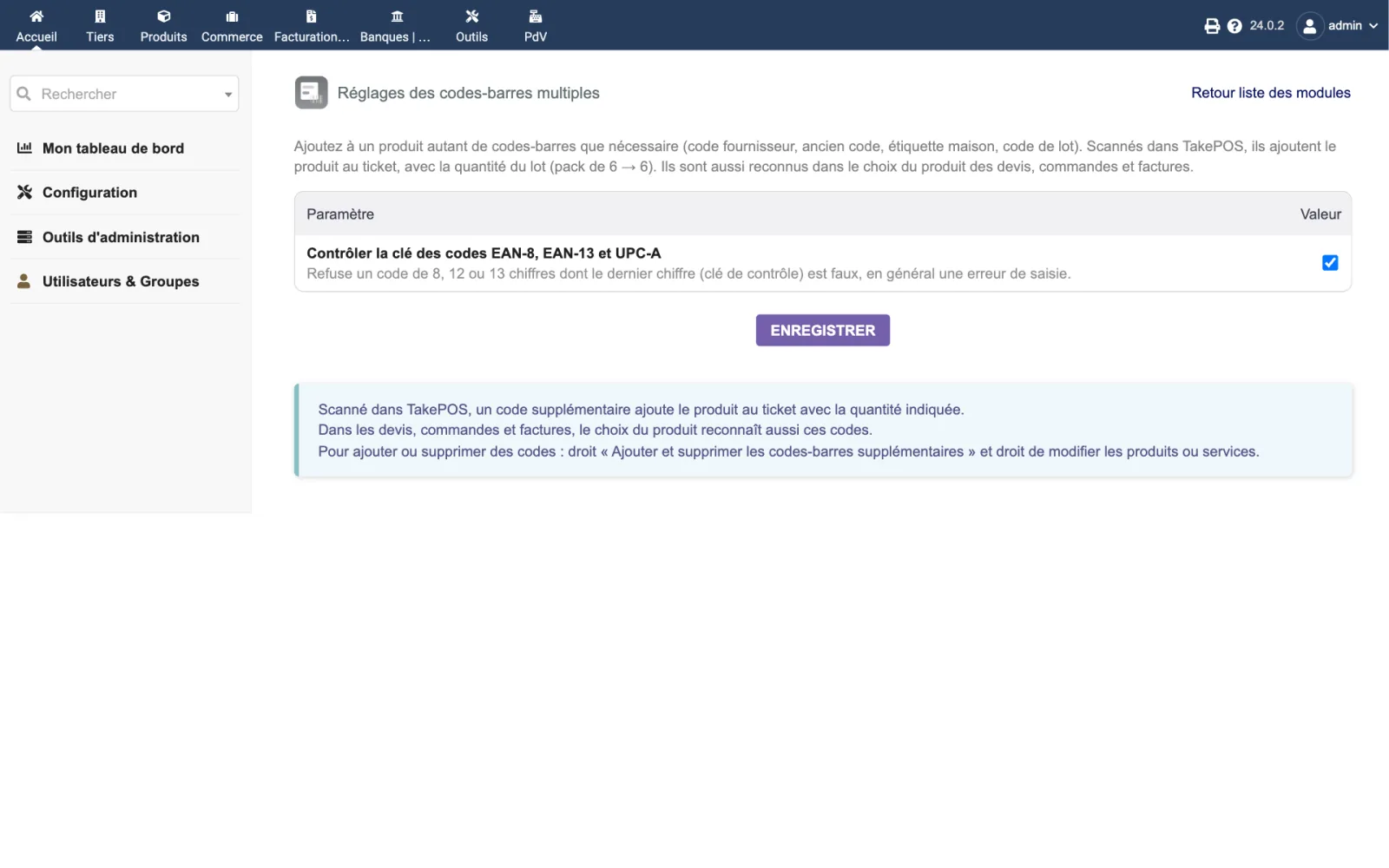
| Database tables created | One table: llx_dolixmultibarcode. One row per additional code: product, code (up to 128 characters), label, quantity added when scanned, creation date, user, entity. A code is unique within an entity (unique index on entity and code). A single setting, the constant DOLIXMULTIBARCODE_CHECK_EAN (EAN/UPC check digit control, enabled by default). The products table is only read. |
|---|---|
| Permissions | One permission: “Add and delete the additional barcodes of products”. The Dolibarr permission to create or modify products (or services, for a service) is also needed. The “Barcodes” tab is visible with the Dolibarr permission to read products or services; without the write permission, it is read-only. Adding and deleting check the form's security token. The settings page is reserved for administrators. |
| Uninstalling |
|
The dolixmultibarcode folder, in readable PHP, under the GPL v3 or later: the module descriptor,
the product tab, the settings page, the codes class, the hooks class (TakePOS and product
selection), the SQL files of the table and the icons.
fr_FR), English (en_US), German (de_DE) and Spanish (es_ES).README.md and a ChangeLog.md.conf.php.llx_dolixmultibarcode, one row per additional code (product, code, label,
quantity added when scanned, creation date, user, entity). A code is unique within an entity.DOLIXMULTIBARCODE_CHECK_EAN.The module descriptor only declares a minimum version. No upper bound is written in the code: the versions below are those on which the module has actually been run.
| Dolibarr versions | Dolibarr 19.0 minimum. Version 1.0.1 tested on 19.0.4, 20.0.4, 21.0.4, 22.0.5, 23.0.4, 24.0.1, 24.0.2 and 24.0.3. |
|---|---|
| Minimum PHP | 7.4 |
| Dolibarr modules to enable | Products |
| Licence | GPL v3 or later, full source code |
| Languages | French, English, German, Spanish |
| Menu | No menu entry. “Barcodes” tab on the product card and on the service card. Settings from the list of modules (Products family). |
The test results, Dolibarr version by version, are on the Compatibility tested page.
The details — permissions on the custom folder, shared hosting, upgrades, uninstalling — are on the page Installation and upgrades.
The descriptor requires Dolibarr 19.0 and PHP 7.4 at least. Version 1.0.1 was installed and tested on 19.0.4, 20.0.4, 21.0.4, 22.0.5, 23.0.4, 24.0.1, 24.0.2 and 24.0.3: integration test with 20 checks, deletion of a product and its codes, update from 1.0.0, with no PHP message from the module; on 19.0.4 to 24.0.2, a browser run (adding a code, deleting the product, reusing the code). Scanning at the TakePOS till and product selection in a proposal were tried on screen on 19.0.4 and 24.0.2. If you are unsure about your version, write before buying.
The product is added to the ticket with a quantity of 6, at the product's unit price: 6 boxes at €22.68 make €136.08. The module does not create a “pack” product and applies no specific price to the lot.
The module only requires the Products module. On the screenshots, the product does not even have a main barcode: only its additional codes are used. The main code, if there is one, keeps working as before.
No. When a code is added, a code already used as an additional code or as a product's main barcode is rejected, and the message gives the reference of the product that uses it. The check applies to codes added in the tab: the module does not watch the main barcode entered on the product card.
For a code of 8, 12 or 13 digits, the last digit is a key calculated from the others. If it does not match, it is usually a typing error. For in-house codes of that length that do not follow the standard, untick the check in the module's settings.
Yes, in the product selection of proposals, orders and invoices. With the classic drop-down list, from Dolibarr 19. With the option “search to select a product”, from Dolibarr 22 only (tested on 24.0.2): before 22, Dolibarr does not pass the searched term to modules, and only the main code is recognised in that mode.
The tab disappears and the additional codes are no longer recognised. Your products, their main codes, tickets and documents are not touched. The codes table stays in the database: if you enable the module again, the codes are still there.
The module is sold directly on dolix.fr, by card: the invoice arrives by e-mail and the zip can be downloaded straight away. Direct purchase is reserved for businesses and organisations established in France; if that is not your case, write to support@dolix.fr. For 2 years, the latest version can be downloaded at dolix.fr/telecharger/, with the invoice number and the e-mail address. Support is provided by the person who wrote the module, at support@dolix.fr.
Taken from the module’s ChangeLog.md file: a single source.
1.0.114 November 2026
Deleted product: its additional codes are deleted with it. Before, they stayed in the database: the code could no longer be given to another product and a scan could return the deleted product. Codes left over by 1.0.0 are ignored when scanning, reusable, and removed by disabling then re-enabling the module. Tested on 19.0.4, 20.0.4, 21.0.4, 22.0.5, 23.0.4, 24.0.1, 24.0.2 and 24.0.3.
1.0.018 October 2026
First version: “Barcodes” tab on the product and service card (code, label, quantity added when scanned); checks when adding (unique code, including against main barcodes, EAN-8, EAN-13 and UPC-A check digit that can be disabled, quantity greater than 0); scanning in TakePOS with the code's quantity; codes recognised in the product selection of proposals, orders and invoices (classic list from 19, search mode from 22); Dolibarr permissions respected, codes per entity. Interface in French, English, German and Spanish.
Write to support@dolix.fr. The person who wrote the module is the one who replies.
Reply within two working days. This is not an on-call service.
To include in your message
Sold directly to businesses in France
Direct purchase, with immediate download and an invoice by email, is open to businesses and associations established in France, on the French page of this module. From elsewhere, write to support@dolix.fr.
margeparjour · v1.0.2
You see what a working day brings in before you accept the quote.

dolixdomaine · v1.0.8
A customer changes its name: its addresses move to the new domain in a single operation.
dolixmasse · v1.0.9
You change a field across a series of records without writing an SQL query.
dolixtaches · v1.0.5
A task was created in the wrong project: you move it, with its subtasks, its time spent and its documents.
dolixdoublons · v1.1.8
You find records entered twice and merge them: third parties, contacts and members.
dolixprix · v1.1.4
Your draft quotes and template invoices pick up the catalogue prices, one by one or all at once.
dolixapproche · v1.0.6
You spread freight, customs and the other costs of a shipment over the cost of products and their weighted average price.
dolixresteafacturer · v1.0.3
You see what remains to be invoiced on each customer order, line by line, in quantity and in amount excluding tax.
dolixmaj · v1.1.2
Before upgrading Dolibarr, you know how far you can go, what will stop working and what to do first. The module changes nothing.
dolixtva · v1.0.1
The mandatory VAT statement is printed on your invoices by itself: small business exemption, intra-Community supply, reverse charge, export.
dolixjustif · v1.0.1
The expense report PDF also contains its receipts, photos and PDFs, page by page: one single document to hand over.
dolixportemonnaie · v1.1.1
Your customers or members pay an amount in advance, and TakePOS spends it at each visit to the till, until it runs out.
dolixmondialrelay · v1.0.2
You choose the recipient's Point Relais® or Locker on the shipment, and the module creates the Mondial Relay label with your Sendcloud account.
dolixdlc · v1.0.1
You see in time the lots in stock whose sell-by or eat-by date is near or past, and you can prevent the validation of a shipment that contains a lot past its sell-by date.
dolixhabillage · v1.0.3
Make TakePOS look like a modern till: category tabs, large product grid, basket on the right, Charge button, trade looks or your logo colours.
dolixtags · v1.0.1
The tags of your proposals, orders, invoices, third parties, contacts, products and projects are shown in colour in a column of the list, without opening each card.
dolixcotisations · v1.0.4
A membership fee for each member, and all subscriptions renewed at once, with invoice, payment and email.
dolixconsignes · v1.0.2
You see how many returnable kegs, crates or pallets each customer holds, what those deposits are worth, and which ones have not come back in time.
dolixdepotvente · v1.0.4
For each consignor, you see what was sold and your commission, and the statement prepares the invoices as drafts.
dolixblgroupe · v1.0.3
One single PDF delivery note for several shipments of the same customer, signed only once.
dolixdernierprix · v1.0.2
You pick a product on a proposal, order or invoice: the last price and discount granted to that customer are shown, and applied in one click.
dolixretrait · v1.0.2
The customer comes to collect a pre-order: one click in TakePOS copies it into the ticket, and after payment the order is classified billed, even if the weight changed.
dolixcloture · v1.0.0
Bank deposits, withdrawals to the safe, cash in and cash expenses recorded from TakePOS, a count by notes and coins, and the discrepancy booked so that the cash account matches the drawer.

dolixoss · v1.0.0
For your sales of goods to consumers in other EU countries: the VAT rate of the customer's country, found from the product's customs code and the European Commission's official rates, draft invoices fixed in one click, tracking of the €10,000 threshold and the quarterly OSS return.
dolixcalc · v1.0.0
An extra field computed by a formula written without PHP, with its value stored: right in the lists, sortable, filterable and printable on PDFs.
dolixshortcuts · v1.0.0
Ctrl+S (Cmd+S on Mac) saves the record you are filling in, without scrolling down to the button. g then a letter opens third parties, proposals, orders, invoices or products. ? shows the help.
dolixgcontacts · v1.0.0
Dolibarr contacts and Google Contacts synced both ways, for each user. Only the contacts with the “Dolibarr” label in Google are involved, and a field changed on both sides is settled by the rule you chose.
dolixcoop · v1.0.0
For cooperative and community grocery stores: shelf labels with the price per kilo or per litre, the customer's membership status in the TakePOS checkout, a simplified home page and menu for volunteers, a quick inventory on the phone.