Margin per day
margeparjour · v1.0.2
You see what a working day brings in before you accept the quote.
dolixgcontacts · version 1.0.0
Dolibarr contacts and Google Contacts synced both ways, for each user. Only the contacts with the “Dolibarr” label in Google are involved, and a field changed on both sides is settled by the rule you chose.
Sold directly to businesses in France
Direct purchase, with immediate download and an invoice by email, is open to businesses and associations established in France, on the French page of this module. From elsewhere, write to support@dolix.fr.
The company's contacts are in Dolibarr; the ones users look up on their phone or in Gmail are in Google Contacts. Sending Dolibarr contacts to Google is not enough: a number corrected on the phone, or a contact added in Google, must also come back to Dolibarr. Without a two-way sync, the two address books drift apart and someone has to copy by hand.
The company’s contacts are in Dolibarr. The ones users look up on their phone or in Gmail are in Google Contacts.
Sending Dolibarr contacts to Google is not enough: a number corrected on the phone, or a contact added in Google, must also come back to Dolibarr. Without a two-way sync, the two address books drift apart and someone has to copy by hand.
Who it is for: Companies whose Dolibarr users also look up their contacts in Google Contacts, on their phone or in Gmail, and want a change made on one side to reach the other without copying.
This section appears on all 29 module pages, without exception.
Each user with the module permission goes to Third parties > Google Contacts sync and clicks “Connect my Google account”. They go through Google’s consent page, then come back to Dolibarr. Access tokens are stored encrypted in the database. Nothing is synced until the user has chosen their settings.
The module creates a label in each Google account, “Dolibarr” by default (the name can be changed). Only the contacts with this label are synced: the other contacts of the Google account never come into Dolibarr.
The module keeps the values of the last sync and compares each field:
Before creating a contact, the module looks for the same email address on the other side. If it finds it, it links the two records instead of creating a second one.
Deleting on the other side is an option in the settings.
First name, last name, job title, email, work, mobile and home phones, address, zip code, town, country, birthday. The third party name is sent to Google as the company. Google data that Dolibarr does not know (other emails, other numbers, notes, photo) is kept.
Records saved in the Google Contacts interface are handled: translated phone labels, address on two lines, numbers typed without a label.
Every 15 minutes through the scheduled job, for users who ticked automatic sync, or at any time with the “Sync now” button. Each user sees their own log; the administrator sees every connected account and everyone’s log.
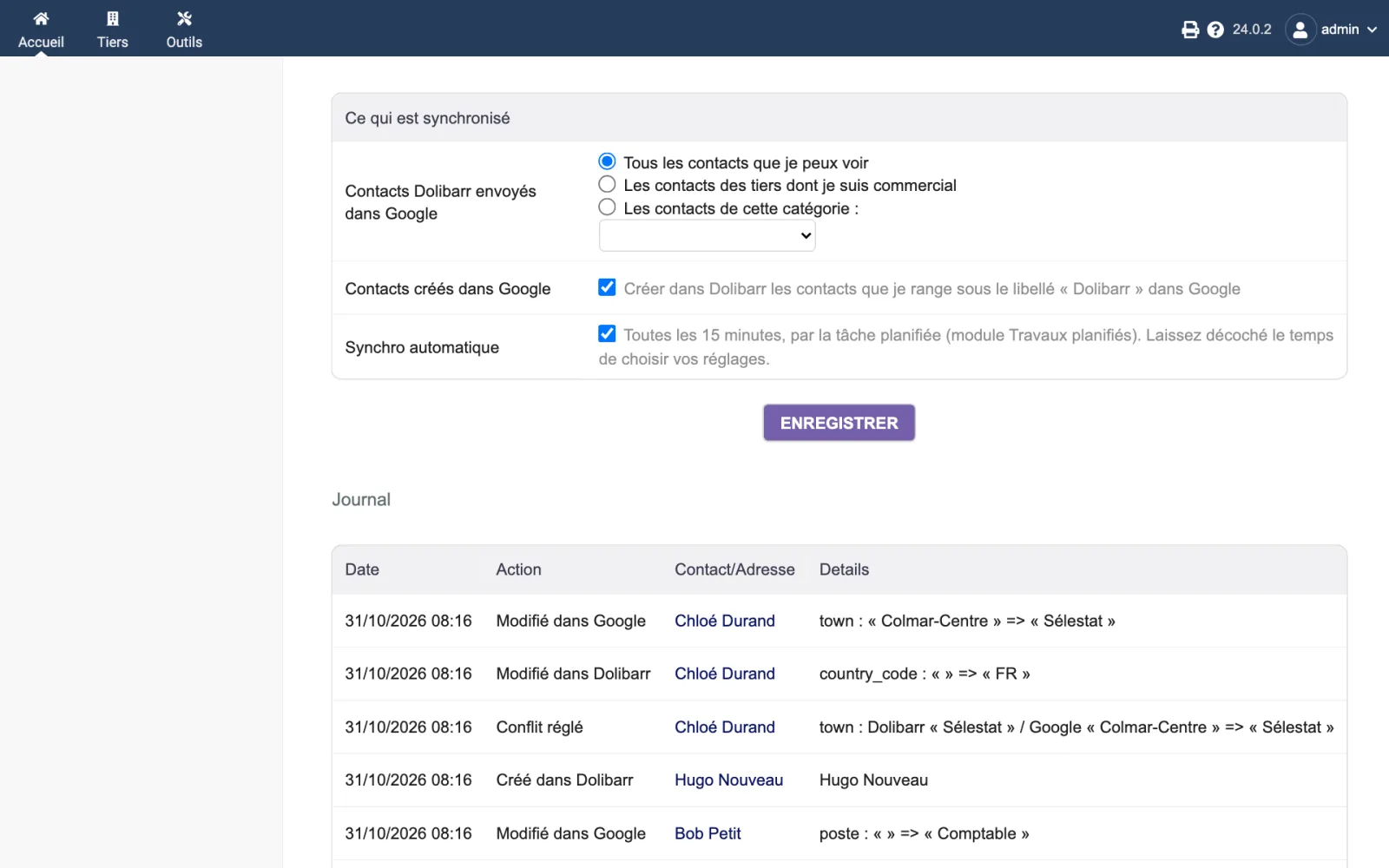
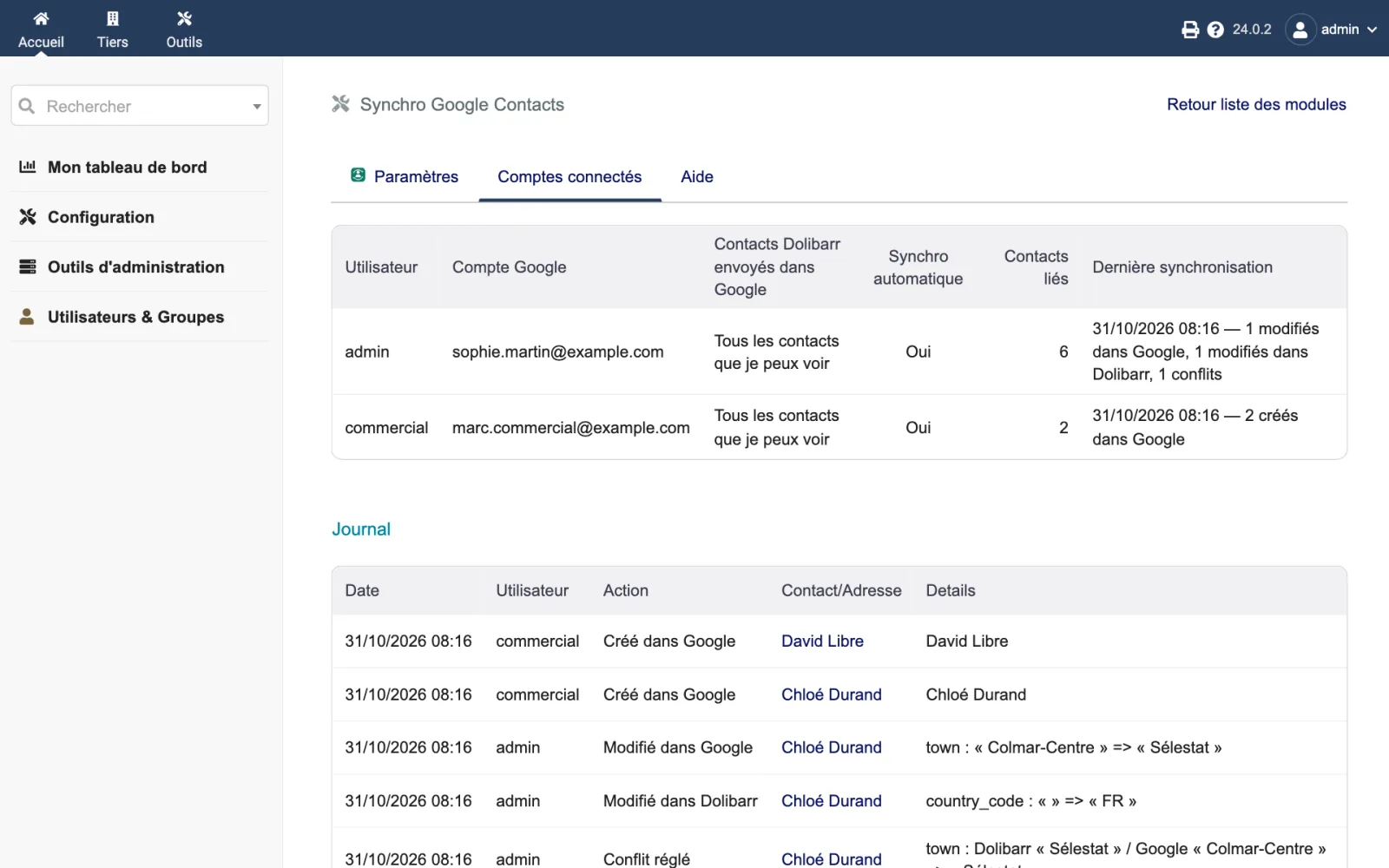
A user’s page on Dolibarr 24.0.2, with demo data. The log shows both directions: a town changed in Google, a country filled in Dolibarr, a contact created in Dolibarr from Google. Chloé Durand’s town had changed on both sides: the “Conflit réglé” (conflict settled) line keeps “Sélestat” (Dolibarr) and “Colmar-Centre” (Google), then the value kept.
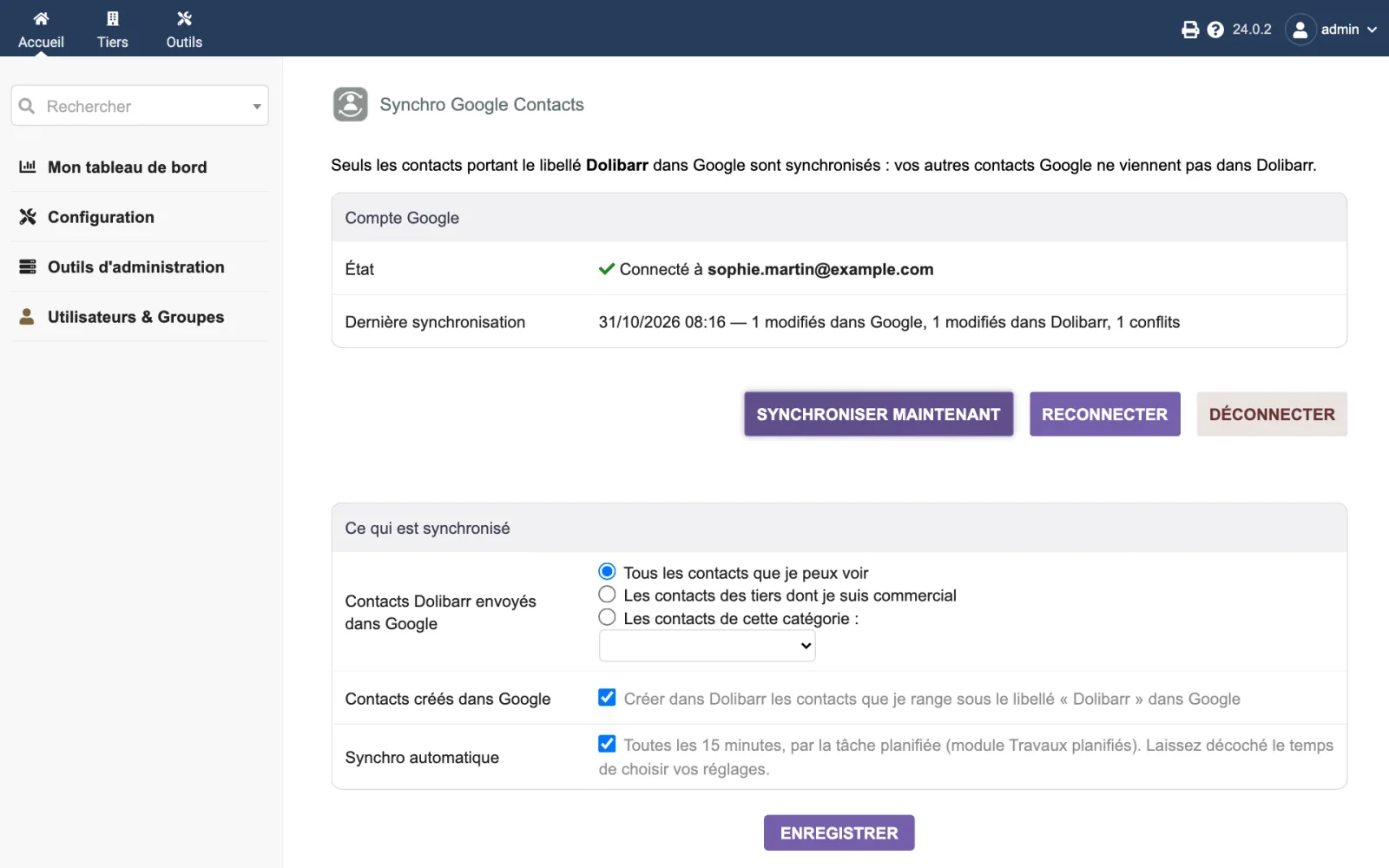
The top of the same page: the connected Google account (fictitious address), the summary of the last sync, the “Synchroniser maintenant” (Sync now), “Reconnecter” and “Déconnecter” buttons, and the choice of contacts sent to Google.
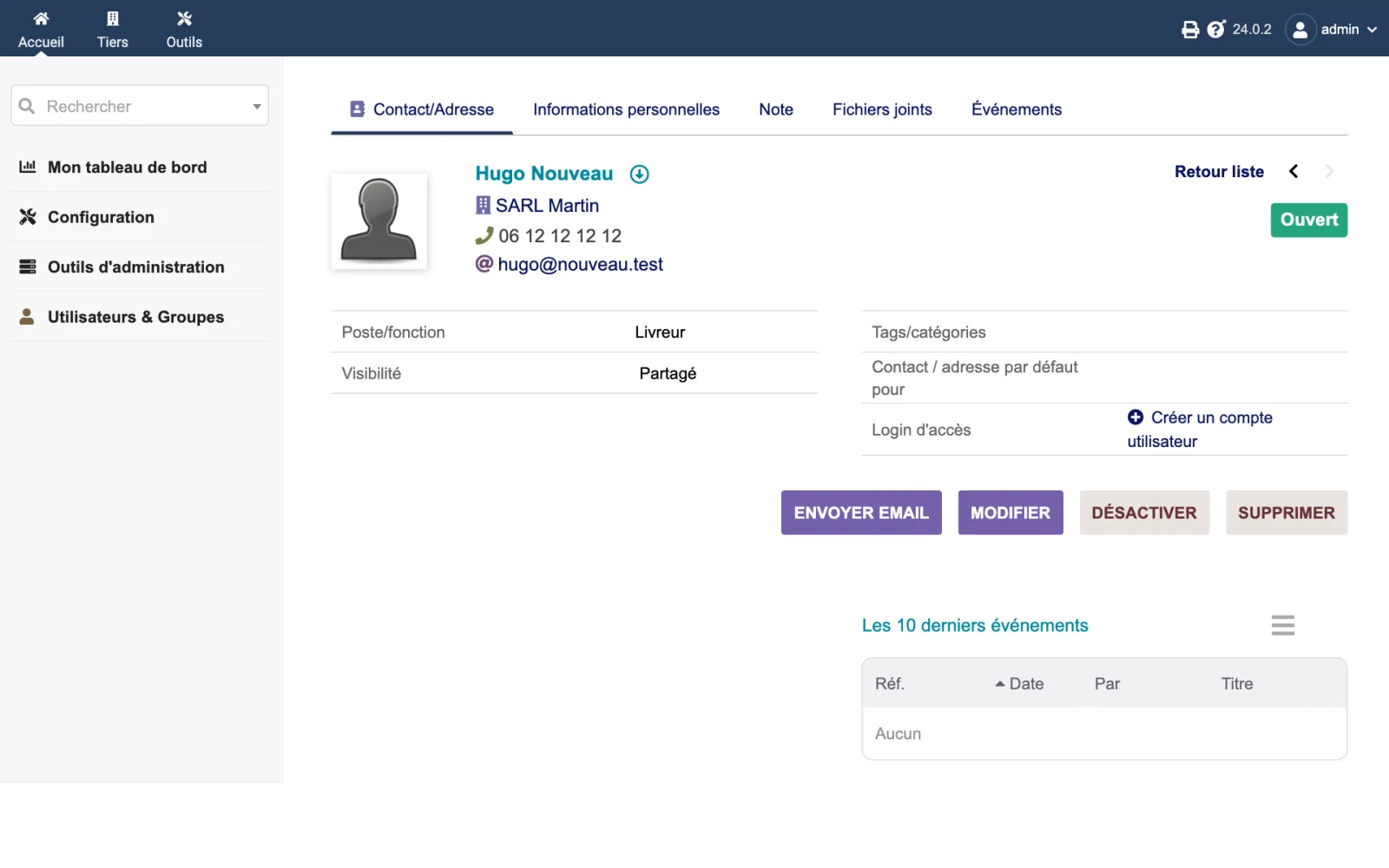
Hugo Nouveau was created in Google, under the “Dolibarr” label, with the company “SARL Martin”. After the sync, his record exists in Dolibarr, attached to the third party SARL Martin, with his job title, phone and email.
The “Comptes connectés” (Connected accounts) tab, for administrators only: each user, their Google account, their scope, automatic sync, the number of linked contacts, the last sync, then everyone’s log.
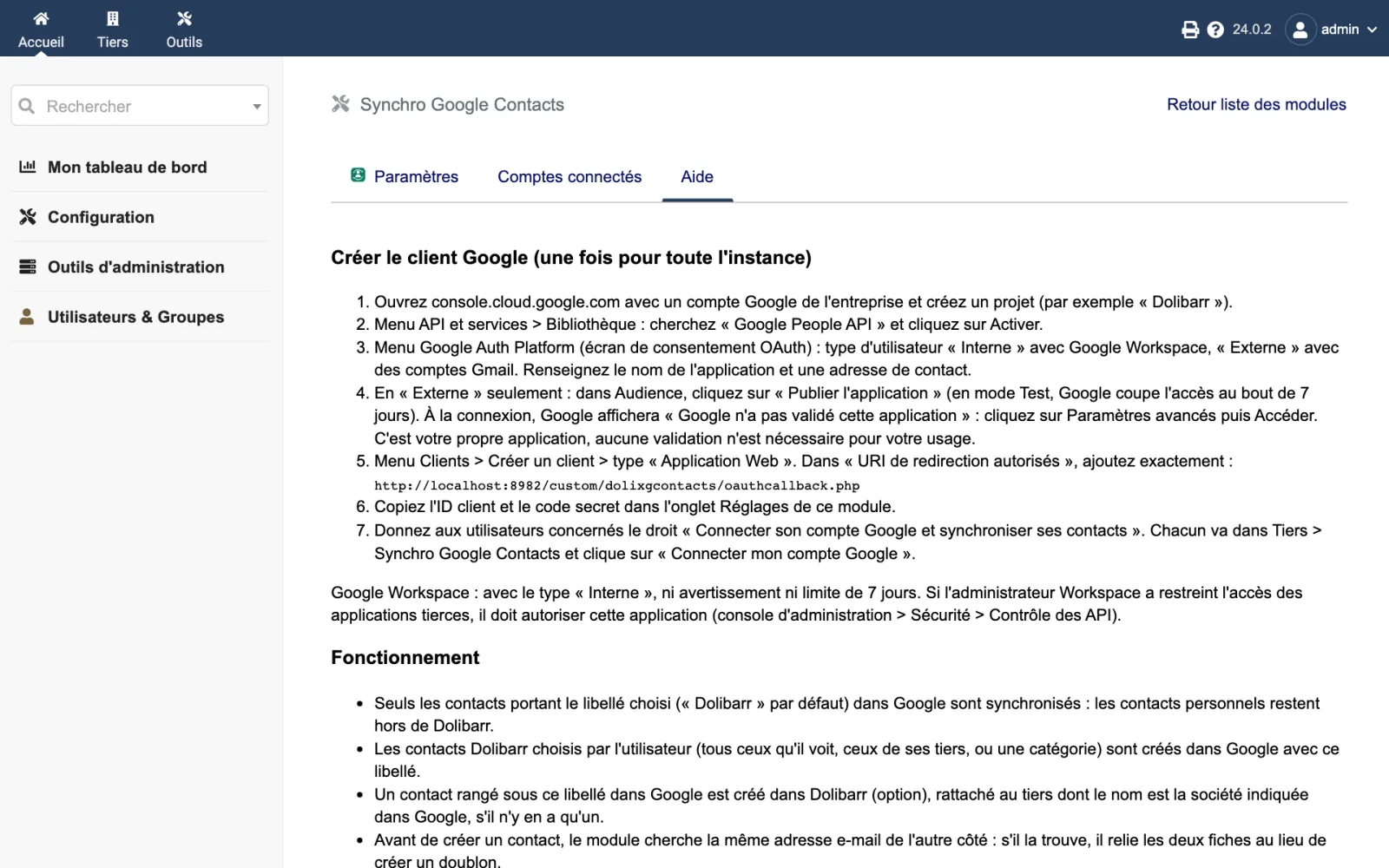
The “Aide” (Help) tab gives the steps to create the Google client, then how the sync works.
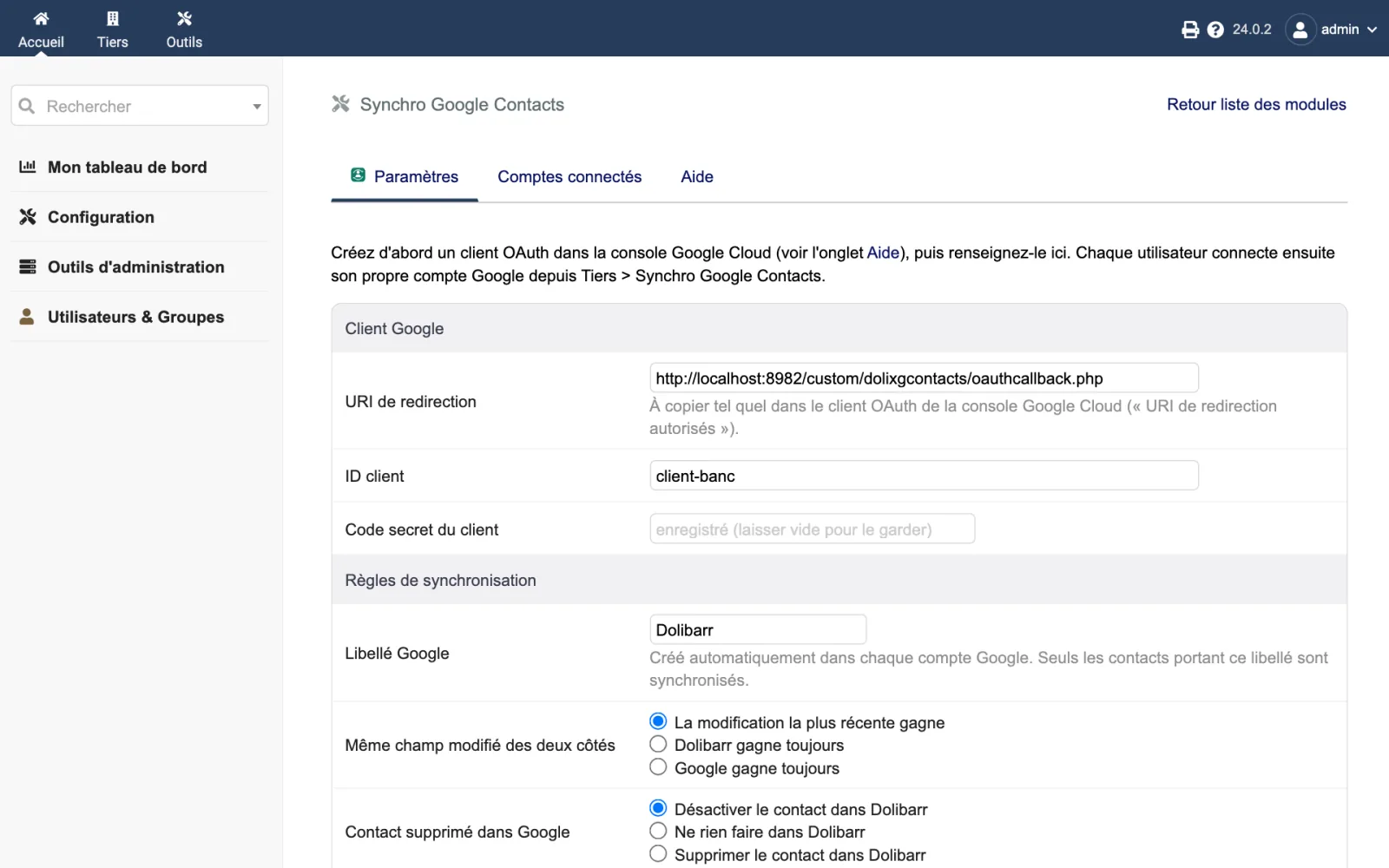
Two levels. The administrator sets up the instance in the module configuration (Settings tab). Each user chooses what they sync on their page Third parties > Google Contacts sync.
| Administrator setting | Default | Effect |
|---|---|---|
| Redirect URI | shown | To be copied as is into the OAuth client in the Google Cloud console. |
| Client ID, client secret | empty | The OAuth client created in the Google Cloud console. The secret is stored encrypted and never shown again; empty field = secret kept. |
| Google label | Dolibarr | Created in each Google account. Only the contacts with this label are synced. |
| Same field modified on both sides | the most recent change wins | Or “Dolibarr always wins”, or “Google always wins”. |
| Contact deleted in Google | disable it in Dolibarr | Or “Do nothing in Dolibarr”, or “Delete the contact in Dolibarr”. |
| Contact deleted in Dolibarr | remove the label in Google | The contact stays in Google. Or “Delete the contact in Google”. |
| Writes per run | 300 | Beyond that, the rest is done at the next run (Google quotas). Minimum 10. |
| User setting | Default | Effect |
|---|---|---|
| Dolibarr contacts sent to Google | all the contacts I can see | Or the contacts of the third parties I am sales representative of, or the contacts of one category. |
| Contacts created in Google | ticked | Creates in Dolibarr the contacts put under the label in Google. |
| Automatic sync | unticked | Ticked, the scheduled job syncs this account every 15 minutes. |
| Database tables created | Three tables. llx_dolixgcontacts_account: one Google account per Dolibarr user (account address, encrypted access tokens, chosen scope, automatic sync, last result). llx_dolixgcontacts_link: the link between a Dolibarr contact and a Google contact, with the values agreed at the last sync, used to know which side changed. llx_dolixgcontacts_log: the log (creations, updates, conflicts with both values, deletions, errors). Settings are Dolibarr constants: DOLIXGCONTACTS_CLIENT_ID, DOLIXGCONTACTS_CLIENT_SECRET (encrypted), DOLIXGCONTACTS_GROUP_NAME, DOLIXGCONTACTS_CONFLICT, DOLIXGCONTACTS_ON_GOOGLE_DELETE, DOLIXGCONTACTS_ON_DOLIBARR_DELETE and DOLIXGCONTACTS_MAX_WRITES. |
|---|---|
| Permissions | One permission: “Connect one's Google account and sync one's contacts”. It opens the page Third parties > Google Contacts sync. What is synced then follows the user's Dolibarr permissions: they must be able to read contacts; only the contacts they see are sent (not another user's private contacts, not inactive contacts, and only those of their own third parties if they may not see all third parties); without the permission to modify contacts, the sync only goes from Dolibarr to Google; deleting in Dolibarr requires the permission to delete contacts. The scheduled job applies each user's permissions. The configuration and the list of connected accounts are for administrators only. |
| Uninstalling |
|
The dolixgcontacts folder, in readable PHP, under the GPL v3 or later: the module descriptor, the
user page, the Google sign-in return page, the three configuration tabs, the Google API class, the
sync class, the SQL files of the three tables and the icons.
fr_FR), English (en_US) and German (de_DE).README.md and a ChangeLog.md.conf.php.llx_dolixgcontacts_account (one Google account per user, encrypted tokens),
llx_dolixgcontacts_link (the link between a Dolibarr contact and a Google contact, with the
values of the last sync) and llx_dolixgcontacts_log (the log, with old and new values). The log
is not purged by the module.DOLIXGCONTACTS_…).The module descriptor only declares a minimum version. No upper bound is written in the code: the versions below are those on which the module has actually been run.
| Dolibarr versions | Dolibarr 19.0 minimum. Installed and run on 19.0.4, 20.0.4, 21.0.4, 22.0.5, 23.0.4 and 24.0.2; tried with a real Google account on 24.0.2. |
|---|---|
| Minimum PHP | 7.1 |
| Dolibarr modules to enable | Third Parties |
| Licence | GPL v3 or later, full source code |
| Languages | French, English, German |
| Menu | “Google Contacts sync” entry in the left menu of Third parties, for users with the module permission. Module configuration in three tabs: Settings, Connected accounts, Help. |
The test results, Dolibarr version by version, are on the Compatibility tested page.
The details — permissions on the custom folder, shared hosting, upgrades, uninstalling — are on the page Installation and upgrades.
The descriptor requires Dolibarr 19.0 at least. The module has been installed and run on 19.0.4, 20.0.4, 21.0.4, 22.0.5, 23.0.4 and 24.0.2, under PHP 8.2 to 8.5, with 71 checks out of 71 on each version against a simulated Google. It was also tried with a real Gmail account on 24.0.2. If in doubt about your installation, write before buying.
Once for the whole instance: create a project in the Google Cloud console, enable Google People API and create a “Web application” OAuth client with the redirect URI shown by the module. The module's Help tab gives every step. With Gmail accounts (“External” type), the app must be published: in Testing mode, Google cuts the access after 7 days. When connecting, Google then shows “Google hasn't verified this app”: it is your own app, you go through Advanced then Go to.
No. Only the contacts with the “Dolibarr” label in Google (the name can be changed) are synced. The other contacts of your Google account are never imported.
The module compares field by field with the values of the last sync. A field changed on one side only takes the new value. If the same field changed on both sides, the chosen rule decides: the most recent change by default, or Dolibarr always, or Google always. The conflict is written to the log with both values and the result.
Not with the default settings: a contact deleted in Google is disabled in Dolibarr, and a contact deleted in Dolibarr is removed from the label in Google, where it stays. Deleting on the other side is an option to choose in the settings. Removing the label from a contact in Google, or taking it out of the scope in Dolibarr, stops its sync without deleting anything.
Only what Dolibarr shows them: the contacts they can see, without other users' private contacts or inactive contacts, and only those of their own third parties if they may not see all third parties. They can also choose to send only the contacts of the third parties they are sales representative of. Without the permission to modify contacts, the sync only goes to Google.
The Dolibarr server talks directly to Google's servers (sign-in and People API): the synced contacts are sent to the Google account of the user who syncs them. Nothing goes through Dolix. Access tokens and the client secret are stored encrypted in your database.
Support is provided by the person who wrote the module, at support@dolix.fr. The module is sold directly on dolix.fr to businesses and associations established in France; new versions remain downloadable for two years at dolix.fr/telecharger/. Outside France or buying as an individual: write to support@dolix.fr.
Taken from the module’s ChangeLog.md file: a single source.
1.0.030 October 2026
First version: one Google account connected per user, two-way sync of the contacts with the “Dolibarr” label, scope as chosen (visible contacts, contacts of the third parties the user is sales representative of, category), conflicts settled field by field with both values logged, matching by email address, configurable deletions (nothing deleted by default), Dolibarr permissions respected, scheduled job every 15 minutes and “Sync now” button. Records saved in the Google Contacts interface handled (translated labels, address on two lines, numbers without a label). Interface in French, English and German.
Write to support@dolix.fr. The person who wrote the module is the one who replies.
Reply within two working days. This is not an on-call service.
To include in your message
Sold directly to businesses in France
Direct purchase, with immediate download and an invoice by email, is open to businesses and associations established in France, on the French page of this module. From elsewhere, write to support@dolix.fr.
margeparjour · v1.0.2
You see what a working day brings in before you accept the quote.

dolixdomaine · v1.0.8
A customer changes its name: its addresses move to the new domain in a single operation.
dolixmasse · v1.0.9
You change a field across a series of records without writing an SQL query.
dolixtaches · v1.0.5
A task was created in the wrong project: you move it, with its subtasks, its time spent and its documents.
dolixdoublons · v1.1.8
You find records entered twice and merge them: third parties, contacts and members.
dolixprix · v1.1.4
Your draft quotes and template invoices pick up the catalogue prices, one by one or all at once.
dolixapproche · v1.0.6
You spread freight, customs and the other costs of a shipment over the cost of products and their weighted average price.
dolixresteafacturer · v1.0.3
You see what remains to be invoiced on each customer order, line by line, in quantity and in amount excluding tax.
dolixmaj · v1.1.2
Before upgrading Dolibarr, you know how far you can go, what will stop working and what to do first. The module changes nothing.

dolixtva · v1.0.1
The mandatory VAT statement is printed on your invoices by itself: small business exemption, intra-Community supply, reverse charge, export.
dolixjustif · v1.0.1
The expense report PDF also contains its receipts, photos and PDFs, page by page: one single document to hand over.
dolixportemonnaie · v1.1.1
Your customers or members pay an amount in advance, and TakePOS spends it at each visit to the till, until it runs out.
dolixmondialrelay · v1.0.2
You choose the recipient's Point Relais® or Locker on the shipment, and the module creates the Mondial Relay label with your Sendcloud account.
dolixdlc · v1.0.1
You see in time the lots in stock whose sell-by or eat-by date is near or past, and you can prevent the validation of a shipment that contains a lot past its sell-by date.
dolixhabillage · v1.0.3
Make TakePOS look like a modern till: category tabs, large product grid, basket on the right, Charge button, trade looks or your logo colours.
dolixtags · v1.0.1
The tags of your proposals, orders, invoices, third parties, contacts, products and projects are shown in colour in a column of the list, without opening each card.
dolixcotisations · v1.0.4
A membership fee for each member, and all subscriptions renewed at once, with invoice, payment and email.
dolixconsignes · v1.0.2
You see how many returnable kegs, crates or pallets each customer holds, what those deposits are worth, and which ones have not come back in time.
dolixdepotvente · v1.0.4
For each consignor, you see what was sold and your commission, and the statement prepares the invoices as drafts.
dolixblgroupe · v1.0.3
One single PDF delivery note for several shipments of the same customer, signed only once.
dolixdernierprix · v1.0.2
You pick a product on a proposal, order or invoice: the last price and discount granted to that customer are shown, and applied in one click.
dolixmultibarcode · v1.0.1
Several barcodes for one product: supplier code, old code, in-store label, pack code. Scanned in TakePOS, each code adds the product to the ticket with its quantity: the code of a pack of 6 adds 6 units.
dolixretrait · v1.0.2
The customer comes to collect a pre-order: one click in TakePOS copies it into the ticket, and after payment the order is classified billed, even if the weight changed.
dolixcloture · v1.0.0
Bank deposits, withdrawals to the safe, cash in and cash expenses recorded from TakePOS, a count by notes and coins, and the discrepancy booked so that the cash account matches the drawer.

dolixoss · v1.0.0
For your sales of goods to consumers in other EU countries: the VAT rate of the customer's country, found from the product's customs code and the European Commission's official rates, draft invoices fixed in one click, tracking of the €10,000 threshold and the quarterly OSS return.
dolixcalc · v1.0.0
An extra field computed by a formula written without PHP, with its value stored: right in the lists, sortable, filterable and printable on PDFs.
dolixshortcuts · v1.0.0
Ctrl+S (Cmd+S on Mac) saves the record you are filling in, without scrolling down to the button. g then a letter opens third parties, proposals, orders, invoices or products. ? shows the help.
dolixcoop · v1.0.0
For cooperative and community grocery stores: shelf labels with the price per kilo or per litre, the customer's membership status in the TakePOS checkout, a simplified home page and menu for volunteers, a quick inventory on the phone.