Down payments in Dolibarr: margin, deduction, overpayment and splitting
Create a down payment invoice from an order, deduct it from the final invoice, handle a customer who paid too much, split a down payment over several invoices. What happens to the margin in each case. Tested on Dolibarr 24.0.2 and 23.0.4.
Want someone to look at your instance? Diagnosis, fixed price €90.
What was checked (versions, tests, code read)
Tests on 03/11/2026 on a fresh Dolibarr 24.0.2 install (official Docker image, MariaDB 11.4), driven by a browser like a user: order with two VAT rates, down payment invoices in the three modes, payment, deduction on the final invoice, PDF of the sponge model, payment higher than the down payment, split of a credit used on two invoices. Results checked on screen and in the database. Same scenario replayed on 23.0.4, same results. Screenshots are from the French interface. Not tested: other versions, refund of an overpayment, supplier invoices.
A down payment invoice is created in two clicks from an order or a proposal. The questions come afterwards: why does the down payment show 100 % margin? How do you deduct it from the final invoice? What if the customer paid more than expected, or if the down payment must cover several invoices?
Everything below was tested on 3 November 2026 on Dolibarr 24.0.2, then replayed on 23.0.4 with the same results, with the down payment as a line of the final invoice
(default setting, FACTURE_DEPOSITS_ARE_JUST_PAYMENTS = 0). The example: an order of 1,500 excl. tax, one line
“Floor fitting” at 1,000 (VAT 20 %, cost price 600) and one line “Floor boards” at 500 (VAT 10 %, cost price 100).
Margin of the sale: 800. Down payment: 30 %. Screenshots are from the French interface.
In short
| What Dolibarr 24.0.2 does | |
|---|---|
| “1 line” down payment (fixed amount or %) | Cost price 0: the down payment shows 100 % margin |
| “All lines from origin” down payment | Each line of the order at 30 %, cost price kept: right margin on the down payment |
| Deduction on the final invoice | To apply by hand, one negative line per VAT rate |
| Customer paid too much | “Mark as credit available” button: excess received credit for the difference |
| One down payment for several invoices | Split the credit by hand, then apply it part by part |
| Down payment in the PDF totals | No: it shows as lines and in “Total discount” |
1. Create the down payment: one line or all lines
From the validated order, Create invoice, then tick Deposit invoice. Three choices:
- Fixed amount - 1 line: you enter an amount;
- Variable amount (% tot.) - 1 line: you enter a percentage;
- Variable amount (% tot.) - all lines from origin: each line of the order is copied, at the percentage.

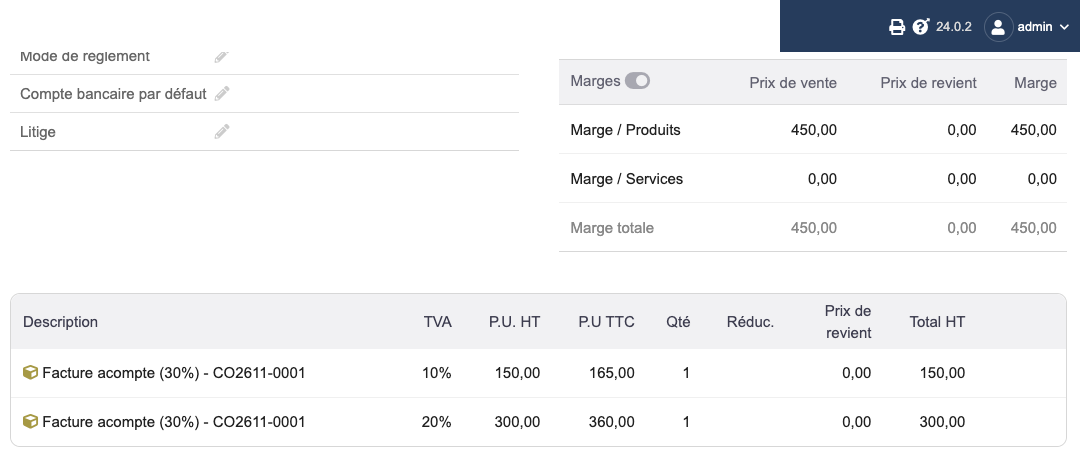
With 30 % “1 line”, Dolibarr creates one line per VAT rate: 300 at 20 % and 150 at 10 %. Both have a cost price of 0. The down payment shows 450 of margin on 450 of sales.
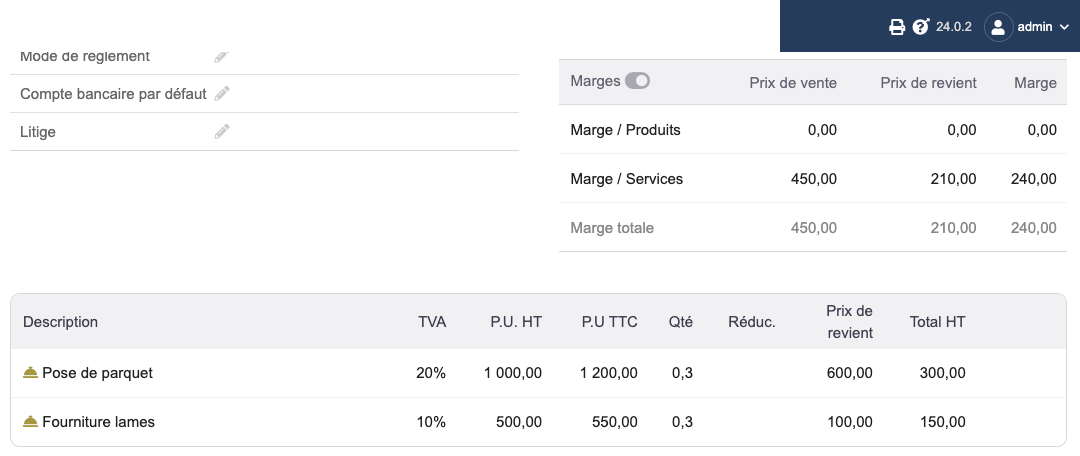
With 30 % “all lines from origin”, the down payment copies both lines with quantity 0.3 and their cost price: cost 210, margin 240, which is 30 % of the margin of the sale.
Also note: with Fixed amount, the down payment line was created with 0 % VAT (450 excl. tax, 0 %). Check the VAT of the line before validating if your down payment must carry VAT.
2. Deduct the down payment from the final invoice
In the test, paying the down payment in full turned it into available credits for the customer, one per VAT rate.
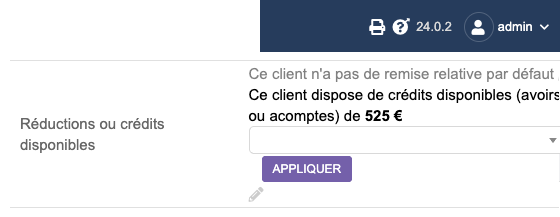
Then create the final invoice from the order (Standard invoice, 100 %). The down payment is not deducted automatically: in the Discounts or credits available box, choose each credit of the down payment, then Apply. There is one per VAT rate.
The final invoice gets one negative line per VAT rate. This line takes the cost price of the down payment invoice. With a “1 line” down payment, that cost is 0: the final invoice shows 350 of margin instead of 560.
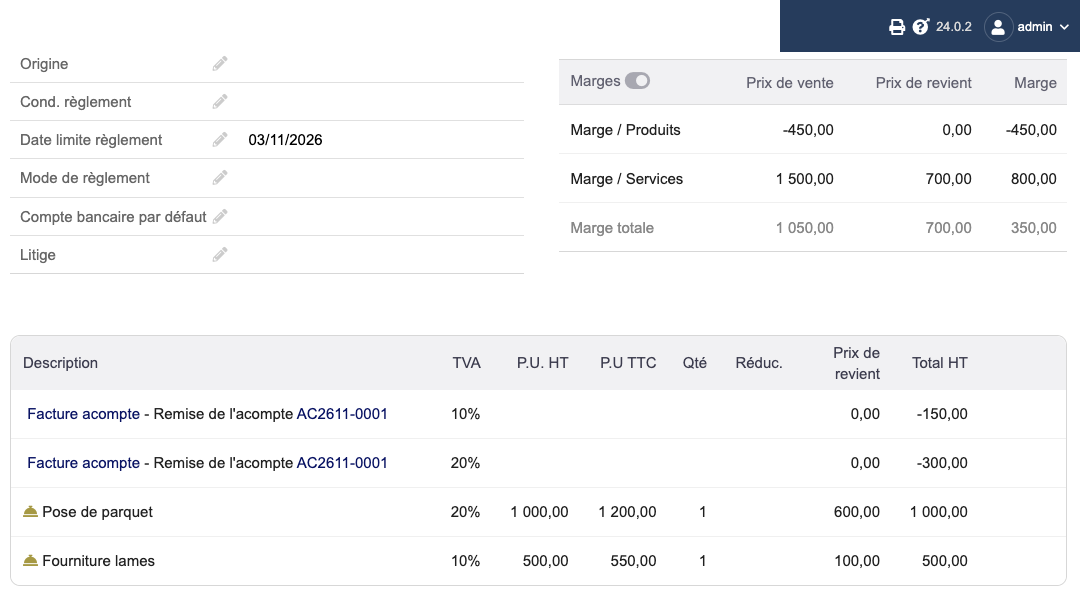
The margin is not lost, it is badly split: 450 on the down payment, 350 on the final invoice, 800 in total. The Margins > Margins by customer report adds up the invoices of the period (checked on 24.0.2 with fix #41476 applied: report total equal to the sum of the invoice margins). To follow the margin of a sale with a down payment, look at the period, not at one invoice.
Two limits, measured on 24.0.2 and 23.0.4:
- Several VAT rates in “all lines” mode: each deduction line of the final invoice gets the whole cost of the down payment (210 on each of the two lines instead of 180 and 30). The final invoice shows 770 of margin instead of 560, and the total over the period is overstated by as much. With a single VAT rate the result is right. The fix (#41476) is in the Dolibarr 24.0 branch since 13 October 2026, not yet in a released version at the time of the test.
- “1 line” down payment: the cost price of 0 has an issue (#42615) and a proposed fix (#42616): cost of the order prorated, like in “all lines” mode. Meanwhile, with a single VAT rate, you can edit the down payment line before validating it and set its amount excl. tax as cost price: the down payment then has 0 margin and the final invoice carries the whole margin of the sale (tested on 23.0.4 for an answer on the French Dolibarr forum).
3. The customer paid more than the down payment
Tested case: down payment of 525 incl. tax, the customer transfers 600. Record the real payment of 600 on the down payment invoice: Dolibarr 24.0.2 accepts it. The invoice stays open and the Mark as credit available button is active. It creates three credits: an excess received credit of 75 (no VAT) and the two credits of the down payment (165 and 360 incl. tax).
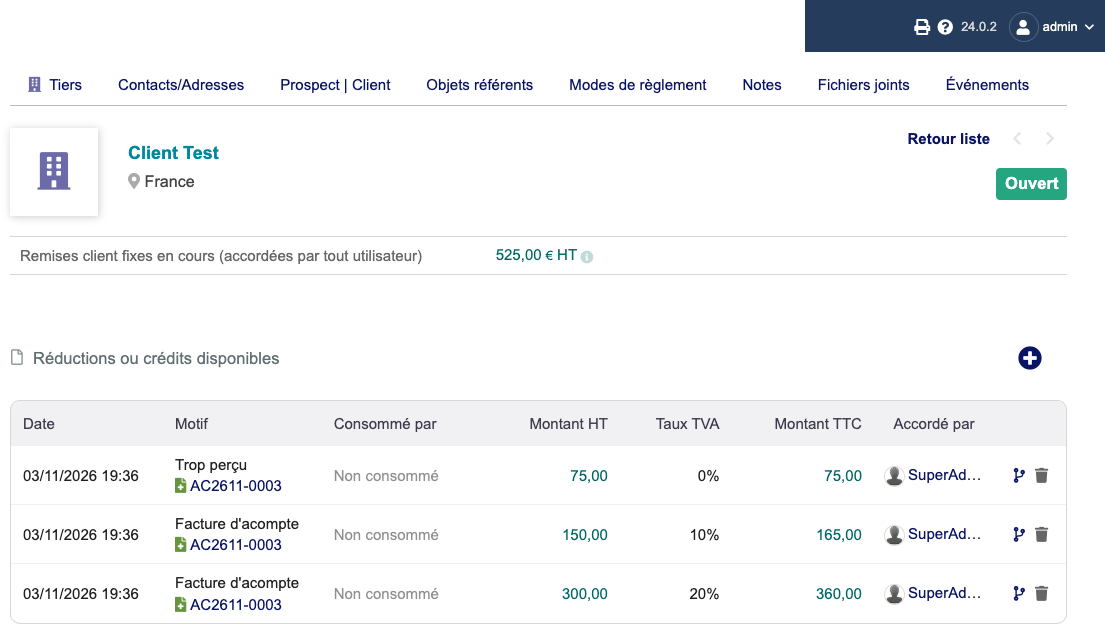
The excess joins the other available credits of the customer (using it on an invoice was not tested). A user reported on the forum that converting an overpaid down payment was blocked in 22.0.3: in 23.0.4 and 24.0.2 it works. Not tested: refunding the excess to the customer.
4. Split a down payment over several invoices
Dolibarr does not split a down payment by itself. You do it by hand, by splitting the credit:
- On the customer card, customer tab, click the amount of the Absolute discount line. The page of discounts and credits of the customer opens.
- Next to the credit to share, click the Split discount in two icon.
- Enter the two amounts incl. tax (their sum must equal the credit), choose Yes, then Validate.
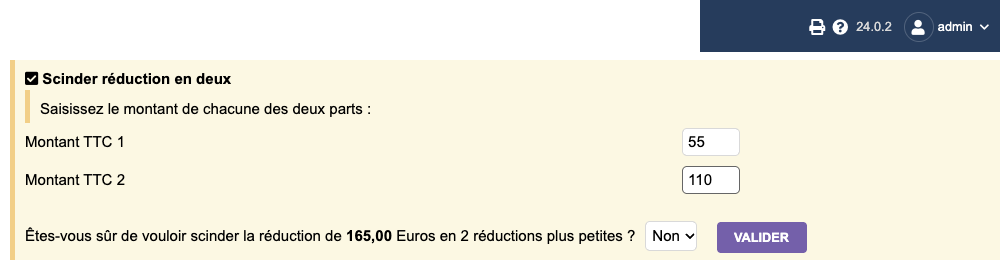
In the test, the credit of 360 incl. tax (VAT 20 %) became two credits of 120 and 240 incl. tax (100 and 200 excl. tax). The first one was applied on one invoice, the second on another: each got its own down payment line. For a down payment spread over ten invoices, you split the rest again each time.
5. The down payment in the PDF of the final invoice
On the PDF (sponge model), the down payment shows as negative lines, one per VAT rate. The totals table has no “Down payment” line: the amount is counted in Total discount.
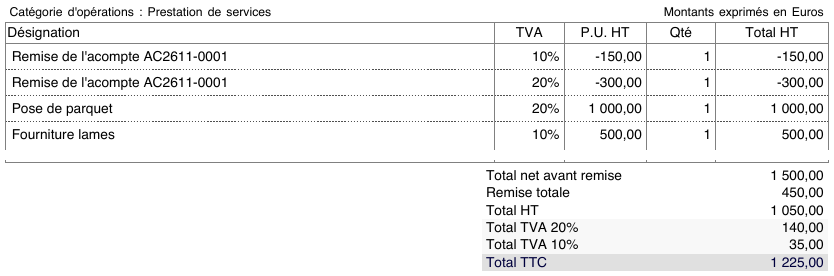
The total incl. tax is right (1,225 = 1,750 of the order minus 525 of down payment). The “Total discount” label may puzzle a customer or an accountant. It is known and open at Dolibarr: issue #37398.
How this was checked
On 3 November 2026, on a fresh Dolibarr 24.0.2 install (official Docker image, MariaDB 11.4), in French, driven by a browser like a user: order with two VAT rates and cost prices, down payment invoices in “1 line” (fixed amount and percentage) and “all lines from origin” modes, validation and payment, final invoice with the credits applied, PDF of the sponge model, payment of 600 on a down payment of 525, split of a credit used on two invoices. Each result was checked on screen and in the database. The same scenario replayed on Dolibarr 23.0.4 gave the same figures. Not tested: other versions, refund of an overpayment, supplier invoices.
Read also
- Track the margin per day on a job site with Dolibarr alone
- To see what is left to invoice on each order after a down payment: our module Remaining to bill.
Frequently asked questions
Why does my down payment invoice show 100 % margin in Dolibarr?
With the "Fixed amount" and "Variable amount (% tot.) - 1 line" modes, Dolibarr 24.0.2 creates the down payment line with a cost price of 0. The down payment shows 100 % margin and the final invoice loses the down payment amount in margin. The total of both invoices stays right. The "all lines from origin" mode keeps the cost price of each line.
What if the customer paid more than the down payment?
Record the real payment. In 24.0.2 the down payment invoice then stays open with the "Mark as credit available" button: it creates an excess received credit for the difference, on top of the credits of the down payment. They are listed with the available credits of the customer.
How to split a down payment over several invoices in Dolibarr?
Open the discounts and credits page of the customer, click the "Split discount in two" icon next to the credit, enter the two amounts including tax, then apply each part on a different invoice. There is no automatic split.