Dolibarr won't open?
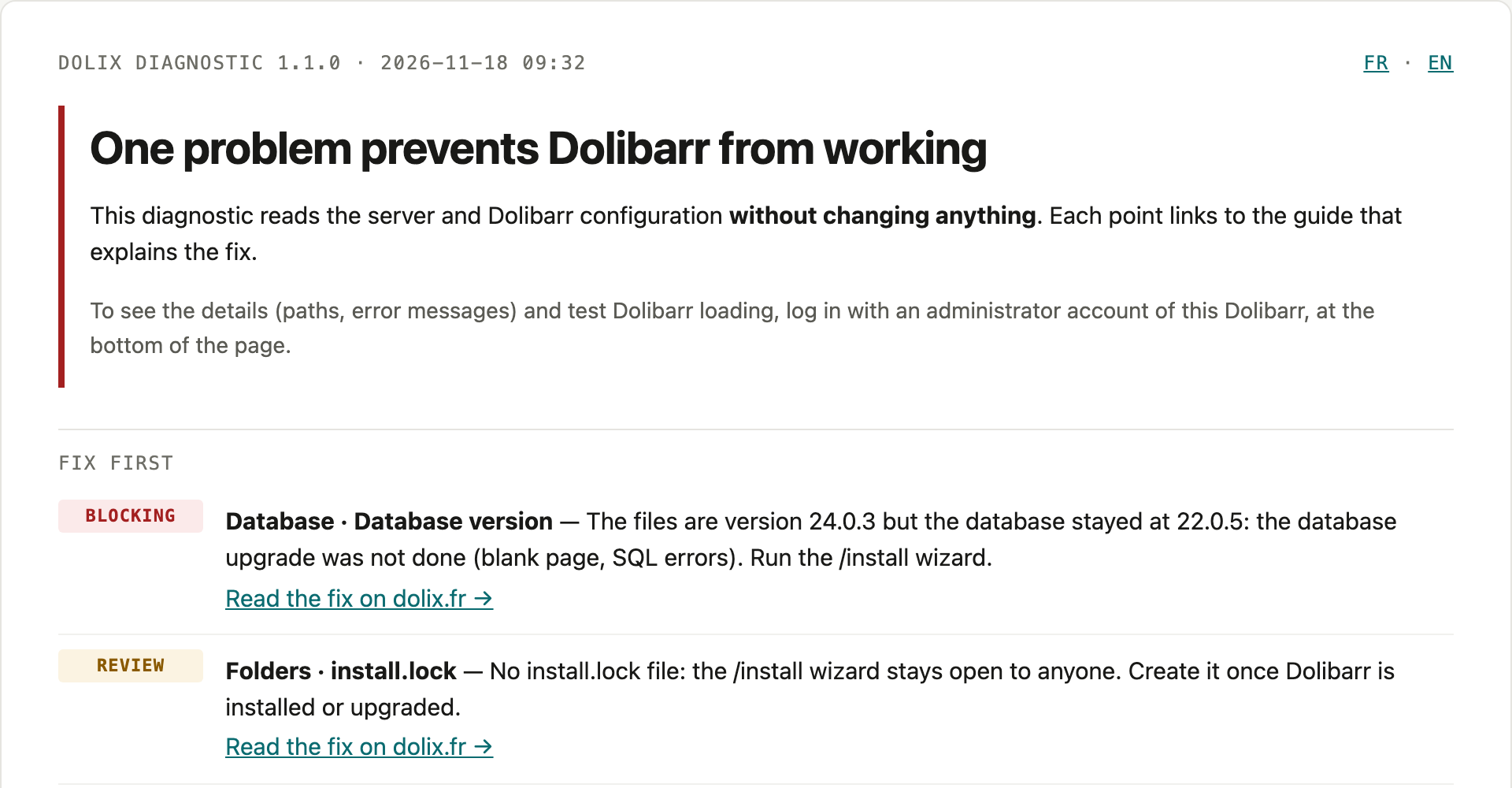
Error 500, blank page, “config file not correctly defined”, endless redirect to the installation page… When Dolibarr no longer starts, you cannot use a module to find out why. The Dolix diagnostic is a free file you put next to Dolibarr and open in your browser: it checks the server and the configuration without changing anything, and links each problem to the guide that explains the fix.
A single PHP file · Dolibarr 18 to 24 · PHP 7.0 or later · MySQL/MariaDB and PostgreSQL · English and French (it follows your browser) · free GPL v3 licence.
What it checks
- PHP: the version, compared with what your Dolibarr version needs, the required extensions (gd, curl, zip, mbstring…), intl, memory.
- The conf.php file: present, readable, without syntax error, the Dolibarr path (the cause of the “config file not correctly defined” message), the site address after a move, the file protection.
- The database: the connection with the conf.php settings (password refused, missing database, stopped server), then the database version compared with the files: a database left at the old version after an upgrade often gives a blank page.
- The folders: the documents folder, the
install.lockfile, PHP sessions. - Enabled external modules, the first suspects of an error 500 after an upgrade.
- Dolibarr loading: the script calls the login page from the server and tells whether it answers normally or with an error 500, with the last errors of the PHP log when it is readable.
Security
A diagnostic file on a public server has to be careful. This one:
- changes nothing: neither the database nor the files (except itself, if you ask to delete it);
- shows a visitor only yes/no, without path, database name or error message;
- shows the details only after logging in with an administrator account of your Dolibarr, checked in your own database, the way Dolibarr does;
- stops by itself 3 hours after upload, and offers a button to delete itself;
- never shows a password or the content of conf.php, and sends nothing outside.
How we checked it
On Dolibarr 18.0.9, 19.0.4, 20.0.4, 21.0.4, 22.0.5, 23.0.4 and 24.0.3, we caused real
failures, one by one, and checked that the diagnostic finds them: stopped database, wrong
database password, conf.php missing, with an empty path, a wrong path or a syntax error, database
left at an old version, Dolibarr in error 500, missing install.lock. We also checked that a
visitor who is not logged in sees no sensitive information, that a wrong password is refused, that
the file expires, and that every page is fully in English or fully in French.
Using it
- Download the zip above and unzip it.
- Put
dolix-diagnostic.phpin thehtdocsfolder of Dolibarr, next tomain.inc.php(by FTP, with your host’s file manager, ordocker cpwith Docker). - Open
https://your-dolibarr/dolix-diagnostic.php. - For the details, log in with your Dolibarr administrator account.
- When you are done, click Delete this file from the server.
What it does not do
- It repairs nothing: it shows the cause and links to the fix.
- It cannot read the web server log when the host does not let PHP read it (the case with Docker): it then tells you where to find it.
- If the database password is encrypted in conf.php, it does not test the connection.
Prefer us to look at it with you?
If the diagnostic is not enough, Dolix steps in remotely, at a fixed price: see the
services. Write to support@dolix.fr with what the diagnostic shows.