Accounting in Dolibarr: from the invoice to the export file
Dolibarr 24 double-entry accounting tested end to end: the chart of accounts, default accounts, the accounting period, invoice binding, journals and the export for your accountant, with the three traps that block a fresh install, and the French FEC file checked against the law.
Want someone to look at your instance? Diagnosis, fixed price €90.
What was checked (versions, tests, code read)
Tests on 22/10/2026 on a fresh Dolibarr 24.0.2 install with a French company, in the interface: module enabled, chart of accounts chosen and loaded, 9 default accounts, accounting period, bank account, third-party accounting codes, one sales invoice (a service and a product), one purchase invoice, two payments, automatic binding, Sales, Purchases and Bank journals recorded (11 balanced entries), FEC export, validation, closure. FEC file checked line by line against article A47 A-1 (Légifrance). Export code read (accountancyexport.class.php). Not tested: charts of other countries, other export formats, cash-basis VAT, currencies, fixed assets.
Dolibarr offers two accounting modules. Accounting (simplified) gives reports based directly on the data in the database, with no entries. Accounting (double entry) keeps real books: journals, ledger, balance, and exports for your accountant.
This guide follows the second one end to end, on a fresh Dolibarr 24.0.2 install with a French company, tested on 22 October 2026: from enabling the module to the export file. The French tax file (FEC) is covered at the end; the steps before it apply in any country.
In short: the three traps of a fresh install
- On our install, the preselected chart of accounts was PCG18-ASSOC, the French chart for non-profits, and no account was loaded. Choose your chart, then click Change and load.
- Without an accounting period, nothing is recorded. Dolibarr answers: “A mandatory step in setup has not been completed (Fiscal period is not defined)”.
- Journals open on the previous month. This month’s invoices only show after changing the period.
1. Enable the module
Home › Setup › Modules/Applications, search for “double” and enable Accounting (double entry). The Taxes & Special Expenses module is enabled with it. An Accounting menu appears at the top.
The Accounting › Setup page has a “Show Tutorial” link listing the steps in order. This guide follows them.
2. Choose the right chart of accounts
Accounting › Setup › Chart of accounts. Pick your chart in the list and click Change and load; Dolibarr answers “Chart of account loaded”. For our French company we chose FR - PCG25-DEV (the French general chart, 2025 version): 838 accounts became available. The list also offers, for example, SKR03 and SKR04 for Germany and ENG-BASE for England; we did not test them.

3. Default accounts
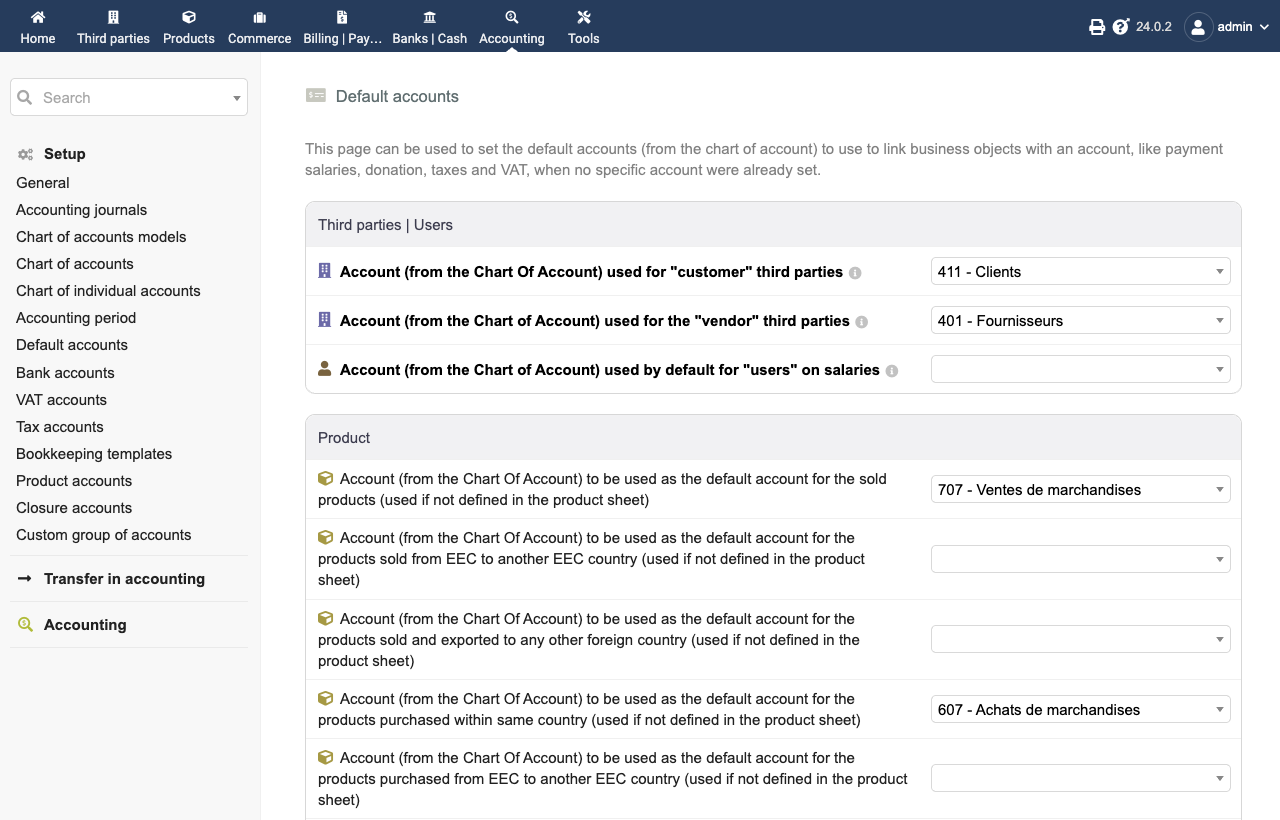
Accounting › Setup › Default accounts. The screen has 31 lines, all empty except internal transfers and suspense. These accounts are used when neither the product nor the third party has its own account. With the French chart, these nine were enough for our test: customers 411, suppliers 401, products sold 707, services sold 706, products bought 607, services bought 604, VAT on sales 44571, VAT on purchases 44566, VAT payment 44551. With another chart, ask your accountant for the equivalents. Click Save at the bottom of the page.
4. The accounting period (mandatory)
Accounting › Setup › Accounting period, then New accounting period: a label (2026), a start date and an end date. Without it, recording into journals is refused with the message quoted above.
5. Bank and third parties
The bank account. On each bank account card (Banks | Cash), fill in the Accounting code (512 in the French chart) and the Accounting code journal (BQ). Payments then go through them.
One subsidiary account per customer. By default Dolibarr creates no accounting code for third
parties (module “Panicum”, which returns an empty accounting code). In our test, all customers ended
up under the same subsidiary account, 411. In Home › Setup › Modules/Applications, settings of
the Third parties module, choose Aquarium: each new customer gets a code such as
411CU261000002 (411 followed by its customer code), each new supplier 401…. Third parties created
before keep an empty code: fill it in on their card.
6. Every month: bind, then record
Bind invoice lines. Accounting › Transfer in accounting › Customer invoice binding, then the Bind Automatically button. In our test: “Automatic bindings done (2)”, the service to 706 and the product to 707. Same in Vendor invoice binding: the purchase was bound to 607.
Record the entries. Under Transfer in accounting, open the Sales journal. Careful: the Analysis period opens on the previous month. Set the dates you want, click Refresh, check the proposed lines, then Record transactions in accounting. Dolibarr answers “Transactions are written in the Ledger”. Do the same with Purchases and Bank.
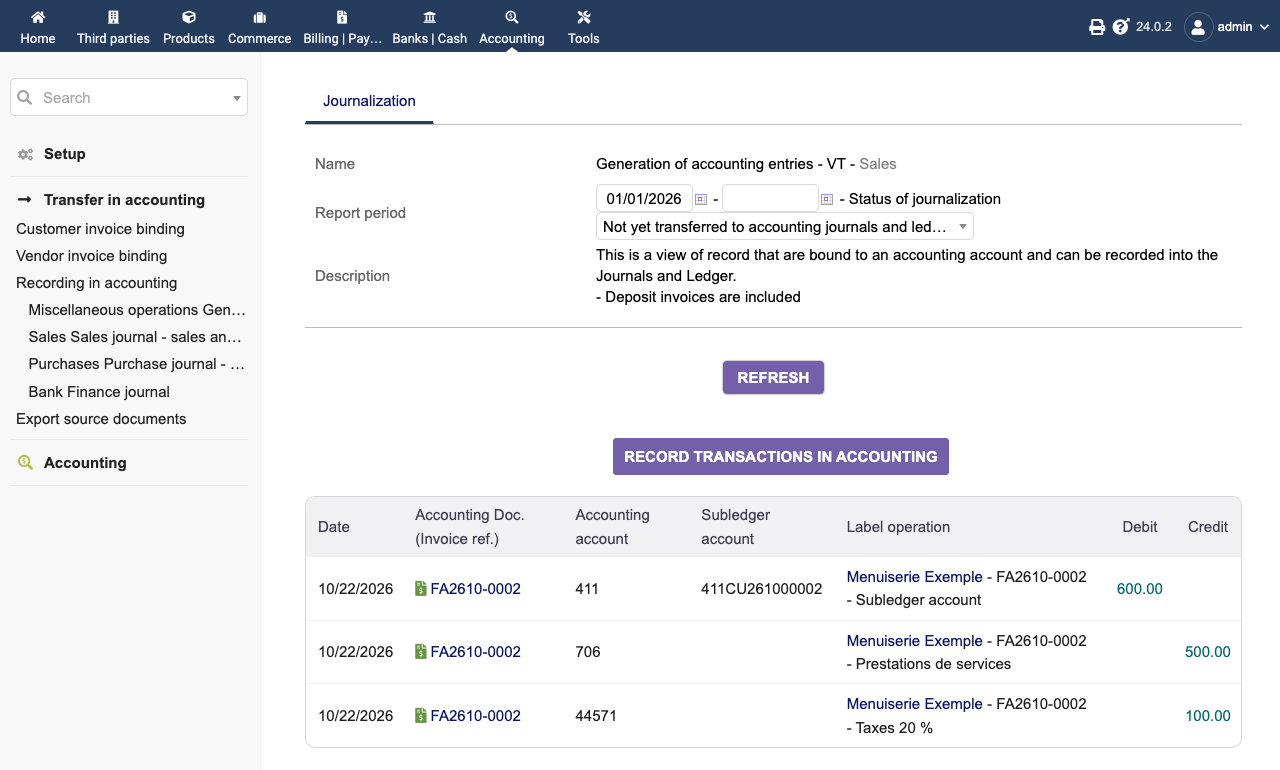
In our test, a sale of €678 excl. VAT, a purchase of €100 excl. VAT and both payments gave 11 entries in 4 transactions, balanced (€1,867.20 debit and credit).
7. Export for your accountant
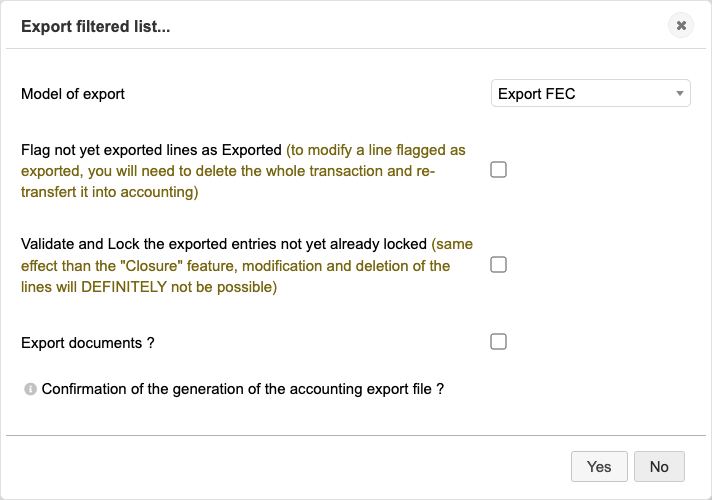
Accounting › Export accountancy, button Export filtered list, then choose the Model of export and Yes. Dolibarr 24 offers about twenty formats for accounting software (EBP, Cegid, Sage, Quadratus…), plus a configurable export and the French FEC. We saw no DATEV format in the list. We only tested the FEC.
France: the FEC file
The FEC is the file a French company hands to the tax administration at the start of a tax audit
when its books are kept on computer (article L47 A of the Livre des procédures fiscales). We checked
the exported file against article A47 A-1: name SirenFECYYYYMMDD.txt, tab separator, field names on
the first line, the 18 official fields in order followed by 3 columns added by Dolibarr (allowed: the
file must contain all accounting data, the first 18 matching the official table), dates as YYYYMMDD,
comma decimals, continuous entry numbers, each entry balanced.
The validation date trap. On our first export, the ValidDate column was empty on all 11 lines, because the entries were not validated yet; the law does not allow it to be empty. The box Validate and Lock the exported entries in the same window does validate them… but after producing the file, which stays without the date. So validate first (see below), then export. Our second export had the validation date on every line.
8. Validate and close
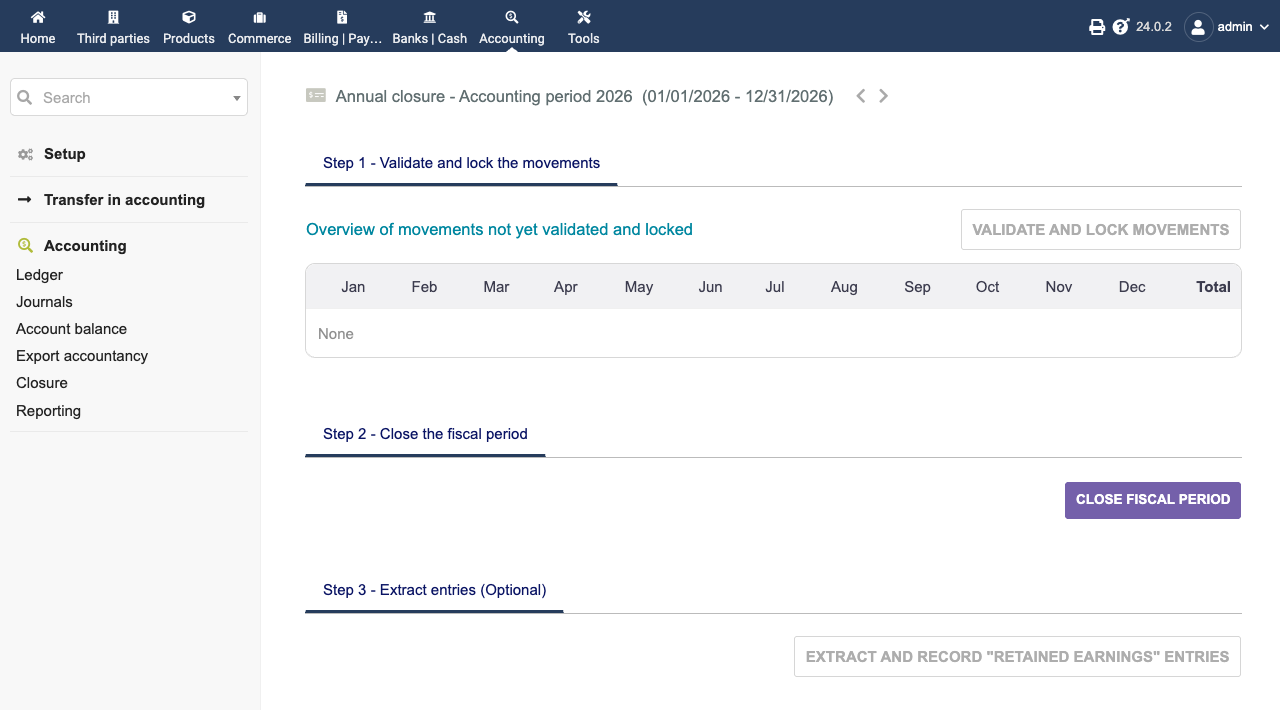
Accounting › Closure shows three steps: Validate and lock the movements, Close the fiscal period, then, if needed, reverse inventory-type entries into the next period. A validated entry can no longer be modified or deleted: the export window says so (“DEFINITELY not be possible”). Have your books reviewed first.
What we did not test
- Charts of accounts and rules of countries other than France.
- Export formats other than the FEC, and their import into other software.
- Cash-basis VAT, currencies, deposits, fixed assets, expense reports.
Your accountant remains the right person to approve the chart of accounts and the VAT settings.
How this was verified
On 22 October 2026, on a fresh install (official Docker image dolibarr/dolibarr:24.0.2), every step
done in the interface, as a user. Entries read in the database after each recording. FEC file
checked by a script (name, separator, field order, date and amount formats, balance, numbering)
against the text of article
A47 A-1 and article
L47 A of the Livre des
procédures fiscales, read on Légifrance the same day. Export code read in Dolibarr 24.0.2
(accountancy/class/accountancyexport.class.php).