· updated
Dolibarr as a CRM: prospects, follow-ups, leads and a public contact form
Using Dolibarr 24 as a CRM, tested end to end: qualify prospects, schedule follow-ups with reminders, track leads in a pipeline, go from signed quote to customer, receive requests through a public form. With the settings to make and what Dolibarr does not do on its own.
Rather have it done for you? Installation and setup, fixed price €690.
What was checked (versions, tests, code read)
Tests on 22/10/2026 on a fresh Dolibarr 24.0.2 install (official Docker image, MariaDB 11.4), driven by a browser like a user: module activation, prospect creation, status and potential, prospect list, follow-up with reminder, leads and the Kanban view, quote created from the lead then signed, public form sent by a visitor who was not logged in. Results checked on screen and in the database. Source code read for the behaviours quoted (quote signature, public form).
Dolibarr is a simple CRM with no module to buy: prospect records with a status and a potential, an agenda for follow-ups, leads with an amount and a pipeline, and even a public contact form. Everything is in modules shipped with the software; you only need to enable them and make two settings that Dolibarr does not suggest by itself.
This guide follows a real path, tested on 22 October 2026 on Dolibarr 24.0.2: a prospect, a follow-up, a lead, a signed quote, then a request received through the public form. Screen labels are those of the English interface.
In short
| Need | Where in Dolibarr | Setting needed |
|---|---|---|
| Prospect records, status, potential | Third parties > New Prospect, Prospect tab | None |
| Follow-ups, meetings, reminders | Events/Agenda tab of the prospect | Event types and reminders to enable |
| Leads with amount and probability | Projects > New lead or project | None (enabled with Projects) |
| Pipeline | Projects > List open leads > Kanban view (grouped by) | None |
| Requests from your website | Public form of Projects | Default status required |
1. Modules to enable
In Home > Setup > Modules, enable: Third Parties (on by default), Proposals, Projects or Leads, Events/Agenda and, to classify your prospects, Tags/Categories. None of them triggered any other activation during the test.
Leads need nothing more: the option is on as soon as the Projects module is.
2. Prospects
Create and qualify
Third parties > New Prospect opens the form with the Prospect box ticked. Status and potential are not in this form: you set them afterwards in the Prospect tab of the record.
- Prospect potential (pencil): None, Low, Medium, High.
- Prospect status (icons on the right): Do not contact, Never contacted, To be contacted, Contact in process, Contact done. A new prospect is “Never contacted”.
Dolibarr records the creation and every change of the record in the agenda on its own.
Follow the list
Third parties > Prospects shows the potential and the status of each record. The status can be changed right in the list, with the drop-down on each row (saved immediately, checked in the database). The filters at the top of the columns select one or more potentials and statuses.
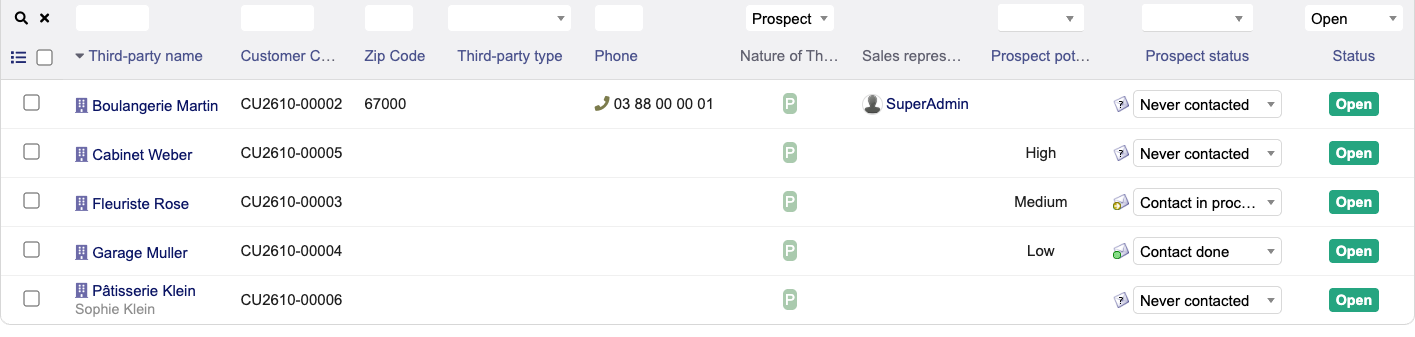
The list’s mass actions can send an email, assign a tag or a sales representative, close or delete. They cannot change the prospect status or turn prospects into customers.
Pitfall: duplicates
Dolibarr accepts two prospects with the same name without any warning: during the test, a second “Boulangerie Martin”, with the same phone number, was created with no message. They then show up side by side in selection lists (the same name twice when creating a lead).
The Merge button of a record merges two third parties, but you first need to know which ones: Dolibarr does not look for duplicates. That is what our Duplicate finder module does. To block them at entry (uniqueness rules) and merge them without a module, see Duplicates in Dolibarr.
3. Follow-ups: the agenda
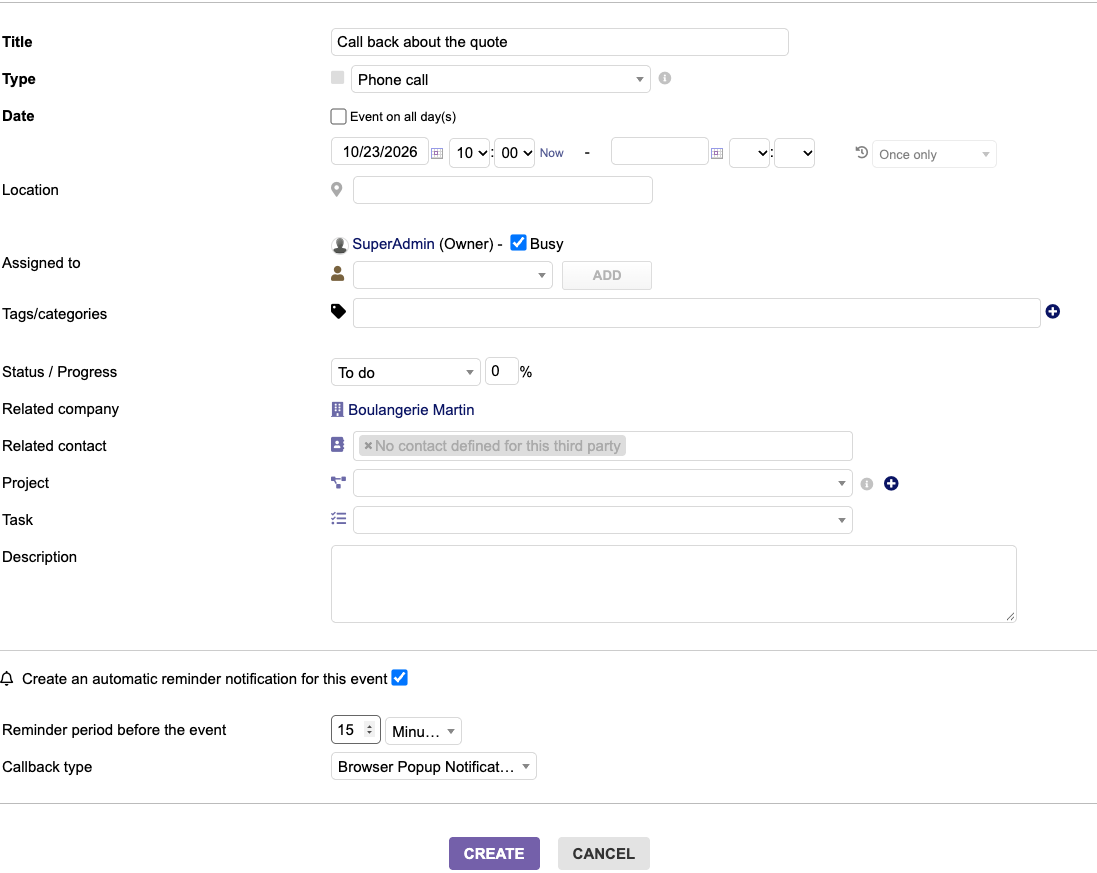
From the prospect’s Events/Agenda tab, New event opens a form already linked to the third party. By default, there is no event type (call, meeting…) and no reminder. Two settings in the setup of the Agenda module:
- Miscellaneous tab: enable “Use events types”. The form then offers Meetings, Phone call, Intervention on site, Other.
- Reminders tab: enable “Allow event reminders on user’s browser”. Reminders by email and SMS also require the Scheduled jobs module, and a scheduled task on the server.
Tested: a phone call the next day at 10:00, state To do, reminder 15 minutes before. Dolibarr saved the event and a browser reminder for 9:45; the call shows in the list of events to do. The form also lets you repeat the event (every week, month or year).
4. Leads and the pipeline
A lead is a project with Follow opportunity ticked (it is by default). Projects > New lead or project asks for the third party, a label, the Lead status and the Lead amount. Choosing the status fills in the probability: Qualification gave 20% in the test.
| Status | Probability |
|---|---|
| Prospection | 0% |
| Qualification | 20% |
| Proposal | 40% |
| Negotiation | 60% |
| Won | 100% |
| Lost | 0% |
The Projects home page adds up open leads. With four leads (€4,800 at 20%, €2,500 at 40%, €6,000 at 60%, €1,200 at 0%), it showed a total amount of €14,500 and a weighted amount of €5,560, exactly the expected result.
The pipeline: in Projects > List open leads, the Kanban view (grouped by) button lays leads out in columns by status, with the amount and the probability on each card. Won and Lost are collapsed.
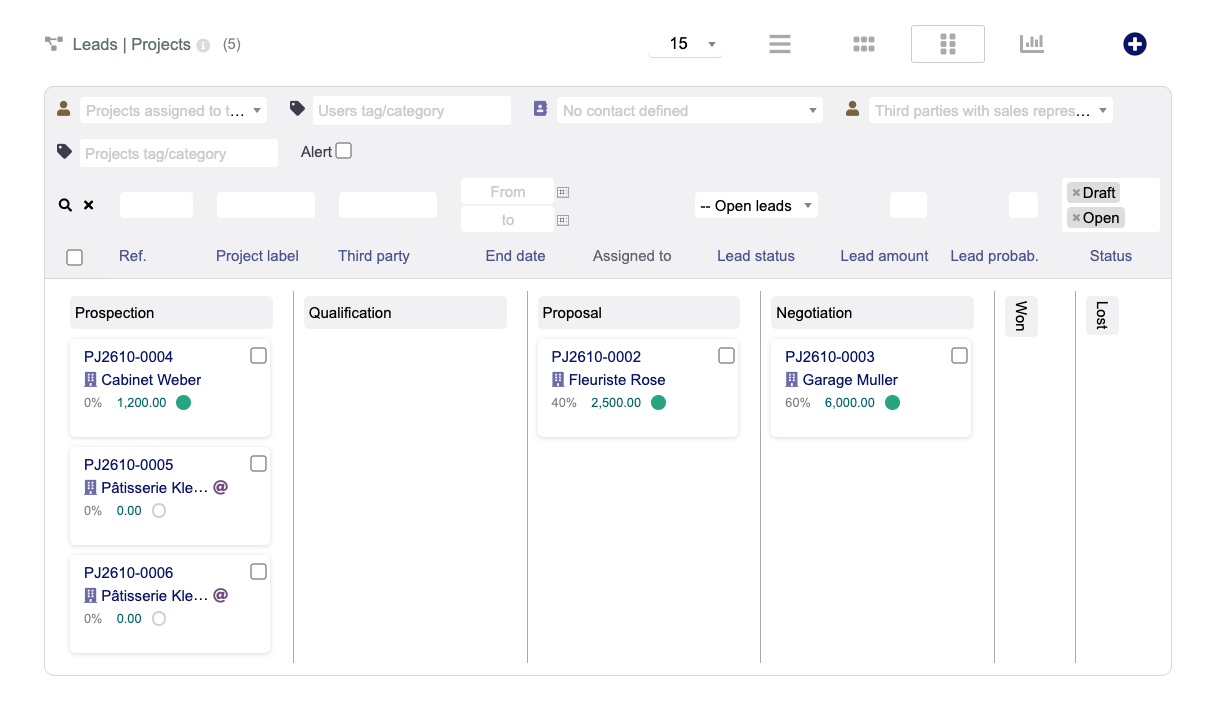
One limit seen in 24.0.2: cards cannot be moved from one column to another. To change the status, open the lead and edit it. (In other interface languages, some column titles also stay in English: the view prints the raw dictionary label instead of its translation.)
5. From signed quote to customer
On the lead, Create proposal opens a quote already linked to the third party and the lead. In the test: one line of €4,800 excl. VAT, quote validated, then Set accepted/refused > Signed.
What Dolibarr does on its own when the quote is signed:
- the prospect becomes a customer. The Prospect box is removed (the third party is no longer “Prospect / Customer”);
- the prospect status does not change.
What it does not do: the lead keeps its status (Qualification, 20% in the test). Set it to Won by hand: the probability goes to 100% and the lead leaves the “open” amounts of the home page (€14,500€9,700). Otherwise your pipeline still counts deals that are already signed.
6. Receiving requests through a public form
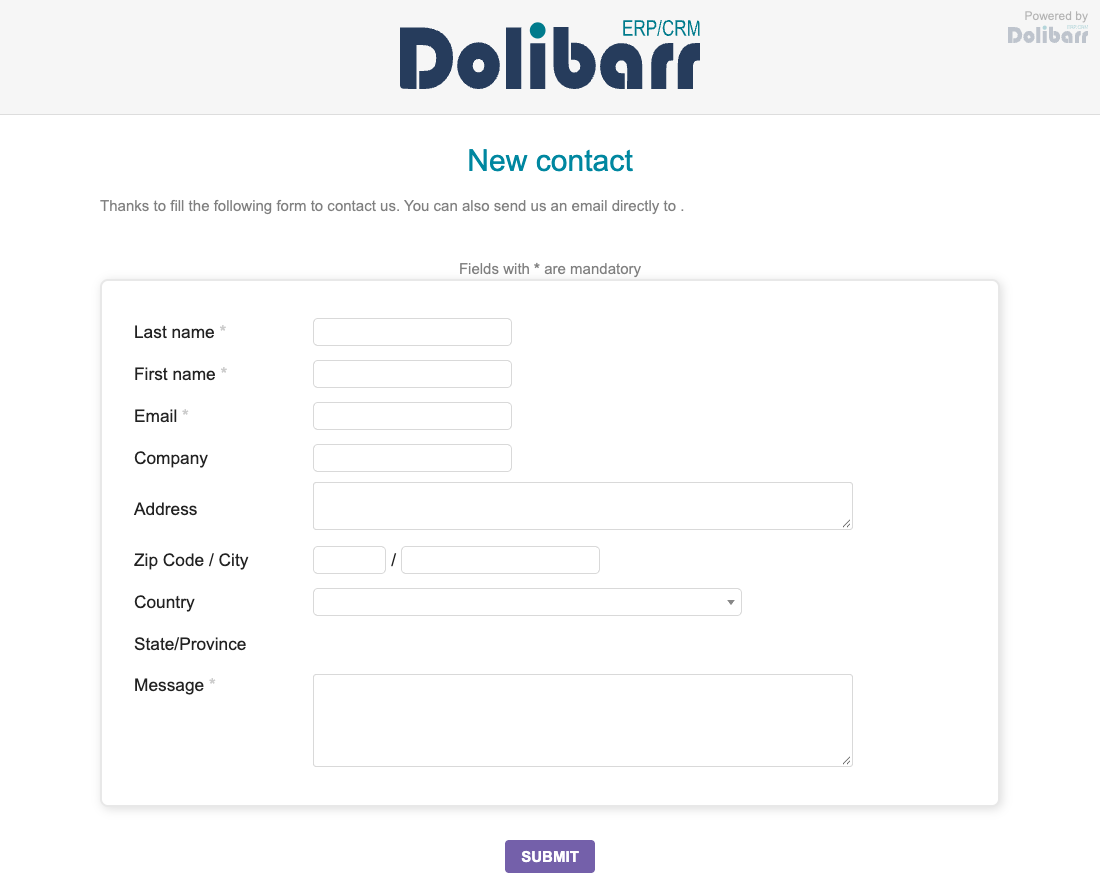
Dolibarr can publish a contact form whose every submission becomes a prospect and a lead. In the setup of the Projects module, Public self-registration form tab:
- enable “Enable the public form for contact”; the form address is shown
(
https://your-dolibarr/public/project/new.php); - choose the default lead status, for example Prospection, and save.
Without step 2, the form is displayed but rejects every submission. The visitor reads “Setup of module Project looks to be incomplete”, and nothing is saved.
What one submission created in the test (visitor not logged in):
- a prospect named after the company entered, with the person’s name as alternative name, the email and the town, status “Never contacted”;
- a draft lead titled after the public form, with the chosen status and the visitor’s message as description;
- the matching events in the agenda.
A second request with the same email was attached to the same prospect, with a new lead. Three things to know:
- no contact is created: the person only exists in the third party’s alternative name;
- the postcode entered is not saved in 24.0.2: the form sends a field named
zipcodewhile the code readszip(the town is saved); - fill in your company email (Setup > Company/Organization), otherwise the form’s intro sentence ends with “send us an email directly to .”.
Against abuse, Dolibarr limits submissions by default to 200 per IP address per month (setting
MAIN_SECURITY_MAX_POST_ON_PUBLIC_PAGES_BY_IP_ADDRESS).
What Dolibarr does not do on its own
- Spot duplicates: nothing warns you when entering a record, and merging is done one record at a time. Our Duplicate finder module finds and merges them.
- Turn a series of prospects into customers (or change the same field on many records): mass actions do not offer it. Our Bulk field update module does.
- Update the lead when the quote is signed, and move pipeline cards: to be done by hand.
- Email reminders: they require the Scheduled jobs module and a scheduled task on the server, plus working email sending (SMTP setup).
How this was verified
On 22 October 2026, on a fresh Dolibarr 24.0.2 install (official Docker image, MariaDB 11.4), driven by a browser like a user: modules enabled from the Modules page, prospects created through the form, status and potential in the Prospect tab and in the list, follow-up with reminder, four leads and the Kanban view, quote created from the lead then signed, public form sent twice by a visitor who was not logged in. Every result was checked on screen and in the database. The behaviour on quote signature and the postcode of the public form were also read in the 24.0.2 source code. Not tested: mass emailing, reminders by email and SMS, other Dolibarr versions.
See also
Frequently asked questions
Can Dolibarr be used as a standalone CRM without third-party add-ons?
Yes. Dolibarr provides built-in lead management with status and potential ratings, an opportunity pipeline with Kanban view, follow-up scheduling with agenda reminders, and a public web contact form.
How does a signed quote convert a lead into a customer in Dolibarr?
When a lead signs their proposal (either online via the public link or through manual validation), the quote status becomes 'Signed'. Dolibarr then automatically updates the third party from lead to customer.
How to capture website leads directly into Dolibarr?
In the setup of the Projects module, Public self-registration form tab, enable the public contact form and choose the default lead status (without it, every submission is refused). Each visitor submission then creates a prospect and a draft lead.