· updated
Duplicates in Dolibarr: prevent them, find them and merge third parties, contacts and members
Dolibarr 24 accepts two identical customers or contacts without a warning. The uniqueness rules to enable (email, company IDs, VAT number) and their limits, how to find duplicates, and the built-in merge of third parties and members, tested. Contacts cannot be merged.
Want someone to look at your instance? Diagnosis, fixed price €90.
What was checked (versions, tests, code read)
Tests on 22/10/2026 on a fresh Dolibarr 24.0.2 install (official Docker image, MariaDB 11.4), driven by a browser like a user: duplicate third parties and contacts created through the form, list sorted and searched, uniqueness rules for email and the first company ID (French SIREN) enabled then tested, editing an existing duplicate, merge of two third parties (with a contact and a quote), merge of two members. Results checked on screen and in the database. Not tested: other Dolibarr versions.
After a few months, the same customer ends up entered twice: “Cabinet Vaillant” and “SARL Cabinet Vaillant”, quotes on one, invoices on the other. Dolibarr does not prevent it by default. It offers rules to block some duplicates and a merge to join two records, with limits worth knowing before using them.
Everything below was tested on 22 October 2026 on Dolibarr 24.0.2. The company IDs depend on the country of your company: the test used a French company (SIREN, SIRET…); other countries have their own IDs in the same places.
In short
| Warning when entering | Rule to prevent it | Merge in Dolibarr | |
|---|---|---|---|
| Third parties (customers, prospects, suppliers) | None | Yes: email, company IDs, VAT number… | Yes, Merge button |
| Contacts | None | No | No |
| Members | None on name or email | No (only the login must be unique) | Yes, Merge button (24.0.2) |
1. Dolibarr accepts duplicates without a word
In the test, “Cabinet Vaillant” then “SARL Cabinet Vaillant” were created through the form, with the same email
(once in capitals) and the same phone (03 88 12 34 56 and +33 3 88 12 34 56). No message. Dolibarr saved both
emails in lower case, so identical, and both phones without spaces, so different.
Same for contacts: a second “Paul Vaillant”, same third party, same email, was created without a warning.
2. Preventing duplicates: uniqueness rules
In the setup of the Third Parties module (Home > Setup > Modules, Third Parties), the Rules for Professional IDs table has a Must be unique? column. It exists for the six professional IDs of your country, the email, the EUID and the VAT number.
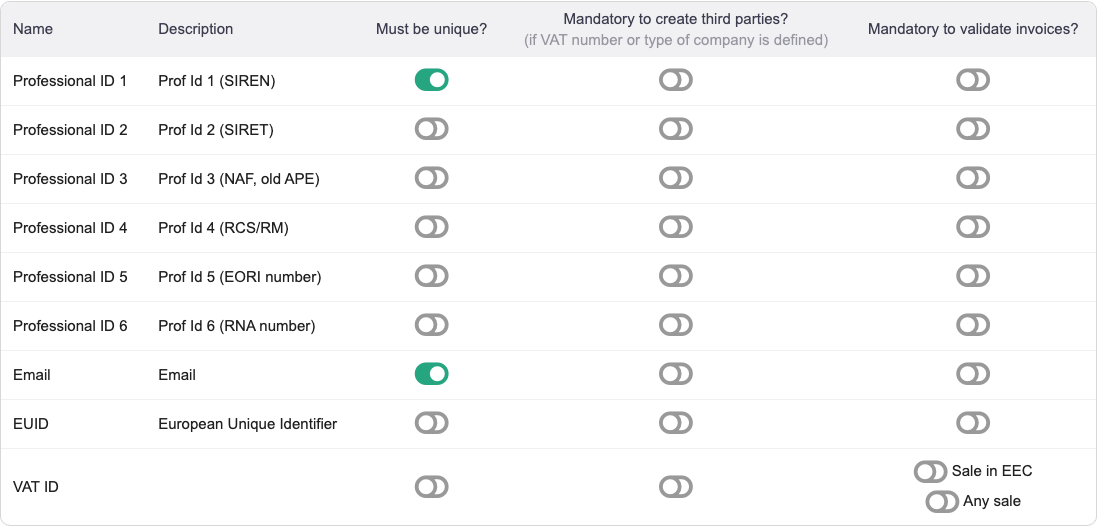
Tested with email and the first professional ID (SIREN) enabled:
- a new third party with the same email is rejected, even written in capitals: “Email … is assigned to another third (Forbidden by setup rules)”;
- a new third party with the same SIREN is rejected with the same message.
Three limits seen in the test:
- The check compares the text entered. The same SIREN pasted with spaces was accepted. The form even cut it to 9 characters, spaces included: the record got a wrong number.
- Existing duplicates are not reported, and they can no longer be edited. Once the email rule was on, changing only the town of “SARL Cabinet Vaillant” was rejected with the same message, because its email is also the one of “Cabinet Vaillant”. Deal with existing duplicates before enabling the rule.
- There is no rule on the name, the phone, or for contacts.
3. Finding duplicates by hand
Dolibarr has no duplicate search. The third party list helps little: sorted by name, it puts “Cabinet Vaillant” 2nd and “SARL Cabinet Vaillant” 7th out of 8, with their phone written two ways.
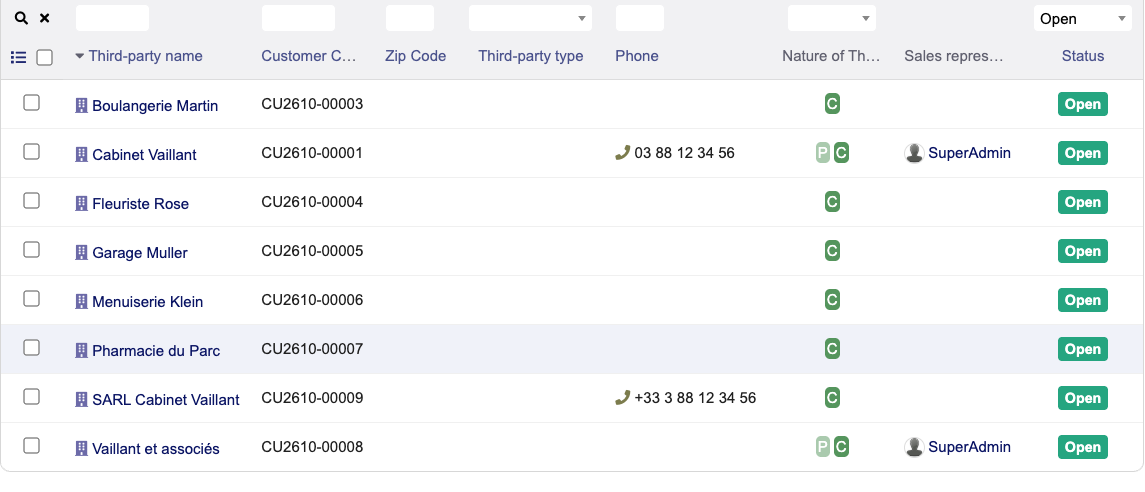
Searching for a word of the name (“vaillant”) or filtering on the email does show them together, provided you suspect the duplicate. Over hundreds of records, you have to repeat it customer by customer.
4. Merging two third parties
- Open the record to keep.
- Click Merge. The button is only active for a user allowed to delete third parties.
- In the window, choose the duplicated third party, the one that will be deleted, then Yes.
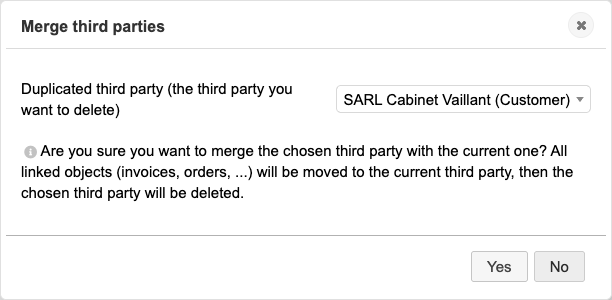
Test result, merging “SARL Cabinet Vaillant” into “Cabinet Vaillant”:
- message “Third parties have been merged”, and “SARL Cabinet Vaillant” deleted;
- its contact and its validated quote moved to “Cabinet Vaillant”;
- the town, empty on the kept record, was taken from the duplicate (Strasbourg); the phone of the kept record did not change;
- the agenda keeps a trace of the deletion and of the change.
The merge is final. The window lists every third party in the database: a wrong choice deletes the wrong record. Make a backup before a series of merges.
5. Contacts and members
Contacts: the contact record of Dolibarr 24.0.2 has no Merge button (buttons seen in the test: Send email, Modify, Disable, Delete). A duplicate contact has to be fixed by hand: move what is linked to it (roles on quotes and invoices, events…) to the other record, then delete it.
Members: the record has a Merge button in 24.0.2. Tested with two “Anne Durand” with the same email: message “Members have been merged”, a single record left.
Finding duplicates automatically
This is what Dolibarr lacks, and what our Duplicate finder module does. It compares third parties, contacts and members on the criteria you tick: same email, same name (ignoring accents, punctuation and legal forms such as SARL, SAS, GmbH or Ltd), same phone whatever the format, same company ID or VAT number. It shows the matching records in groups, then merges them: with Dolibarr’s merge for third parties, with its own for contacts and members. “Cabinet Vaillant” and “SARL Cabinet Vaillant” are typically in the same group.
How this was verified
On 22 October 2026, on a fresh Dolibarr 24.0.2 install (official Docker image, MariaDB 11.4), driven by a browser like a user: duplicate third parties and contacts created through the form, list sorted by name and searched, uniqueness rules for email and SIREN enabled in the setup then tested, editing an existing duplicate, merge of two third parties with a contact and a validated quote, merge of two members. Every result was checked on screen and in the database. Not tested: other Dolibarr versions.
See also
Frequently asked questions
Why does Dolibarr allow duplicate customers by default?
On a fresh installation, Dolibarr does not check names, emails, or company numbers for uniqueness. You must activate specific uniqueness constraints in Setup > Modules > Third Parties (e.g. unique email or tax registration number).
How to merge duplicate customers or leads in Dolibarr?
Open the third party record to keep, click the Merge button (only active if you are allowed to delete third parties), choose the duplicated third party, the one that will be deleted, then Yes. In our test, its contact and its validated quote moved to the kept record. The merge is final: make a backup first.
Can duplicate contacts be merged in standard Dolibarr?
No. In Dolibarr 24.0.2 only third parties and members have a Merge button; the contact record has none. A duplicate contact has to be fixed by hand: move what is linked to it (roles on quotes and invoices, events…) to the other record, then delete it. Our Duplicate finder module can also merge contacts.