Dolibarr or Odoo? Both installed and compared on the same case
Dolibarr 24 and Odoo 20 installed side by side and tested on the same case, from quote to payment: what is really free, the real cost for 3 users, e-invoicing, stock, what each one does better, and how to move from Odoo to Dolibarr.
Rather have it done for you? Installation and setup, fixed price €690.
What was checked (versions, tests, code read)
Tests on 22/10/2026 on two fresh installs, side by side in Docker: Dolibarr 24.0.2 with MariaDB 11.4, Odoo 20.0 Community with PostgreSQL 16. Same case in both: one customer, one service and one stocked product, quote, order, delivery, validated invoice, payment, PDF. Odoo's Factur-X produced, then checked with the official EN 16931 rules of CEN. Dolibarr's stock decrease rule checked in the screen. Customers exported from Odoo and imported into Dolibarr with its wizard. Image size and memory measured. Licences read in both projects' GitHub repositories, prices read on odoo.com and dolicloud.com on 22/10/2026. Not tested: Odoo Enterprise and its paid apps.
Dolibarr and Odoo are the two open source business applications small companies mention most. Comparisons online line up ratings and feature lists. We did something else: install both, then run the same case from quote to payment in each one, on 22 October 2026.
One thing first: Dolix sells modules and services for Dolibarr. We have an interest in you choosing Dolibarr. That is why every statement below comes from a test or a quoted source, and why there is a section called “What Odoo does better”.
In short
- Choose Dolibarr if you are a small organisation (tradesperson, shop, non-profit, service company) and want software that is entirely free, light, and can be hosted almost anywhere.
- Choose Odoo if you want a more modern interface and a very large catalogue of apps, and you accept paying a per-user subscription for part of the features, including full accounting.
- In both, the everyday case (quote, order, delivery, invoice, payment) works right after installation: we ran it without adding any module.
The test bench
Two fresh installs on the same computer, with the official Docker images:
| Dolibarr | Odoo | |
|---|---|---|
| Version | 24.0.2 | 20.0 Community |
| Database | MariaDB 11.4 | PostgreSQL 16 |
| Language | PHP 8.2 | Python 3.12 |
| Disk space (software + database) | 1.4 GB + 0.5 GB | 3.5 GB + 0.7 GB |
| Memory at rest, then after the test | 260 then 340 MB | 460 then 680 MB |
In Odoo we installed the Sales, Inventory and Invoicing apps (30 seconds). In Dolibarr, the Third parties, Commercial proposals, Sales orders, Invoices, Products, Stocks, Shipments and Banks modules. Fictitious company “Atelier Démo”, fictitious customer “Boulangerie Démo SARL”.
The same case, in both
A service at €690 excl. VAT, a stocked product at €89 excl. VAT (10 in stock), then: a quote with 1 service and 2 products, order, delivery, invoice, payment, PDF.
| Step | Dolibarr 24 | Odoo 20 Community |
|---|---|---|
| Quote | €868 excl. VAT, €173.60 VAT, €1,041.60 incl. VAT | Same amounts |
| Order | Created from the signed quote | The confirmed quote becomes the order |
| Delivery | Shipment created from the order | Delivery order created automatically on confirmation |
| Stock after delivery | Unchanged (10): see below | 8 |
| Invoice | Created from the order, validated | Created from the order, posted |
| Payment | Invoice set to “Paid” | Invoice “Paid” |
| Yes | Yes |
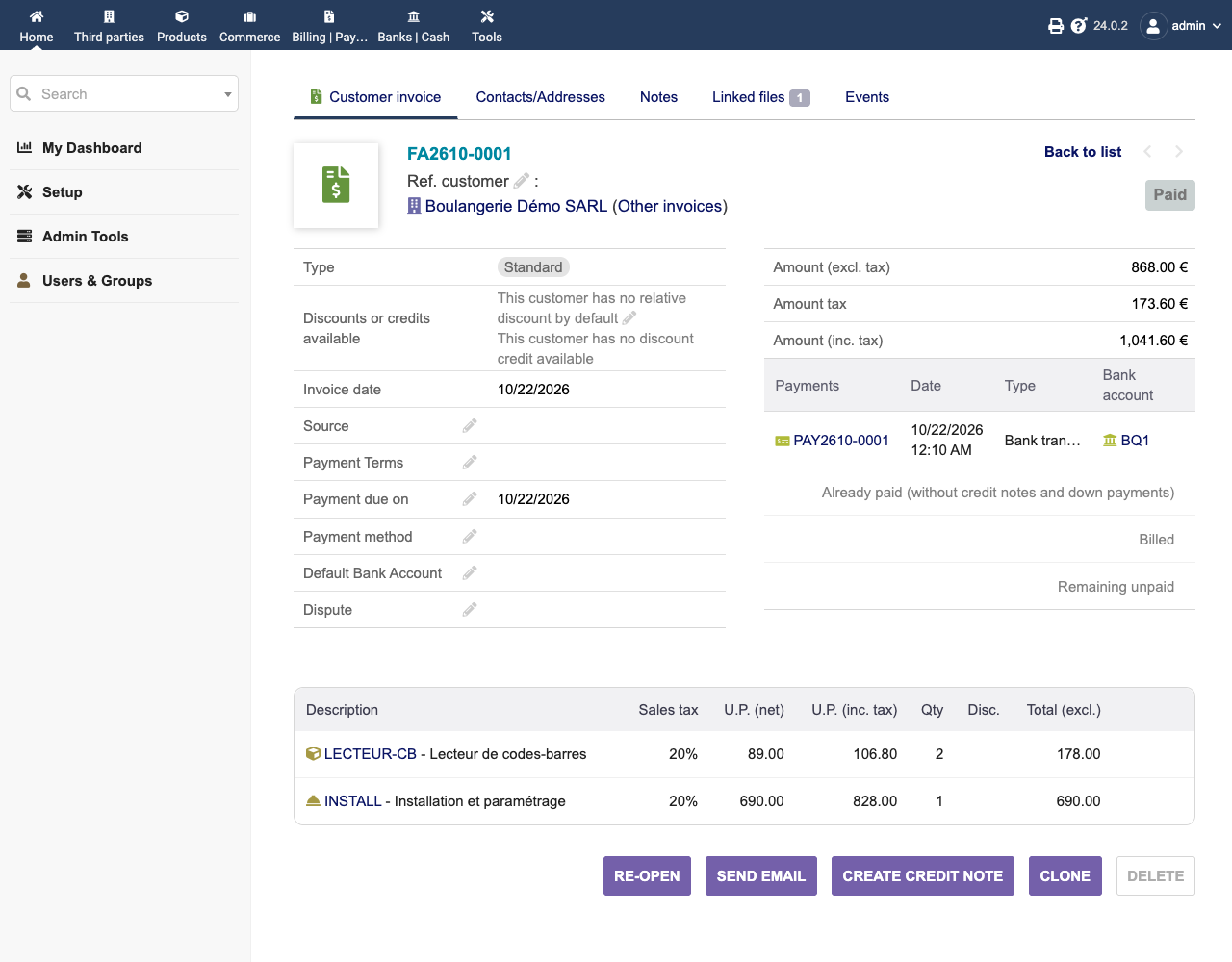
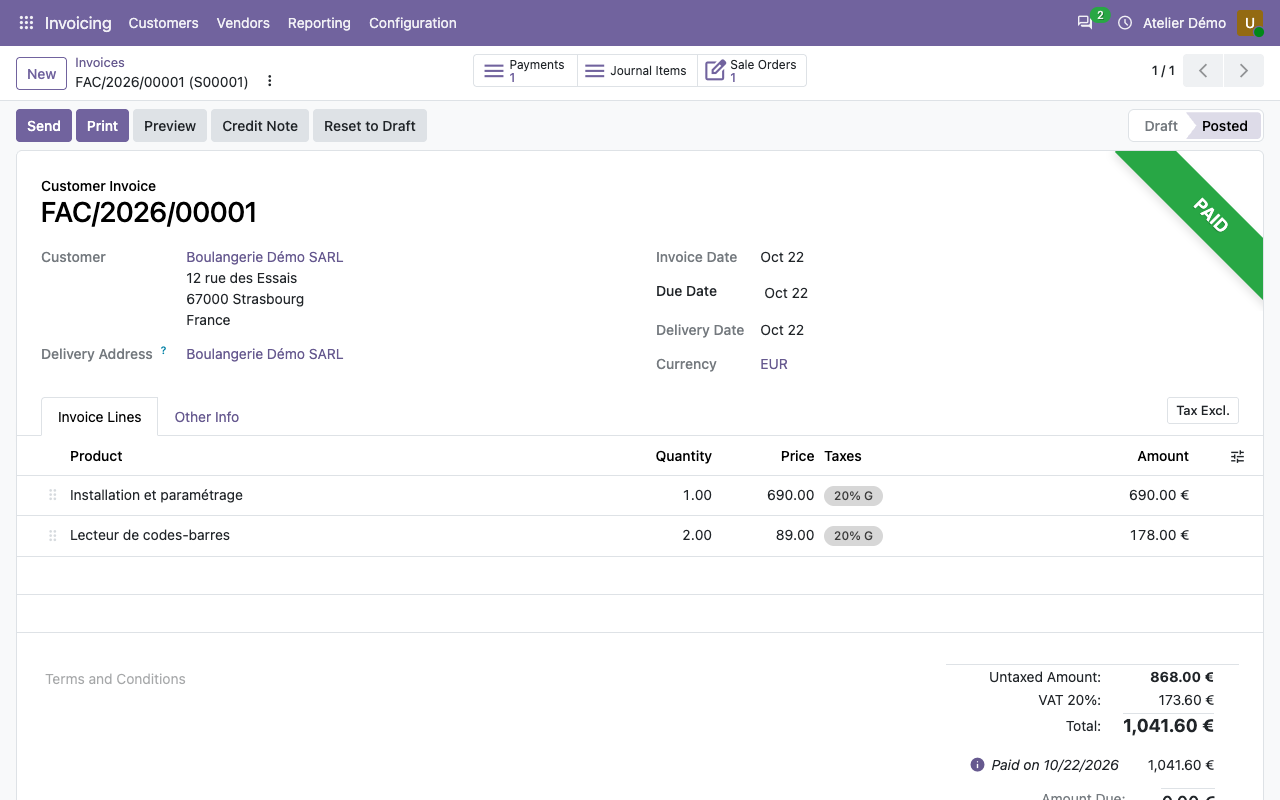
Both do the job, with the same amounts. The difference is in the way of working: Odoo chains the documents by itself (the order creates the delivery), Dolibarr lets you create each document from the previous one.
What is really free
Dolibarr is released under the GPL v3 or later. The 95 modules shipped with version 24 are all free, including double-entry accounting, barcodes, support tickets, time spent on projects and online signature of quotes. There is no paid edition of Dolibarr. Paid modules come from other publishers, on the DoliStore.
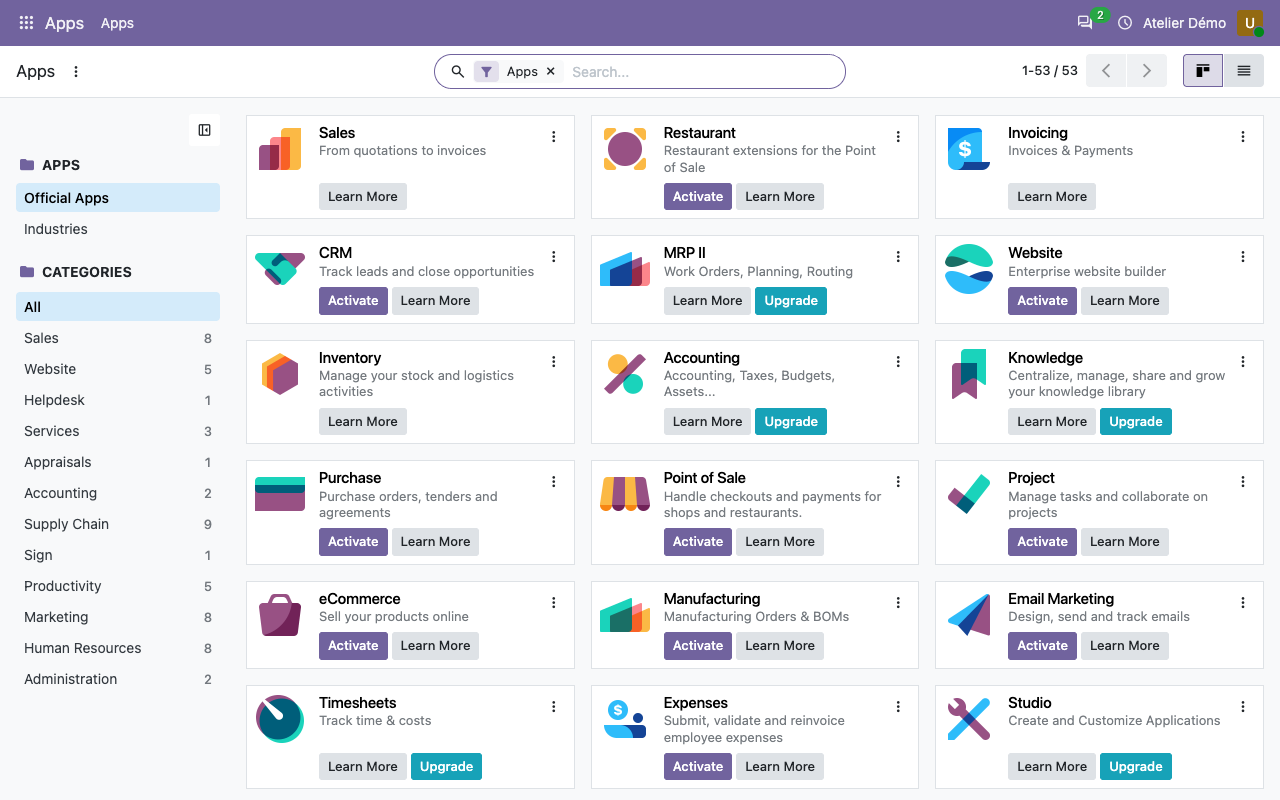
Odoo comes in two editions. Odoo Community is released under the LGPL v3. Odoo Enterprise is under a proprietary, paid licence. In our Odoo Community 20, the Apps menu shows 53 apps: 34 can be installed, 19 have an “Upgrade” button and require the Enterprise edition. Among them:
- Accounting (full accounting; the Invoicing app is free);
- Barcode, Timesheets, Helpdesk;
- Sign, Subscriptions, Studio (customisation);
- Android & iPhone (mobile app), Knowledge, Planning, Appointments, Quality, PLM.
What it costs: example for 3 users
Prices read on 22 October 2026 (euros, as shown on the French pages of both sites), yearly billing:
| Option | Price shown | For 3 users, over a year |
|---|---|---|
| Dolibarr, hosted by you | Free software | €0 + your hosting |
| Dolibarr, hosted by DoliCloud (Basic plan) | €14 excl. VAT per user per month | €504 excl. VAT |
| Odoo Community, hosted by you | Free software | €0 + your server, without the Enterprise apps |
| Odoo, Standard plan (Odoo Online only) | €24.90 per user per month | €896.40 (€716.40 the 1st year with the discount shown) |
| Odoo, Custom plan (also on your servers) | €44.90 per user per month | €1,616.40 (€1,292.40 the 1st year) |
On odoo.com, the Standard plan includes all apps but only on Odoo Online, without Studio or external API. The Custom plan adds Studio, multiple companies, the external API and hosting on your own servers. Odoo also offers one free app, for unlimited users, on Odoo Online. The page does not say whether its prices exclude VAT.
Installation and hosting
Dolibarr is a PHP application with a MySQL or MariaDB database: the same as a WordPress site. It installs on a server, in Docker, or at a regular web host.
Odoo is a Python application with a PostgreSQL database, running as a permanent service. It needs a server you administer (or Odoo.sh, or Odoo Online). On our bench, Odoo used about twice as much memory and more than twice the disk space of Dolibarr.
E-invoicing (Factur-X)
- Odoo Community 20 produces a Factur-X PDF without any extra module. Its list of e-invoice formats also includes ZUGFeRD and XRechnung (Germany) and Peppol BIS 3.0 (we only tested Factur-X). But on our first try, sending was refused while this information was missing: the company’s VAT number and phone, its bank account (IBAN), and that account on the invoice. Once that account was added, Odoo 20 refused to post the invoice carrying it until it was marked as trusted (our first invoice, with no bank account, had been posted without any problem). Finally, the “France (FacturX)” format must be chosen on the customer. Once all that was done, the XML file passed the official EN 16931 rules of CEN: no error, one warning.
- Dolibarr 24 does not produce Factur-X on its own. It needs the official EInvoicing module, free, installed from within Dolibarr (source on GitHub). We tested it in detail for France in our French-language guide.
Stock: a rule to choose in Dolibarr
In Odoo, validating the delivery took the stock from 10 to 8, with no setting. In Dolibarr, the stock stayed at 10: on a fresh install, no stock decrease rule is ticked. You must choose one in Home › Setup › Modules/Applications, settings of the Stocks module: on validation of the invoice, of the order, of the shipment, or when the shipment is closed.
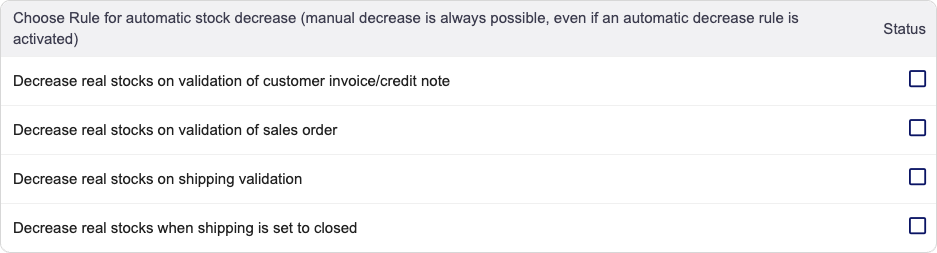
We ticked “Decrease real stocks on shipping validation”, then shipped 3 products: the stock went from 10 to 7. It is more flexible than Odoo (you choose the moment), but it is a trap at the start.
What Odoo does better
- The interface, more modern and smoother, in our opinion.
- Documents chain by themselves: the confirmed order creates the delivery, the delivery updates the stock with no setting.
- E-invoicing is built into the free edition, with a check of mandatory data before sending.
- The ecosystem: many more apps, integrators and users worldwide.
What Dolibarr does better
- Everything is free, with no paid edition: double-entry accounting, barcodes, helpdesk and time spent, which Odoo keeps for Enterprise.
- The cost is predictable: no per-user licence. You pay for hosting, and only for the modules you need.
- It is light: half the memory, less disk space, and it installs at a regular web host.
- It is easy to get started with for a small organisation: each module is turned on or off on a single page.
Moving from Odoo to Dolibarr
Neither offers a tool to import the other’s data directly. The path that works goes through files. We tested it with three customers:
- In Odoo, open the customer list, tick them, then Actions › Export. Choose the name, address,
zip, city, email, phone, VAT number and, for the country, the sub-field Country › Country
Code: you get
FRorDEdirectly, which is what Dolibarr expects. - In a spreadsheet, replace the headers with those of Dolibarr’s import template and add four
columns: Status (
1), Customer (1), Vendor (0) and Customer code (auto). - In Dolibarr, Tools › Imports / Exports › New Import, dataset “Third Parties” (Data imports module enabled). With the template headers, Dolibarr maps each column to the right field by itself.
Result: 3 third parties imported, with their country and an automatic customer code. Note: a customer who already exists in Dolibarr is created a second time. Details, duplicates and products are in our CSV import guide.
Advice: import customers, vendors and products. For invoice history, keep Odoo’s PDFs and accounting exports rather than re-importing them.
How this was verified
On 22 October 2026, with the official Docker images dolibarr/dolibarr:24.0.2 and odoo:20.0
(built on 15/10/2026), on two fresh installs:
- the same sales case run in both, amounts read at each step;
- Odoo’s Factur-X PDF produced, and its XML checked with the official EN 16931 rules of CEN;
- Dolibarr’s stock rule checked in the screen, before and after ticking it;
- export from Odoo and import into Dolibarr done in the wizard, as a user would;
- licences read in the official repositories (Dolibarr’s
COPYING, Odoo’sLICENSE); - prices read on odoo.com/fr_FR/pricing and dolicloud.com on 22 October 2026.
Not tested: Odoo Enterprise and its paid apps. What we say about it comes from Odoo’s pages and the “Upgrade” buttons of the Community edition.