· updated
Dolibarr and electronic invoicing
In France, receiving e-invoices has been mandatory since 1 September 2026, and issuing them comes in 2027 for SMEs and micro-businesses: what Dolibarr 24 does on its own, the official EInvoicing module installed and tested, the errors that block and the PDF settings.
Want someone to look at your instance? Diagnosis, fixed price €90.
What was checked (versions, tests, code read)
Tests on 19 and 20/10/2026 on a fresh Dolibarr 24.0.2 instance: EInvoicing 1.3.0 module installed from within Dolibarr, set up without a platform (generation only), 10 invoices and one credit note (drafts created by script, validated from the interface except the first one): business customer, customer without SIREN, private individual, 0% line, negative line, % discount, micro-entrepreneur under the VAT exemption scheme, Factur-X. XML files checked against the official EN 16931 rules of CEN (not the rules specific to France), PDFs reviewed. Code of Dolibarr 24.0.2 and of the module read. Regulations: impots.gouv.fr, service-public.fr, BOFiP and Légifrance read on 19 and 20/10/2026, then an independent critical review. Not tested: actual sending and receiving through an approved platform.
Since 1 September 2026, every French business subject to VAT must be able to receive its supplier invoices in electronic form, through an approved platform. The obligation to issue them will come on 1 September 2027 for SMEs, very small businesses and micro-entrepreneurs. Large companies and mid-sized companies (ETI) already issue them.
Dolibarr can do it, but not on its own: the core of Dolibarr 24 does not produce any electronic invoice. You need a module, for example the official EInvoicing module, which is free, and an account with an approved platform.
We installed this module on a fresh Dolibarr 24.0.2 on 19 and 20 October 2026, then validated ten invoices and one credit note in common cases: customer without SIREN, private individual, 0% line, negative line, micro-entrepreneur. Each file produced was checked against the official rules of the European standard EN 16931. This page says what worked, what blocks and what we could not test.
In short
- Receiving is mandatory for everyone in France since 1 September 2026. Issuing: 1 September 2027 for SMEs and micro-businesses.
- Dolibarr 24 alone is not enough: install a module (the official one, EInvoicing, is free) and open an account with an approved platform, which is usually paid.
- The message “You should enable and setup a module” stays on screen even once the module is active: it is a display defect, not a configuration problem.
- When activated, the module switches to live mode, not to the sandbox.
- Enter the SIREN of all your business customers before enabling the “private individuals” option: without a SIREN, the module treats them as private individuals, without saying anything.
- A 0% line requires an exemption code. A negative line gives a non-compliant file.
What the law requires of you, and when
Status on 20 October 2026, according to impots.gouv.fr. No postponement has been published. The law still allows the 2027 deadline to be pushed back by decree, to 1 December 2027 at the latest.
| You are | Receive | Issue and e-reporting |
|---|---|---|
| Large company or mid-sized company (ETI) | since 1 September 2026 | since 1 September 2026 |
| SME, very small business, micro-business | since 1 September 2026 | 1 September 2027 |
(impots.gouv FAQ “À partir de quand suis-je concerné” (when am I affected))
A few details, all taken from the official French pages:
- Micro-entrepreneurs under the VAT exemption scheme: affected, even though they do not charge VAT, for receiving as well as for issuing (impots.gouv FAQ, modified on 28/09/2026).
- Sales to private individuals and foreign customers: no electronic invoice, but data to transmit (e-reporting), on the same timeline as issuing.
- Exempt activities (healthcare, education…): not affected for issuing, but required to receive.
- Everything goes through an approved platform (PA, formerly “PDP”). The State keeps the directory and receives the data, but does not transmit the invoices. There are more than 150 platforms (official list, updated on 13/10/2026). You choose freely and you can switch. According to the administration, more than ten of them had a free offer or one at no extra cost on 1 August 2026.
- A PDF sent by email is not an electronic invoice. An SME or a micro-business can keep sending its invoices as PDF until 1 September 2027. Before that date, the law does not allow a customer to force electronic invoicing on you, but a contract can provide for it (DGFiP practical guide, July 2026, questions 9 and 20).
- Formats: CII, UBL, or a PDF that contains the XML file (this is what is called Factur-X).
- Penalties
(article 1737 of the French General Tax Code, CGI):
- €50 per invoice that should have been electronic, capped at €15,000 per year;
- for receiving, a formal notice to comply within three months, then a fine of €500, and €1,000 for each new three-month period;
- for the start, the administration announces an “educational” approach and answers “Non” (No) to the question “Y aura-t-il des sanctions en 2026 ?” (Will there be penalties in 2026?) (“Tout savoir” FAQ, August 2026);
- the practical guide states that this tolerance is “neither a postponement nor a suspension”.
What Dolibarr 24 does on its own, and what it does not
We read the code of 24.0.2 and checked each point on the test instance.
What the core does not do: it produces no CII, UBL or Factur-X file. It sends nothing to an approved platform and does not read your suppliers’ electronic invoices.
What it does provide:
- the four new mentions on the PDF (see below), three of which must be enabled;
- a “VAT exemption code” column in the VAT rates dictionary, useful for the module;
- an “E-invoice” box on the Home > Setup page, which sends you off to look for a module.

This message stays on screen even when the EInvoicing module is installed and active. We saw it
on the test instance, and the code explains why: the box looks for modules named
einvoice or pdpconnectfr (the module’s former name), not einvoicing. You can ignore it.
The official EInvoicing module
It is published by the Dolibarr association, free, on the DoliStore and on GitHub. It requires at least Dolibarr 18. The official dolibarr.org page still announces version 1.0.3, but the one installed on 19 October was 1.3.0. The project wiki still lists it as “experimental” and recommends Dolibarr 24: if you are on an older version, read Update Dolibarr without breaking it. Other modules exist on the DoliStore, most of them paid; we have not tested them.
Installation from Dolibarr 24
No need to download anything by hand:
- Home > Setup > Modules/Applications, “Find external app/modules” tab.
- Enable the “Dolibarr community modules repository” source. It is disabled by default.
- Search for
einvoicing. The “EInvoicing (Generic, FR)” module appears, marked compatible with 24.0.2. Click Install, then confirm. - Go back to the tab of available modules and enable EInvoicing (“Other” family). It also enables the Vendors module (and Products if it was not enabled).
On an older version, take the zip from the DoliStore and unzip it into htdocs/custom/. The
folder must be named exactly einvoicing.
After each update of the module, disable it and then enable it again. The module asks for this in its version history, and a forum user saw their invoice list crash on 19 October for not having done it.
Choosing the approved platform
Open the module setup (the gear wheel), “Access Point Settings (PA, PDP…)” tab. Module 1.3.0 offers three choices:
- SuperPDP: you create your account yourself, then you copy a “Client ID” and a “Client secret” into Dolibarr. The module shows the steps.
- ESALINK: goes through a reseller that is a member of the PDP Libre association. You cannot subscribe to it directly.
- None: the module produces the files, but sends and receives nothing. This is the mode that was used for our tests. It does not make you compliant for receiving.
We have not compared the prices of these platforms.
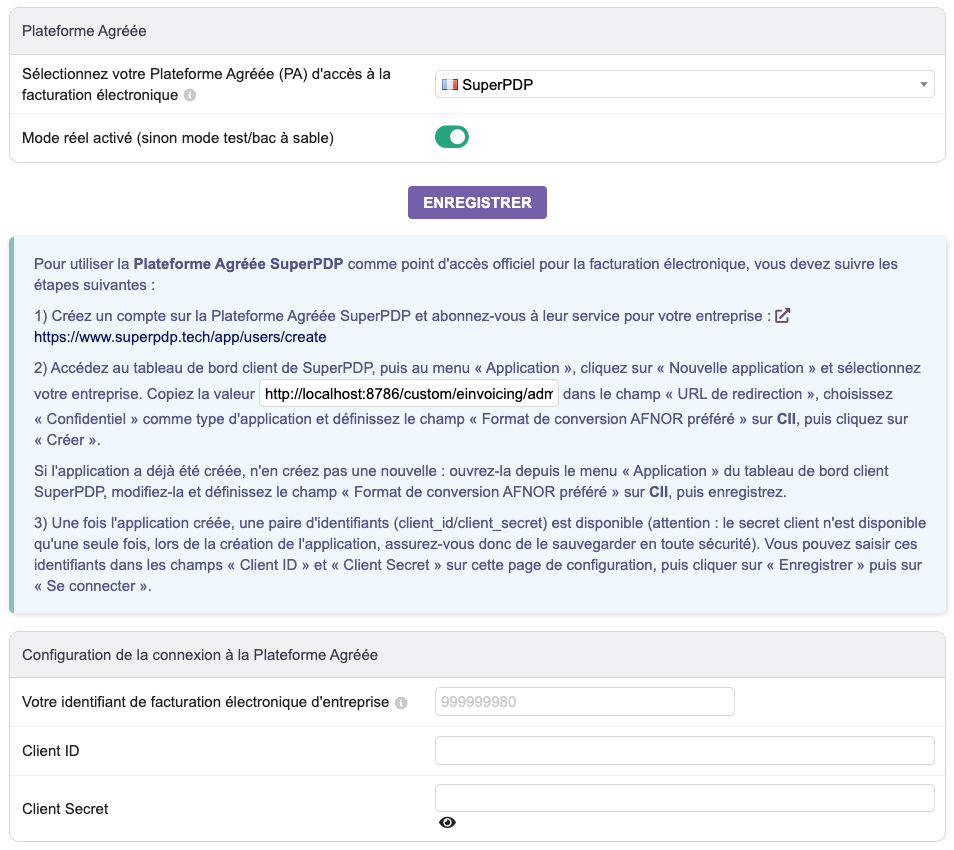
Two traps found on the test instance:
- Live mode is enabled as soon as the module is first activated. The code does this on purpose. Test and production credentials are stored separately. If you want to try the platform’s sandbox first, set the “Live mode enabled (otherwise test/sandbox mode)” switch to no before entering your credentials.
- The selection menu saves as soon as you change platform, without waiting for the Save button.
Module 1.3.0 only connects to these two platforms; other DoliStore modules add more. With another platform, such as your bank’s or your accountant’s, you need another module or to work on the platform’s website, outside Dolibarr. Do not choose before checking that it can exchange with your Dolibarr.
It is the platform that registers your receiving address in the national directory, with your consent. Installing the module is therefore not enough: this registration must also be done.
The options to check
“Options” tab. The screenshot below comes from our instance, where the “private individuals” option was enabled.
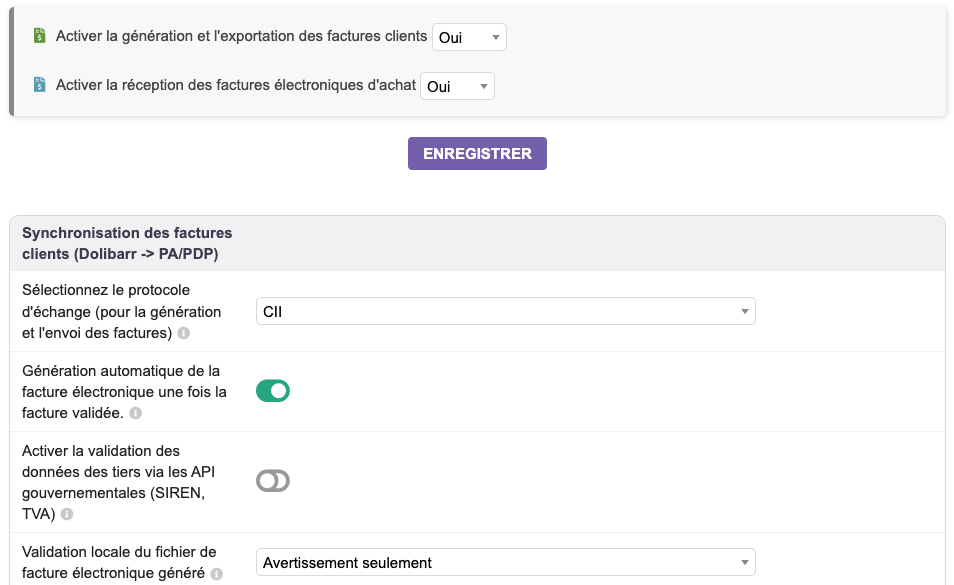
- Format (“exchange protocol”): CII by default. The module recommends it. Factur-X also works (see below).
- “Automatic generation of E-invoice when invoice is validated”: enabled by default. The file is created when you validate.
- “Local validation of the generated e-invoice file”: “Warning only” by default. The “Blocking” choice stops the generation when a rule is not met.
- “Cancel invoice recording if the automatic generation of E-invoice fails”: disabled by default. An invoice whose electronic file fails is still validated, with a warning. Enable this option if you prefer to be blocked.
- “Do not generate e-invoices for private individuals - B2C”: disabled by
default. Two precautions before enabling it:
- first enter the SIREN of all your business customers. A customer with neither a SIREN nor a VAT number is then treated as a private individual: no electronic invoice, and no message. We checked this on the test instance;
- enable it before creating the invoices for your private individuals. The electronic status is set when the draft is created: an invoice created before stays “Not generated”. We saw this on two invoices. This status can be changed by hand on the invoice card (pencil), which we have not tried.
- Point-of-sale sales (TakePOS): according to its setup (the “takepos” field already filled in), the module excludes all invoices made at the till, whatever the customer. A till sale to a business customer will therefore have to be invoiced outside the till to go out as an electronic invoice. We have not tested this with a real till sale.
The module does not do e-reporting yet (sales to private individuals, abroad, payments received). It only flags the invoices concerned. The project wiki announces it for early 2027. SMEs and micro-businesses must comply with it on 1 September 2027.
What blocks an electronic invoice: our tests
Once the invoice is validated, the invoice card shows an “E-invoicing” block with its status, and the
file …_cii.xml appears in the attached files. If it fails, a yellow or red message at the
top of the page says why.
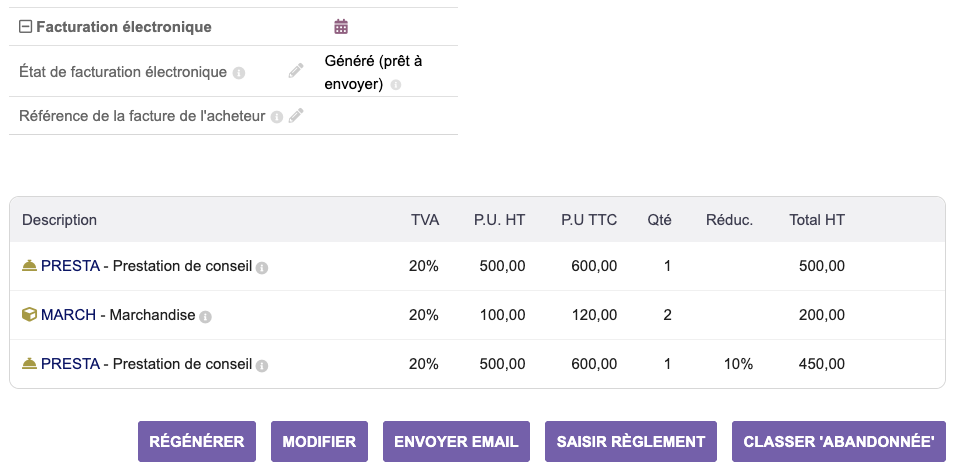
Results of our ten invoices and the credit note. “Compliant” means: zero errors with the official EN 16931 rules of CEN, checked outside Dolibarr. The rules specific to France, which the platforms apply on top, were not checked.
| Case tested | What Dolibarr does | File |
|---|---|---|
| Business customer with SIREN, 20% VAT | invoice validated, file created | compliant |
| Customer without SIREN (B2C option not enabled) | invoice validated, message “The customer does not have a pro ID (SIREN)” | none |
| Private individual (B2C option not enabled) | same message as above | none |
| Private individual, B2C option enabled before creation | status “Do not manage E-invoice (ereporting)” | none (normal) |
| 0% line without exemption code | message “MISSINGSETUP: Unknown exempting VAT reason…” | none |
0% line with code VATEX-FR-CGI261-4 |
file created | compliant |
| Negative line (−€50) | file created, just a “BR-27” warning | non-compliant |
| 10% discount on a line | file created | compliant |
| Credit note on an invoice | file created, which refers to the original invoice | compliant |
| Micro-entrepreneur under the VAT exemption scheme | file created with the reason VATEX-FR-FRANCHISE |
compliant |
| Factur-X format | PDF/A-3 with the embedded XML | XML compliant |
The module’s code also blocks other cases, which we have not all tried: your company’s SIREN missing, your company’s VAT number missing while a line carries VAT, customer name or country missing, invoice in another currency, line without a description, credit note without an original invoice.
What to take away:
- The SIREN of each business customer must be entered: third-party card, field “Prof Id 1 (SIREN)”. It is what serves as the address in the system. Take the opportunity to merge duplicates.
- Do not set “Non assujetti à la TVA” (not subject to VAT) on a business customer’s card, even if they are a micro-entrepreneur: the module ignores customers marked this way (seen in its code, not tested), whereas a micro-entrepreneur is affected by the reform.
- 0% lines require an exemption code: Home > Setup > Dictionaries > VAT Rates or Sales Tax Rates, “VAT exemption code” column. The error message itself says so. The list of possible codes is the one from Peppol (VATEX). Choose the one that matches your exemption, with your accountant if needed. Note: a code set on the 0% rate applies to all your 0% lines. With several exemption reasons, you need several 0% rates with different codes (not tested). The micro-entrepreneur case is handled automatically (see below).
- Negative lines: do not use them any more. By default, Dolibarr refuses them on an invoice, unless
the hidden option
FACTURE_ENABLE_NEGATIVE_LINESis enabled (or through import or API, as in our test). The module then creates the file with just a warning. But the European rule BR-27 forbids a negative price, and a platform may reject it. Use a percentage discount on the line instead, or a credit note. - To correct an invoice that has been transmitted, issue a credit note. According to its code, the module does not allow setting back to draft or deleting an invoice already sent to the platform. It also blocks the modification of the main fields: date, amounts, customer, payment terms. We could not actually transmit.
The four new mentions on the PDF
The French rules add four mentions to invoices (service-public.fr page):
- the customer’s SIREN when it is a business;
- the delivery address if it is different;
- the category of operation (goods, services or both);
- where applicable, the option to pay VAT on a debit basis.
Like issuing, they have applied since 1 September 2026 to large companies and mid-sized companies (ETI), and from 1 September 2027 to SMEs and micro-businesses.
Dolibarr 24 can print them with the sponge invoice template (tested) and, according to the code,
octopus. The crabe template was removed in 24.0. On our installation:
| Mention | On our instance | Where to set it |
|---|---|---|
| Category of operations | shown by default (company in France) | Setup > PDF > Specific parameters |
| Customer’s SIREN | not shown (see below) | Setup > PDF, “Show professional ID with addresses - Prof Id 1 (SIREN)” |
| Delivery address | not shown | Setup > PDF > Specific parameters, “Show shipping address”, then a contact of type shipping on the invoice (Contacts/Addresses tab) |
| VAT on a debit basis | not shown | “Taxes & Special Expenses” module, in its setup: “Accrual basis” |
For the customer’s SIREN, Dolibarr enables this setting automatically when you choose France in Home > Setup > Company/Organization. On our Docker installation, where the country is set differently, it was disabled. Check it on yours.
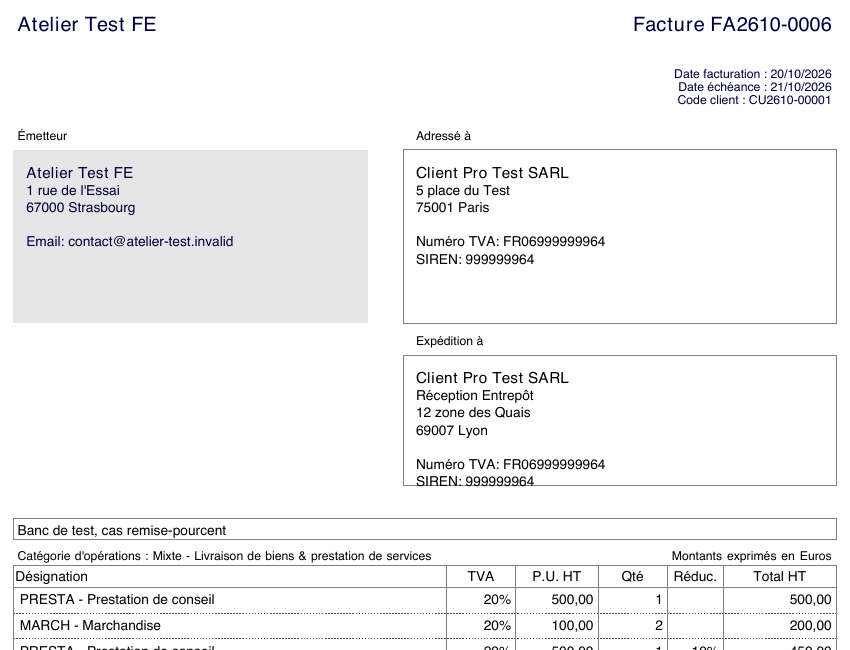
Three caveats:
- VAT on a debit basis: only enable this setting if your business has really opted for the debit basis. It also changes the calculation of the VAT due in Dolibarr, not just the PDF. Dolibarr then prints “Option de paiement de taxe sur débits”; the official text says “Option pour le paiement de la taxe d’après les débits”.
- The category is calculated from the type of each line (product or service), including for free-text lines. Check that your free-text lines have the right type.
- The other mandatory mentions on an invoice do not change; this page does not cover them.
Micro-entrepreneur under the VAT exemption scheme
In Home > Setup > Company/Organization, tick “Sales tax is not used”. We tested this case without an intra-Community VAT number, like many micro-entrepreneurs.
- The electronic file: the module sets the reason
VATEX-FR-FRANCHISEautomatically, even if your 0% line carries another code in the dictionary. Compliant file. - The PDF: Dolibarr 24.0.2 prints “* TVA non applicable, art. L. 223-3 du CIBS”. However, the
transfer of VAT into the CIBS (French code of taxes on goods and services) only comes into force
on 1 January 2027
(BOFiP, news of 07/10/2026). Until then, impots.gouv
gives the mention “TVA non applicable, article 293 B du Code Général des Impôts”. The former
references will remain usable until 30 June 2028. To go back to 293 B, go to Home >
Setup > Translation, “Overwrite a translation string” tab. Check that the
“Allow customization of translations” switch is enabled (it is on a fresh
installation). Add the key
VATIsNotUsedForInvoicein French, with the text* TVA non applicable, art. 293 B du CGI. We tested it: the regenerated PDF does show this mention. The details are in Customise the PDF invoice.
You will only issue electronically in September 2027. However, you must already be able to receive.
Receiving your suppliers’ invoices
This is the obligation in force since 1 September 2026, for everyone. With the module, receiving goes through a menu Billing | Payment > “E-invoice Management” > “E-invoice Synchronization”. It creates the vendor invoices in Dolibarr, and can create the missing third parties and products if you allow it. This menu does not appear in “None” mode.
We have not tested it: it requires a real account with an approved platform, and suppliers who send you invoices. On the dolibarr.fr forum, the feedback from October 2026 is mostly about received invoices that are incomplete (lines grouped together, products not recognised). Plan to check the first ones by hand.
If your receiving address is already registered, with your consent, with your accountant’s platform, your purchase invoices arrive at your accountant’s, and not automatically in Dolibarr.
CII or Factur-X?
Both work:
- CII: a plain XML file. It is the module’s default choice, and the one recommended by the Dolibarr wiki and the DoliCloud guide.
- Factur-X: a readable PDF that contains the XML. The module asks you to first set Home >
Setup > PDF > “PDF documents format” to PDF 1.7/A-3b. This setting applies to all
Dolibarr PDFs. We obtained a
…_facturx.pdffile declared as PDF/A-3 (level B), with the XML embedded in the EXTENDED profile. This XML passes the EN 16931 rules. We have not checked the full PDF/A compliance of the file.
Go with CII, unless your platform or your customers ask for Factur-X.
What we have not tested
- Actual sending and receiving through SuperPDP or EsaLink (no account opened for this test).
- The checking rules specific to France (EXTENDED-CTC-FR profile), applied by the platforms.
- E-reporting: the module does not do it yet.
- Down payment and progress invoices, and Chorus Pro (public sector). The module announces the latter as “Feature not fully supported yet”.
- Till sales, customers marked “not subject to VAT”, Dolibarr versions older than 24.
- The other DoliStore modules: there are dozens of them on the subject.
Summary
- Move to Dolibarr 24 if you can, then install EInvoicing from within Dolibarr.
- Choose a compatible approved platform, and check that it has registered your receiving address: this is what makes you compliant for receiving, mandatory since 1 September 2026.
- Watch out for live mode, enabled by default.
- Enter the SIREN of all your business customers, then enable the “private individuals” option before invoicing private individuals.
- Set an exemption code on the 0% rates. Replace negative lines with discounts or credit notes.
- Check the customer’s SIREN on the PDF and, if needed, the delivery address.
- Micro-entrepreneur: receiving right now, issuing in September 2027. Check the exemption mention on your PDF.
If you would rather have someone check your Dolibarr with you (version, customer data, module and PDF settings), the €90 diagnosis means spending one hour on your instance. You then receive in writing what needs to be fixed.
Read also
Frequently asked questions
Can Dolibarr issue electronic invoices without an external module?
No. The core of Dolibarr 24 does not produce any electronic invoice on its own. You must install a dedicated module (such as the free official EInvoicing module) and sign up with an approved platform (PA / PDP).
What is the e-invoicing timeline for small and medium businesses in France?
Since 1 September 2026, every French business subject to VAT must be able to receive its supplier invoices in electronic form. The obligation to issue applies from 1 September 2027 for SMEs, very small businesses and micro-entrepreneurs; on 20 October 2026 no postponement had been published, but the law still allows it to be pushed back by decree, to 1 December 2027 at the latest.
Which electronic invoice format does Dolibarr generate?
With the official EInvoicing module, the default format is CII, a plain XML file attached to the invoice, which the module recommends. Factur-X also works: a readable PDF that contains the XML, provided you first set Home > Setup > PDF > “PDF documents format” to PDF 1.7/A-3b. In our test, this XML (EXTENDED profile) passed the EN 16931 rules.